How to Save Time on Every Photo Booth Booking: 15 Hours Cut to 7
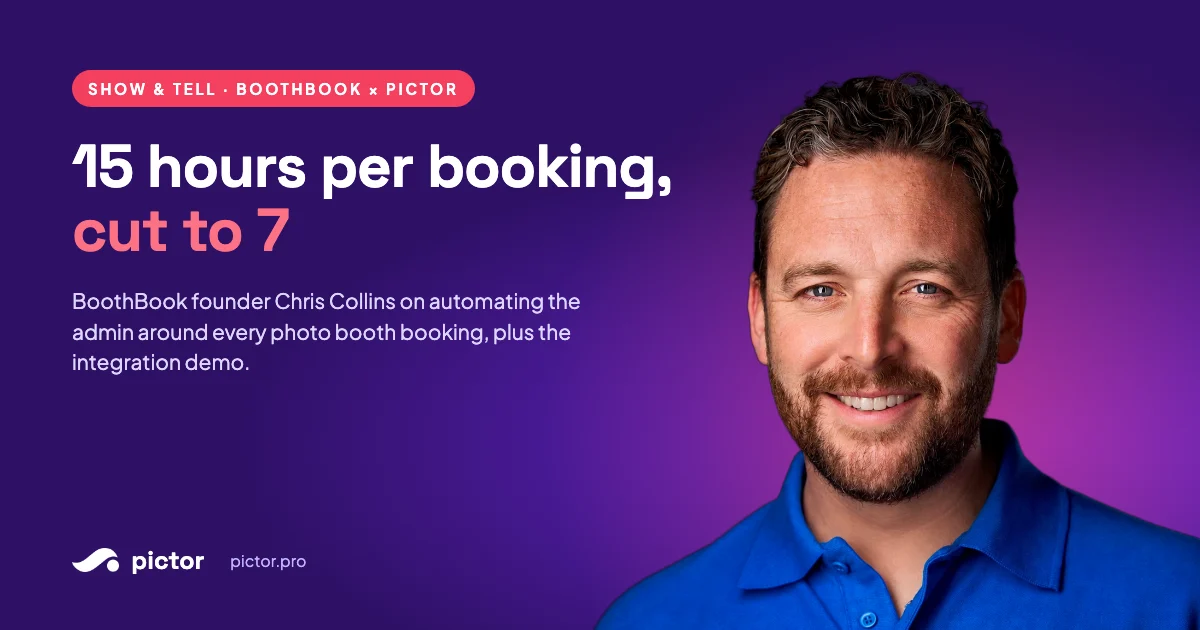
BoothBook founder Chris Collins on where the 15 hours behind every photo booth booking go, what to automate first, how to keep automated emails human, and a live demo of the BoothBook and Pictor integration.

Nicholas Rhodes
Drafted with AI assistance; reviewed and approved by Nicholas Rhodes before publishing.
Full replay: Chris Collins (BoothBook) and Nicholas Rhodes (Pictor) on saving time on photo booth bookings, plus the integration demo. Pictor Show and Tell, October 7, 2026.
Chris Collins, founder of BoothBook, joined Pictor Show & Tell to answer one question: where do the hours on a photo booth booking actually go, and which of them can you get back? His estimate is about 15 hours per booking, start to finish, for an event that runs three. With a CRM handling the admin and booth software building the event, he puts it at half that, or less. Below is how, step by step, plus the BoothBook and Pictor integration demo that takes a client from a 2 AM booking to a live booth without anyone retyping a thing.
How long does a photo booth booking really take?
About 15 hours, by Chris’s count, and only three of them are the event. The rest is the inquiry emails, the proposal and contract, chasing the deposit, the back-and-forth on names and dates for the print, finding staff, loading the booth, travel, setup, teardown, uploading the gallery and the follow-up.
“It’s not three hours. We figured it all out, and it was really around 15 hours.” Chris Collins, founder of BoothBook
Time per booking
The booth runs 3 hours. The booking takes 15.
Where the hours go, from first email to review request. With a CRM handling the admin and booth software building the event, Chris puts the total at about 7.
Admin you can automateStill needs you
- AutomateInquiry replies and follow-ups
- AutomateProposal, contract, invoice and payment reminders
- Self-serveTemplate and artwork approval: the client picks and types it
- AutomateBuilding the event on the booth
- FasterStaffing and scheduling
- YouPack, travel, set up
- YouThe event itself, the 3 hours you quoted
- YouPack down and drive home
- AutomateGallery link, review request and referral email
Hours: Chris Collins (BoothBook), on-air estimate, Pictor Show & Tell, Oct 7 2026
That changes what a booking is worth. At $1,000 for three hours on site, it feels like $333 an hour. Spread over 15 hours, it is about $67. Here in New York City, our operating cost on an event is close to $900, so a $900 booking is not a slow night at OutSnapped. It is a night we pay to work.
Do this: pick your last booking and write down every touch, from the first email to the review request, with a rough time next to each. Then run your price through the photo booth hourly rate calculator.
What should you automate first in a photo booth business?
Anything you do more than once. Chris started building BoothBook in 2013 for his own photo booth company in England (it went public around 2016). That company went from a couple of events to 350 a year by the end of its second year. The team kept missing emails and payment follow-ups. When they finally tracked it properly, they found events where the final invoice had never gone out.
The list he automated, and what BoothBook now does once it is set up:
- The first reply to an inquiry, and the follow-ups after it
- Building and sending the proposal
- Taking payment, generating the contract and the invoices
- Payment reminders
- Upsell emails with logic, for example asking about a scrapbook only if the client has not already bought one
- Travel, routing and tax calculations
“It shouldn’t matter whether you’re doing 10 bookings or a thousand. Your workload shouldn’t increase as a result of growing your company.” Chris Collins, founder of BoothBook
The payoff is not only hours. When the routine mail sends itself, the inbox that is left holds the handful of messages that actually need you, instead of a hundred you are still catching up on.
Do this: open your sent folder and find three emails you have written more than five times this year. Those are your first three templates.
How do you automate client emails without sounding like a robot?
Start from your own sent folder, not a template pack. Chris took emails he had already sent by hand, swapped the first name, event name and venue for variables, kept them plain text and kept his real signature. Then he added the same rules he was already applying in his head: weddings get this email, parties get that one, corporate inquiries wait for a human sign-off.
“It’s no different telling a staff member how to behave than it is telling a system like BoothBook how to behave.” Chris Collins, founder of BoothBook
Timing matters as much as wording. A reply at 9:00 on the dot reads as automated. One at 9:37 with a signature reads like a person. His new-inquiry sequence sends an obvious autoresponder straight away, a plain “I’m putting your proposal together” note 37 minutes later, and the proposal itself, themed by event type and addressed by first name, at about an hour and 14 minutes. Anything that arrives outside 9 to 5 waits until the next morning.
Automation that reads human
Automate the timing, not just the words
Chris Collins’ new-inquiry sequence in BoothBook.
- 0 min“Thanks for getting in touch”An autoresponder, and it is allowed to look like one.
- +37 min“I’m putting your proposal together”Plain text, real signature, an odd minute. 9:00 on the dot looks scheduled. 9:37 looks like a person.
- +1h 14The proposal landsBuilt automatically, themed by event type, addressed by first name.
Rule: inquiry outside 9 to 5? Hold the sequence until the next morning. A 2:37 AM reply gives the game away.
We think about it like a choose-your-own-adventure book. Confirming a date and time is a transactional email, so it can be courteous and automated. The moment the client replies “our wedding is in November, not October,” a person takes it from there. The automation clears the brain space. The replies it generates are the work.
Do this: set one rule this week: any automated email triggered outside business hours holds until a believable time the next morning.
How does the BoothBook and Pictor integration work?
The client does the template work themselves, and the event builds itself in Pictor. The BoothBook and Pictor integration has been live since the Pictor v2 launch on September 28, 2026. During the show we ran it end to end on a test booking:
- A client books in BoothBook. Contract signed, deposit paid, whatever the hour.
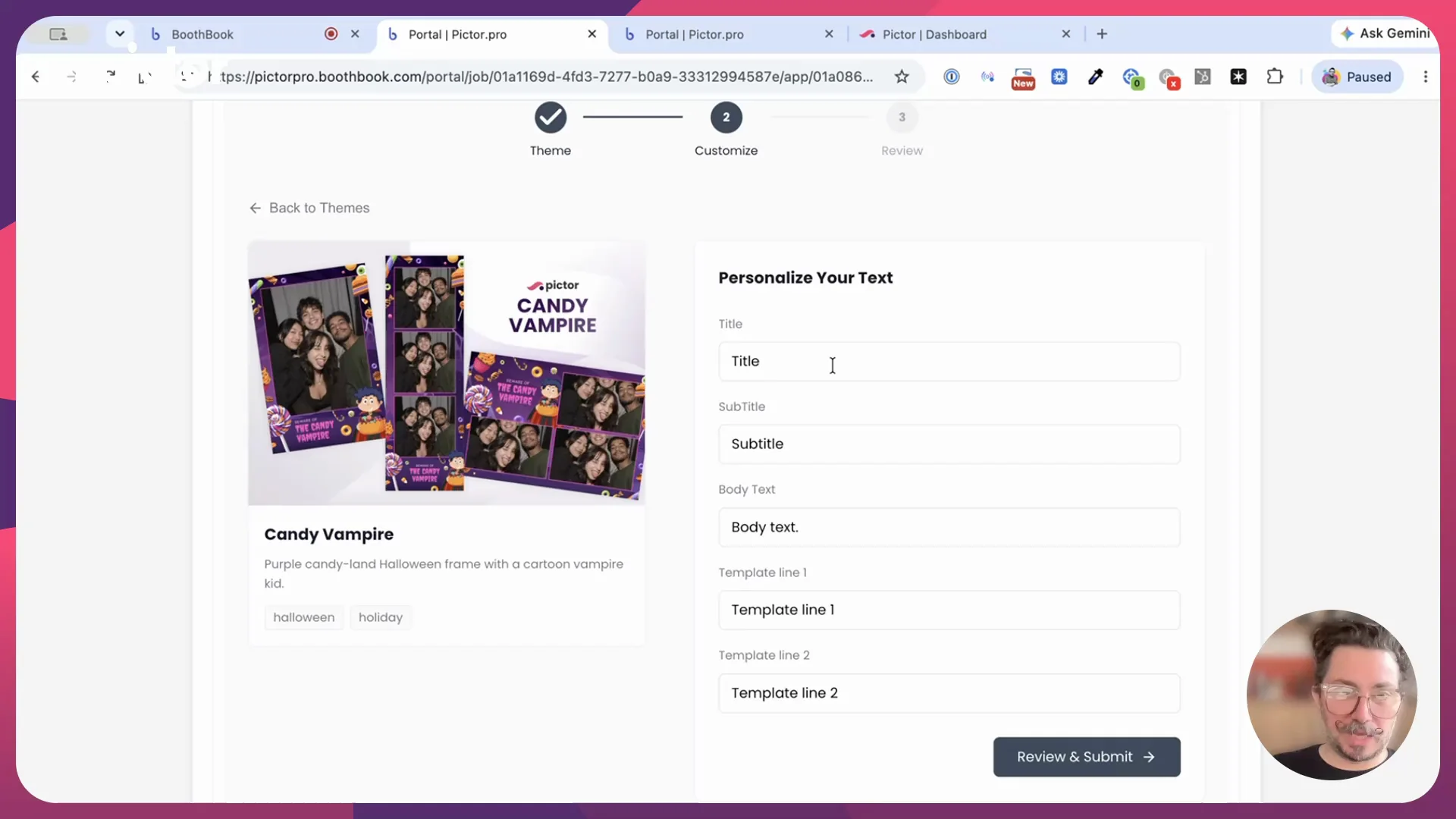
- Their BoothBook client portal opens with a “choose your template” step.
- They pick a theme from your Pictor Lookbook, the themes you have switched on in your Pictor account, and type in the names, date and message.
- They review and confirm. Pictor’s global text fills that wording into every screen and print layout, and the design saves to the booking.
- The event appears in your Pictor account, already built and matched to the booking.
- On event day, staff open Pictor on the booth and tap Launch Event.
- When the gallery is created, the link syncs back to the BoothBook booking.
- BoothBook picks up from there: the thank-you, the gallery link and a referral code for friends and family, on whatever schedule you set.
BoothBook × Pictor
From 2 AM booking to live booth
Nobody retypes anything. Nobody emails a PSD.
Happens in BoothBookHappens in Pictor
- 01
BoothBookClient booksContract signed, deposit paid, any hour of the night. - 02
BoothBookClient portal opensInvoices, details and a “choose your template” step. - 03
PictorThey pick a themeFrom your Pictor Lookbook. They type the names, date and message. - 04
PictorThey confirmGlobal text fills every screen. The design saves to the booking. - 05
PictorThe event appearsAlready built and matched to the booking in your Pictor account. - 06
PictorLaunch EventOn event day, open Pictor on the booth and tap one button. - 07
BoothBookGallery syncs backThe gallery link lands on the BoothBook booking by itself. - 08
BoothBookFollow-up sendsThank-you, gallery link and a referral code, on your schedule.
As demoed live by Nicholas Rhodes (Pictor) and Chris Collins (BoothBook), Oct 7 2026


Setting it up takes a few minutes, and since Pictor 2.0.1 you connect BoothBook in one click. Our step-by-step guides: How to connect Pictor with BoothBook and How to use Pictor with a BoothBook booking. Not on BoothBook? Your Lookbook still works on its own as a public page: see Lookbook bookings, without BoothBook.
This is the step that used to eat our week. Before Pictor, OutSnapped’s template process meant Photoshop files and a long email chain, and the ampersand between a couple’s names alone could run to 30 emails. Now the client can change it right up until the booth launches, because their confirmed changes go straight to the event.
“All of my BoothBook events have already been created in Pictor. All the templates are already created and assigned in Pictor. And all I have to do is click Launch Event on that booth. It’s done.” Chris Collins, founder of BoothBook
“It really is end to end, far better integration than anything else I’ve seen in the industry.” Chris Collins, founder of BoothBook
One suggestion from experience: just because the client can get a working virtual booth in their inbox within a minute of booking does not mean they should. We send an immediate “we’ve received your request” note and deliver the design a day or two later for a thumbs up. It feels more human, and nothing about the work changes.
The themes come from the Photo Booth Marketplace. At launch (September 2026) it has nearly 50 themes, each with about 40 ready-to-use assets: start screens, 4×6, 2×6, 4×5, square and 9×16. We are onboarding catalog partners Photo Booth Templates, Photo Booth Talk, Photo Booth Graphics and PhotoBooth Marketing now. Make templates and want them in front of operators? Get in touch.
Do this: pick the 10 themes your private-event clients choose most and switch only those on in your Lookbook. Fewer, better options mean fewer emails.
BoothBook × Pictor
Connect your BoothBook account to Pictor
Lookbook in the client portal, events built automatically, galleries synced back. Access is by request while we onboard operators.
How fast can you set up a booking CRM in 2026?
Faster than it used to be, because the setup is mostly AI now. In the demo, Chris wrote three packages for a vintage enclosed booth on paper (bronze, silver and gold, three to five hours, $3,000 to $5,000, a printed memory book with gold), took a photo of the sheet, and BoothBook built the services from it in seconds. It can also read your website’s pricing page, take a voice note, or import a spreadsheet.

The same goes for custom fields. Adding a “home state” field with all 50 states took one prompt. When we moved OutSnapped’s CRM over from HubSpot, the 30 event-type options came across from a screenshot.
“What we really did with version two here is made a system that will bend to fit you, not make you bend to fit it.” Chris Collins, founder of BoothBook
Do this: if you are still on a spreadsheet, book BoothBook’s free onboarding call and bring your current price list, in whatever form it lives.
Should you lower your prices once you automate?
No. If a $1,000 booking took 15 hours and now takes 7, you just went from about $67 an hour to about $143. That is a raise. Prices on everything else go up every week, and nothing about the client’s event got smaller.
Should I lower my prices?
Same booking, same price, double the hourly rate
-
Before: every step by hand
$1,000 ÷ 15 hours = $67/hr
Inquiry to gallery link, all on you.
-
After: admin automated
$1,000 ÷ 7 hours = $143/hr
Same client, same booth, same price.
Keep the price. Put the 8 hours you got back into sales, staff and your weekends.
Hours: Chris Collins (BoothBook) on-air estimate. $1,000 example and math: Pictor.
Chris’s one exception: if your margin is genuinely large and a slightly lower price moves you into a bracket that wins more bookings, it can be worth testing. Lowering prices is not the objective. The objective is the same or more money for less of your time, so you make better decisions, enjoy the work and have weekends back.
A week later on Show & Tell, Derek Savickis of Photo Booth Expo made the same case from the sales side: when the budget is tight, pull back scope, never price.
Do this: keep your price. Decide now where the hours you get back go: sales, staff training, or your Saturday nights.
Do photo booth operators need more leads?
There is no such thing as too many good leads, but there are plenty of bad ones. Chris lists five levers that compound: leads, conversion rate, average sale, repeat transactions and margin. Move any one and the others feel it.
At OutSnapped we aim for at least a 25% close rate, and the way we protect it is our “get off the couch” price: the lowest budget option on our inquiry form is the least we need to make an event worth doing. Anyone below it never gets an email from us, so nobody wastes anyone’s time.
Do this: add a budget question to your inquiry form and make the lowest option your own get-off-the-couch number.
Can someone on your team handle bookings without seeing everything?
Yes. BoothBook has permission levels, so an attendant can log in and see only the events assigned to them, without financials or your calendar. On the Pictor side, an event code lets someone launch a fully set-up event without touching any settings. We use this for shipment booths: the client sets up the booth from a short video, opens Pictor, enters the event ID and taps launch. The booth itself is just the launch pad. Everything else happens in the cloud.
Do this: write down the three tasks only you can do today, and for each one, who could do it with the right access.
What would BoothBook’s founder do differently starting a photo booth business today?
Start with the finish line. Chris’s advice is to picture the business in five years, running exactly how you want, and work backwards to the bookings, prices and margins that get you there, before you buy the first booth. He sees the same failure over and over: no plan up front, bottom-of-market prices to win bookings, nothing left at the end of the month.
“It’s not a business until it doesn’t require you in it.” Chris Collins, founder of BoothBook
He did it himself. His team ran his UK photo booth company while he lived in Portugal, without the business email on his phone, and when he sold the company the new owner stepped straight in. His starting-over list:
- BoothBook from day one, with Pictor on every booth feeding into it
- A lead-to-proposal flow built to convert, then work on upsells so every booking is profitable
- Hire attendants for energy and conversation, not technical skill, because iPad booths and event codes have taken most of the setup off their plate
- Spend the owner’s time on growth: venue and stadium relationships, gifts to planners, and causes you believe in. Working with the Wedding Wishing Well Foundation brought his company bookings and community goodwill.
And if you only do one thing today, take an hour. Go into a room with a pad of paper, leave your phone in another room, and stay until the timer goes off. The first five minutes are a flurry, the next ten are doubt, and the useful thinking usually starts around the half-hour mark.
Books mentioned on the show
The book links below are affiliate links. If you buy through them, we may earn a small commission at no extra cost to you.
- The 4-Hour Workweek by Tim Ferriss. Chris’s pick for ditching the job mentality and building systems that run without you.
- The E-Myth Revisited by Michael E. Gerber. Chris’s other pick, for anyone who left a job to do it better and got buried in invoicing, accounting and admin.
- The Goal by Eliyahu M. Goldratt. What we are reading now: a 1980s business novel about removing yourself as the bottleneck.
- Key Performance Indicators (KPI): The 75 Measures Every Manager Needs to Know by Bernard Marr. A dry but useful reference for deciding what each role on your team should actually measure, starting with profit per event rather than revenue.
Saving time on photo booth bookings FAQ
How many hours does a photo booth booking take?
Chris Collins estimates about 15 hours from first inquiry to final follow-up for an event that runs three hours on site. That includes emails, the proposal and contract, payments, artwork approval, staffing, travel, setup, teardown, gallery delivery and review requests.
How much time can a CRM save on a photo booth booking?
Roughly half. Chris’s estimate is that automating the admin brings a 15 hour booking down to about seven, or less. Travel and the event itself cannot be automated. The emails, proposals, contracts, invoices, reminders and follow-ups can.
Does BoothBook integrate with Pictor?
Yes. The BoothBook and Pictor integration has been live since September 28, 2026. Clients pick and personalize a Pictor theme in their BoothBook client portal, the event is created in Pictor automatically, and the gallery link syncs back to BoothBook. Access is by request on the BoothBook integration page, and the setup guide walks through connecting the two accounts.
Can clients choose their own photo booth template?
Yes. With the integration, the client picks a theme from your Pictor Lookbook, types their names, date and message, and confirms. Pictor’s global text places the wording on every screen and print layout, and they can make changes until you launch the booth.
How do I keep automated emails from sounding automated?
Build them from emails you have already sent by hand, keep them plain text with your real signature, and send them at believable times, like 9:37 instead of 9:00. Hold anything triggered after hours until the next morning.
Should I lower my photo booth prices after automating?
Usually not. If a $1,000 booking drops from 15 hours to 7, your effective rate goes from about $67 to about $143 an hour. Keep the price and spend the time on sales, staff and your own weekends.
Join Us Next Week
Show & Tell is live almost every Wednesday at 1 PM ET: operators, partners and the Pictor team building things on screen. Save your seat.
Photo booth software built by operators
Let the booking build the booth
Lookbook themes, global text, virtual booths and one-tap Launch Event, all in Pictor v2. Start free, no credit card.
No credit card required · Tokens never expire