The Photo Booth Client Follow-Up Checklist
One event, five touches. The follow-up sequence Ursula McKinley of Photo Booth Marketing runs for every new client, with a checklist and a copy-ready email template for each step.
Last updated
This is the follow-up sequence Ursula McKinley of Photo Booth Marketing runs at her own photo booth company for every new client, turned into a checklist you can copy, with an email template for each step.
Ursula shared it live on Pictor Show & Tell, and it was too good to leave in a replay. One event, five touches, and a client who books you again and again.
“Follow up, follow up, follow up. The biggest thing for me is repeat custom.”
Ursula McKinley, Photo Booth Marketing
Why follow up after a photo booth event?
Because a client who already loved your work is the easiest next booking you’ll get. Ursula’s measure of success isn’t landing the big brand. It’s doing five, six or ten events for the same client. Her warning is about the operator who lands a big brand, does a great job and never books them again:
“So many people in this industry, it’s one and done. Oh, landed this great job with Coca Cola.”
Her question for that operator: how many more events have you done for that client, and did you ever contact them again?
Quick check before you start: list your last 10 clients. How many have booked you twice? How many have you emailed since the event?
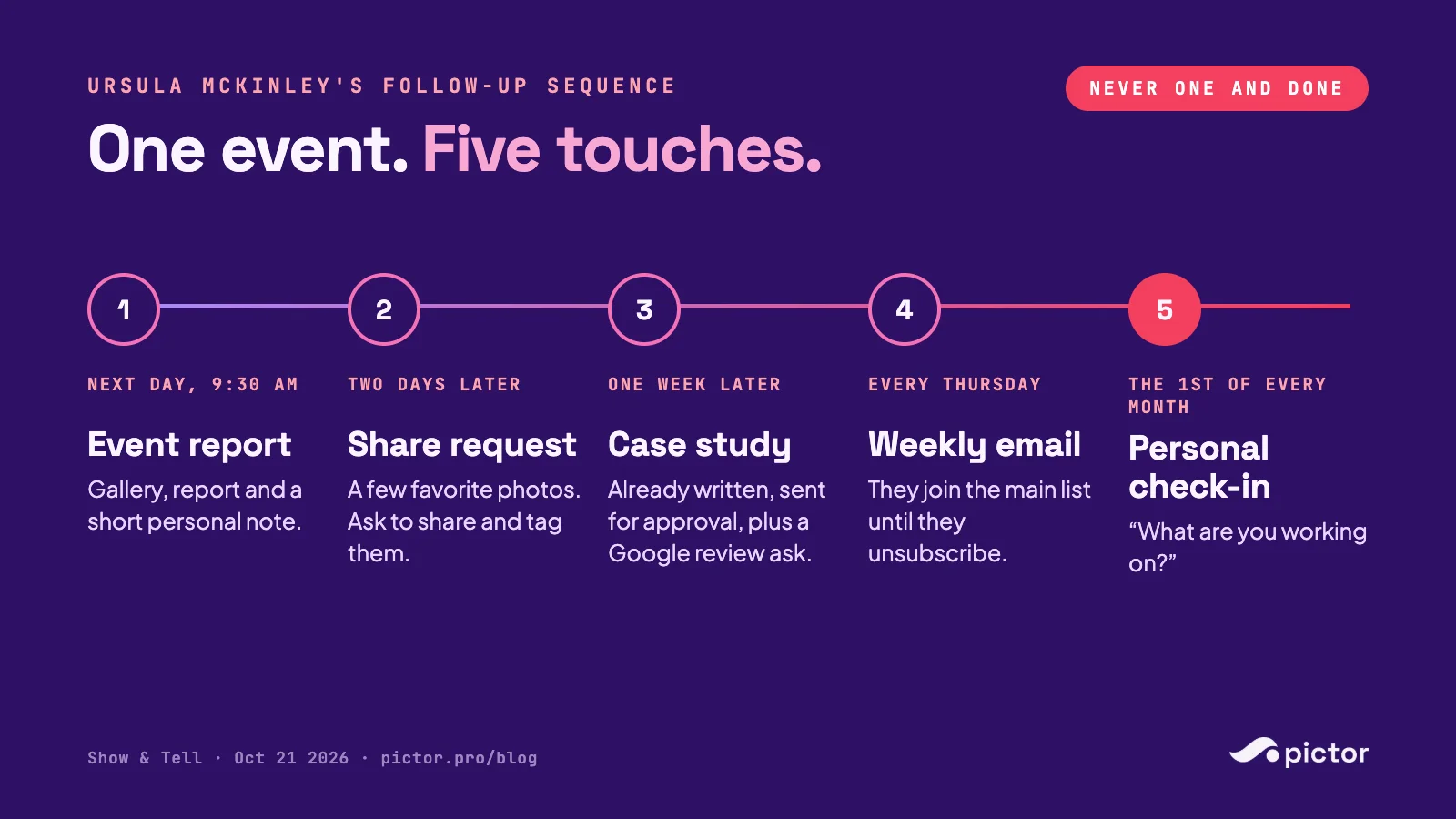
The 5-step follow-up sequence at a glance
- Next morning, by 9:30 AM: event report, gallery and a short personal note. Goal: show the results while the event is fresh.
- Two days later: a few favorite photos, asking to share and tag them. Goal: social proof and permission.
- One week later: a case study you have already written, plus a Google review request. Goal: a website asset and a review.
- Every Thursday after that: your weekly email. Goal: stay remembered.
- The 1st of every month: a personal email asking what they’re working on. Goal: find the next event early.
The end goal, in Ursula’s words: clients who “just send you a text message seven days before an event. My budget’s five grand. Just turn up next week.”
Get the printable checklist
All five steps, every email template, and a one-page per-client tracker so you can tick off each touch. Enter your email and we will send it to you.
We email the link so we know it reaches a real inbox. One email, no list, no drip.
Step 1: The morning after, by 9:30 AM: event report and gallery
Checklist
- Gallery link ready (the client’s full gallery, not a single guest’s photos)
- Event numbers pulled: sessions, photos and videos created, shares, gallery views
- Personal note written by the person who ran the event or owns the account
- Sent before 9:30 AM the morning after
Why 9:30? It lands before the client’s day fills up and while the event is still the thing they’re talking about internally. Their report to their boss can include your numbers.
Template: event report email
Subject: Your [Event Name] gallery and event report Hi [First Name], Hope you’ve all recovered! Here’s your event report and gallery from [Event Name]. – Gallery: [link] – Guests served: [number] sessions, [number] photos and videos – Shared: [number] shares and [number] gallery views so far A highlight for our team: [one specific moment, e.g. “the CEO doing the boomerang three times”]. If you need anything else, just let us know. [Your name] [Company]
In Pictor: the client gets a full gallery link with everything from the event, and the event analytics dashboard shows sessions, outputs, shares and gallery views, so the numbers for this email are on one screen.
Step 2: Two days later: ask to share and tag
Checklist
- 3 to 5 favorite photos picked by your team
- Permission asked to post them and tag the client
- Client’s social handles noted
- Post scheduled once they say yes
Template: share request
Subject: A few favorites from [Event Name] Hi [First Name], Was just checking in with our team. These are some of the pictures we really loved from [Event Name]: [attach or link 3–5 photos]. Would you mind if we share these on our socials and tag you in them? [Your name]
Step 3: One week later: the case study and the Google review
Checklist
- Case study written before you ask (client, event, what you built, results, 2–3 photos)
- Sent for approval, not for writing: “let us know if you want anything changed”
- Google review link included
- Review added to the case study once it comes in
- Case study published on your website
Why write it first? Ursula’s team is “very assuming about” it. Asking a client to write something is a chore. Asking them to approve something is a reply.
Template: case study and review request
Subject: Can we feature [Event Name] on our website? Hi [First Name], We put case studies for all our events on our website, and we’d love to share this one. I’ve already written it up: [link or attachment]. Let us know if you want anything changed. Also, Google reviews are really important to us. If you wouldn’t mind leaving us one here: [Google review link], we can include it in the case study. Thanks again, [Your name]
Step 4: Every Thursday after that: the weekly email
Checklist
- Client added to your main email list (with their permission)
- One send day picked and kept (Ursula’s is Thursday)
- Each email gives them something useful: a new experience, an idea for their next event, a recent case study
- Unsubscribes accepted as a good thing, not a failure
Ursula’s advice when attendees asked which one piece of marketing to fix first was email: pick one day a week and write to the people who already know and trust you, every single week. Her clients get the email “every single Thursday until the end of time,” unless they unsubscribe.
Step 5: The 1st of every month: the personal check-in
Checklist
- Calendar reminder on the 1st of every month
- Short, personal, plain text, from a real person, no images
- One question only
Template: monthly check-in
Subject: Anything exciting coming up? Hi [First Name], Haven’t been talking to you for a while. Are you working on anything exciting at the moment? [Your name]
That’s the whole email. It’s meant to get a reply, not to sell.
FAQ
How soon should a photo booth company follow up after an event? The next morning. Ursula McKinley’s company sends the event report and gallery by 9:30 AM the morning after every new client’s event.
What should a photo booth event report include? The gallery link, a few headline numbers (sessions, photos and videos created, shares and gallery views) and a short personal note with one specific highlight from the event.
How do you ask a client for a Google review? Attach it to something they already want. Ursula’s team writes the case study first, sends it for approval, and asks for a Google review to include in it.
How often should you email past photo booth clients? Ursula’s sequence uses two rhythms: a weekly marketing email on the same day every week, and a personal one-line check-in on the 1st of every month.
When does the follow-up stop? It doesn’t. “There’s no end to follow up,” in Ursula’s words. A client leaves the sequence when they unsubscribe.
Get the printable version
Get the printable checklist
All five steps, every email template, and a one-page per-client tracker so you can tick off each touch. Enter your email and we will send it to you.
We email the link so we know it reaches a real inbox. One email, no list, no drip.
About Photo Booth Marketing
Want more help with your marketing?
Ursula McKinley and the team at Photo Booth Marketing have mentored more than 6,000 photo booth owners worldwide, helping them improve their marketing, attract more bookings and grow their businesses through practical training, coaching and resources.
Watch the full session: Show & Tell recap with Ursula McKinley, with the replay, her three-tier proposal and the Haunted House experience launched live.
The sequence and timing are Ursula McKinley’s, from Pictor Show & Tell on October 21, 2026. The email templates are Pictor’s adaptations of the lines she shared on the show.