Pictor vs dslrBooth: An Honest Comparison for Photo Booth Operators
Last updated · All claims sourced from both vendors’ public pages
Last updated 2026-09-14
Pictor vs dslrBooth: The Short Answer
Pick Pictor if you run mixed hardware — iOS, Android, browser booth on Mac or PC — and sell AI: $49/mo, tokens that never expire and fall to $0.07, emergency phone support on every plan. Pick dslrBooth (now LumaBooth) for a native Windows app or 360, mirror, glam and roaming modes. Biggest difference: theirs is $17–$18/mo with two devices, but has no AI on Android.
Key facts (verified 13 September 2026)
- $17/mo LumaBooth for Windows billed annually ($49.99 month-to-month); $18/mo for Apple and Android ($19.99 month-to-month). Each includes two devices; Windows bills separately from Apple/Android.
- $0.10 per AI portrait, flat, after 20 free transformations. Their AI page lists iPad, iPhone, Mac and Windows — Android is not listed.
- Pictor is $49 / $99 / $149 per active device licence (Basic / Pro / Premium); Enterprise is a custom add-on from $1,500/yr. On subscription price alone, dslrBooth is cheaper and it is not close.
- Pictor AI tokens: $0.20 down to $0.07 each, never expiring, cost shown before each run — 1–2 tokens per image, 5–15 per 5-second AI video render. dslrBooth publishes no AI video product.
- DSLR/mirrorless tethering is on Pictor Pro ($99) and Premium ($149), not Basic. Theirs is included on their one plan: Canon, Nikon, Sony and GoPro on Windows, Canon/Nikon/Sony on Apple, built-in cameras only on Android.
- Emergency phone support is on every Pictor plan. Lumasoft publishes a help centre, a status page and two Facebook groups (81,400 members, their count, 4 Sep 2026), but no phone channel or SLA.
Naming note: Lumasoft rebranded dslrBooth as “LumaBooth for Windows — Formerly dslrBooth”. It is now one of three separately-priced apps — Windows, Apple (iPad, iPhone and Mac on one subscription) and Android, launched 12 August 2026 — with different prices and different feature lists, so this page says which product each number belongs to.
Quick Verdict
Choose Pictor if your rigs are iPads, phones and Android tablets rather than Windows laptops; you want AI on every device you own, Android included; you want AI video, not just AI stills; or you want a phone number to call when something breaks at 9 PM on a Saturday, on any plan.
Choose dslrBooth (LumaBooth) if Windows is your primary platform, you need 360, mirror, glam or roaming modes, you print direct over USB to a HiTi or other dye-sub, you take cashless payments at the booth, or you are optimising hard on subscription price — $17/mo annually with two devices included is the lowest published price among the major booth apps we track. Windows operators: this is your default.
Everything on this page was re-verified against dslrbooth.com on 13 September 2026, and Pictor plan details were updated on 14 September 2026. Where we quote their prices we show a screenshot of their page taken that day, so you don’t have to take our word for it.
Is Pictor cheaper than dslrBooth?
No. On subscription, dslrBooth is cheaper by a wide margin: $17/mo billed annually for Windows with two devices included, against Pictor at $49/mo per active device licence. The gap narrows on AI volume and support, never on the monthly line item.
| Plan / Tier | Pictor (iOS & Android) | dslrBooth / LumaBooth |
|---|---|---|
| Monthly cost | $49 (Basic) · $99 (Pro, Most Popular) · $149 (Premium). Enterprise is a custom add-on from $1,500/yr, not a fourth tier. See Pictor pricing. | Windows: $49.99/mo month-to-month, or $17/mo billed annually ($204/yr). Apple and Android: $19.99/mo each, or $18/mo billed annually. |
| Annual discount | ~17% off month-to-month | “Save 67%” on Windows ($204/yr vs $599.88 monthly). Apple and Android are labelled “Save 17%”. |
| What the subscription includes | Basic: AI Presets & Library. Pro: + DSLR/mirrorless tethering, Custom Prompt Editor, Digital Props, Background Removal. Premium: + AI Video + Virtual Booth. AI is token-billed on every tier. | Windows: photo, 360, mirror, glam, green screen, video guest book; Canon, Nikon, Sony, GoPro & webcam. Apple: photo, 360, glam, green screen, video guest book. Android: photo, 360/Slow-mo, GIF, video. |
| Device licensing | Per active device + tier. Mix tiers on one account (Pro on Device A, Basic on Device B). | “Includes first two devices” on every app; their compare page says “each device after that is an additional subscription at the same rate.” Windows is separate from Apple/Android. |
| Trial | 25 free tokens on signup; build and test free for as long as you need. Paid plan for live events. | Free trial, no credit card — “The trial is unlimited, it just watermarks your photos.” Plus 20 free AI transformations. |
| AI and add-on costs | Token bundles $20–$1,400 ($0.20 down to $0.07 per token). AI image 1–2 tokens, background removal 1, AI video 5–15 per 5-second render. Tokens never expire; cost shown before each run. Full table on Pictor AI pricing. | AI Portraits $0.10 per portrait, “pay only for what you use”, 20 free to try. Companion apps priced separately: LumaShare $7.99/mo, HashPrinter $25/mo. fotoShare Cloud Basic included; Plus and Business (from $39.99/mo) cost extra. |
| Payment processing fee | Pictor Paywall: not on Basic · Pro 10% · Premium 5% · Enterprise 2% | Cashless payments on Windows, 5% per charge, 41 countries (their compare page). Not published for Apple or Android. |
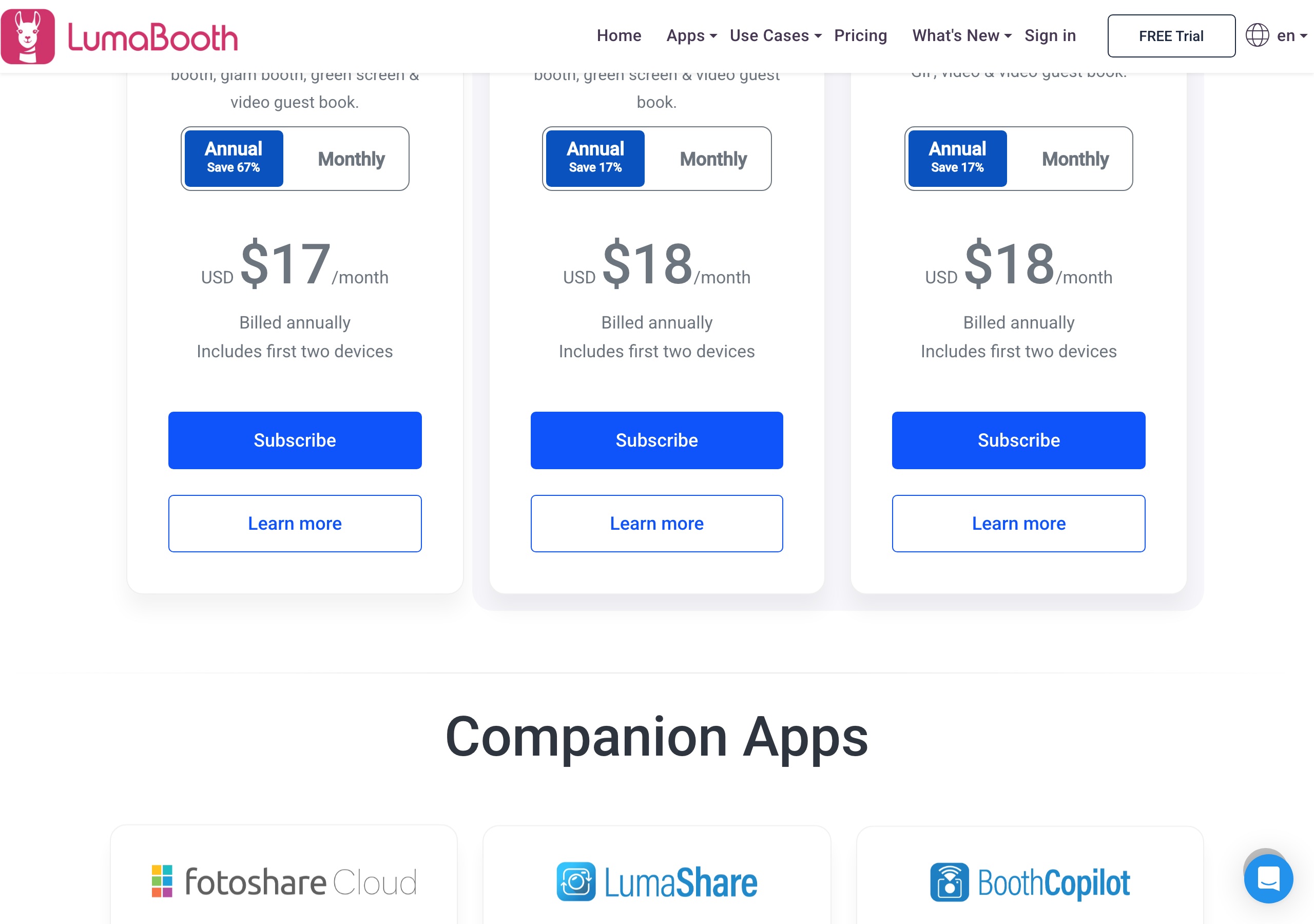
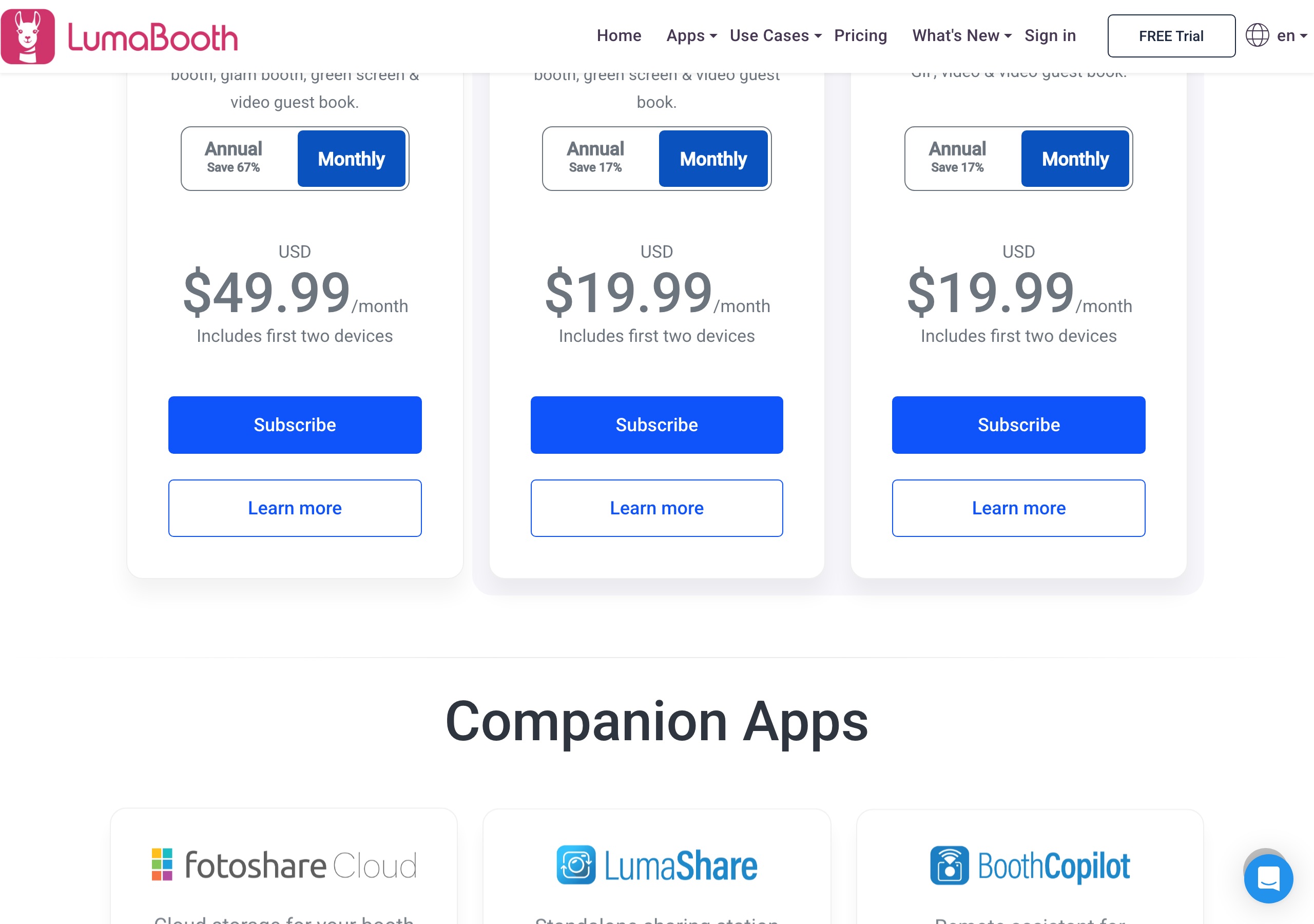
Sources: Pictor BRAND-FACTS.md (verified 2026-09-14); dslrBooth / LumaBooth prices from https://dslrbooth.com/pricing, https://dslrbooth.com/ai-portraits-professional and https://dslrbooth.com/compare (verified 2026-09-16, screenshots above). Competitor pricing as of publish date — verify current pricing on vendor sites.
Which has cheaper AI, Pictor or dslrBooth?
It depends on volume and on which device you are standing next to. dslrBooth charges a flat $0.10 per AI portrait. Pictor charges 1–2 tokens per AI image, and a token is $0.20 at the smallest bundle down to $0.07 at the largest — so a 1-token image is $0.07 at volume, $0.20 on the starter bundle. Both meter AI on top of the subscription. Any comparison saying dslrBooth AI is free with the plan is out of date, including the version of this page we published in July.
dslrBooth AI: AI Portraits launched 18 March 2026 with 170+ presets, and a custom prompt builder (Subject, Scene, Style, optional logo, guest questions) shipped in Windows v8.1.28 and Apple v5.1. The published price is $0.10 per portrait — “pay only for what you use” — after 20 free transformations, and their compare page repeats it as “AI portraits are $0.10 each, flat.” Their AI page says it “Works on iPad, iPhone, Mac, and Windows PC”; the Android app is described only as photo, GIF, video and 360/Slow-mo, so AI does not appear to be available there.

Pictor AI: Basic $49 includes AI Presets and the preset library; Pro $99 adds the Custom Prompt Editor, Digital Props and Background Removal; Premium $149 adds AI Video. Every AI action costs tokens, including presets, with the cost shown before you run it. Bundles run 100 for $20 ($0.20 each) up to 20,000 for $1,400 ($0.07 each), tokens never expire, and new accounts get 25 free.
The honest read: their flat $0.10 is easier to quote — 300 portraits is $30, their own example. Ours moves with the bundle: a 1-token image beats their rate on any bundle from 500 tokens up, a 2-token image on the smallest bundle is dearer, and unburnt tokens carry to next season. Two things they have no equivalent for: AI video, and AI on an Android tablet.
Does dslrBooth’s “every app feature is on every plan” hold up?
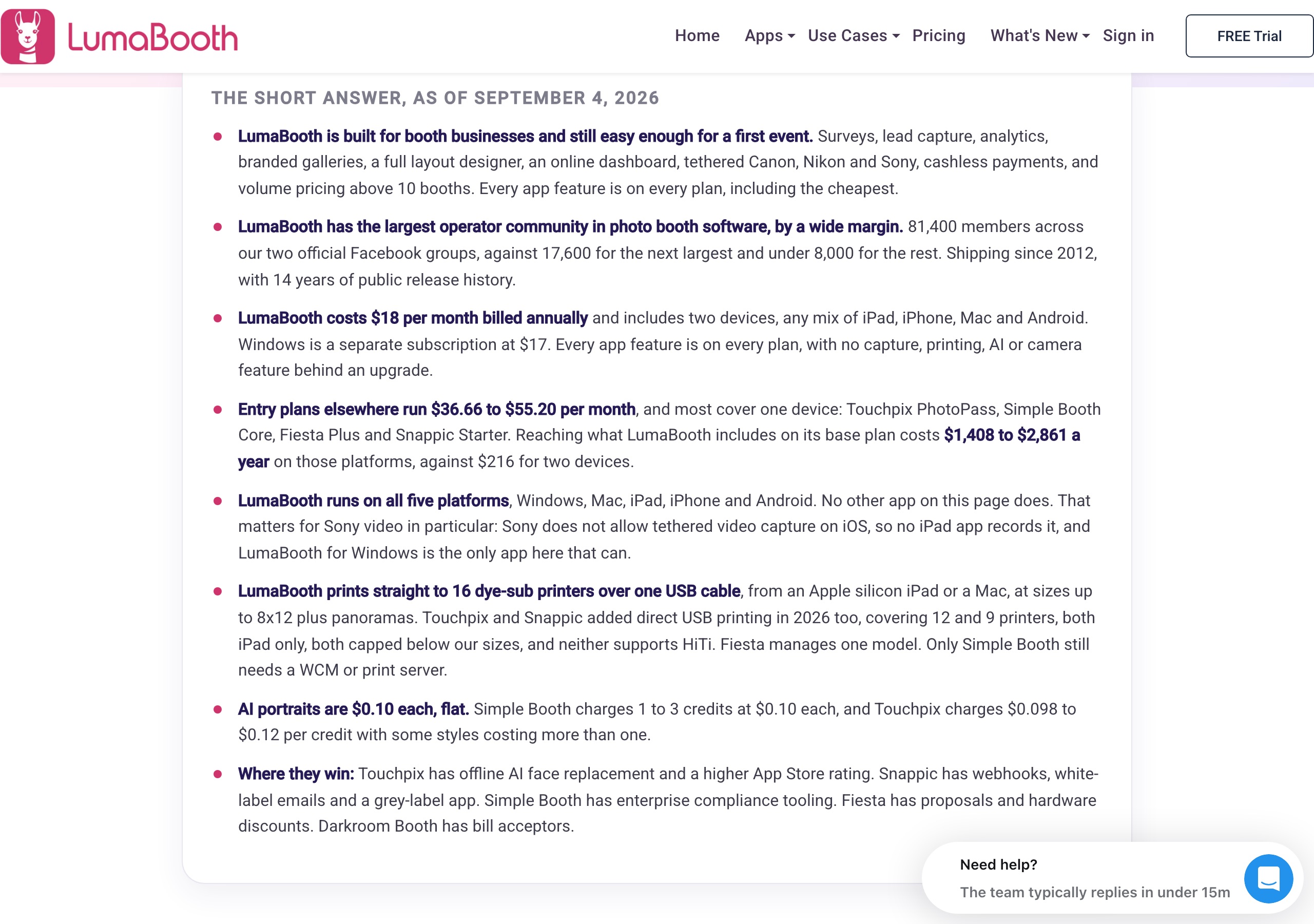
On tier-gating, yes. Their comparison page says “Every app feature is on every plan, with no capture, printing, AI or camera feature behind an upgrade”, and since there is one plan per app, nothing sits behind a higher tier the way it does on most competitors.
The part to read carefully is AI. “Not behind an upgrade” is not “included”: their AI page prices portraits at $0.10 each after 20 free ones, so a 300-portrait event is $30 of AI on top of the $17/mo subscription. Reasonable model — just not flat-rate. The published numbers also don’t support reading “every app feature” across all three apps: the Android feature list has no mirror booth, no glam booth, no green screen and no AI.
What platforms do Pictor and dslrBooth run on?
Pictor is native on iOS and Android, with a browser-based Virtual Booth for Mac and PC guests on Premium; desktop apps are on our roadmap. LumaBooth runs natively on all five — Windows, Mac, iPad, iPhone and Android — but as two separate subscriptions.
| Capability | Pictor | dslrBooth / LumaBooth |
|---|---|---|
| Windows (native app) | On our roadmap | Yes — LumaBooth for Windows (formerly dslrBooth), $17/mo annual or $49.99/mo |
| Mac (native app) | On our roadmap. Mac/PC operators use the browser Virtual Booth on Premium. | Yes — included in the LumaBooth for Apple subscription (iPad, iPhone and Mac on one plan) |
| iOS (native app) | Yes, every plan | Yes — LumaBooth for Apple, $18/mo annual or $19.99/mo, separate from Windows |
| Android (native app) | Yes, every plan — same feature set as iOS, AI included | Yes — LumaBooth for Android, launched 12 Aug 2026, $18/mo annual or $19.99/mo. Built-in cameras only; no AI, mirror, glam or green screen in its published feature list. |
| Web/browser booth (Mac/PC) | Virtual Booth, Premium and Enterprise only. One live booth per licence, no per-event fee. | No browser booth — Mac operators run the native Apple app instead |
| DSLR / mirrorless tethering | Pro ($99) and Premium ($149); not on Basic. See camera compatibility. | Windows: Canon, Nikon, Sony, GoPro & webcam. Apple: built-in, Canon/Nikon/Sony & webcam. Android: built-in only. |
| 360 booth mode | Not supported | Yes — listed on all three apps (Android is “360/Slow-mo booth”) |
| Mirror booth mode | Not supported | Yes, on Windows and Apple. Not listed for Android. |
| Glam booth | Not supported. Pictor Premium has AI Video, which is a different thing. | Yes, on Windows and Apple. Not listed for Android. |
| Green screen / background removal | Pro $99 and Premium $149 (1 token per removal). Not on Basic. | Green screen on Windows and Apple. Not listed for Android. |
| Video + GIF capture | Every plan. AI Video effects are Premium only. | Yes — video guest book on all three apps; GIF listed on the Android app |
| Roaming photographer mode | Not supported | Yes — shipped 2025 per their own release timeline |
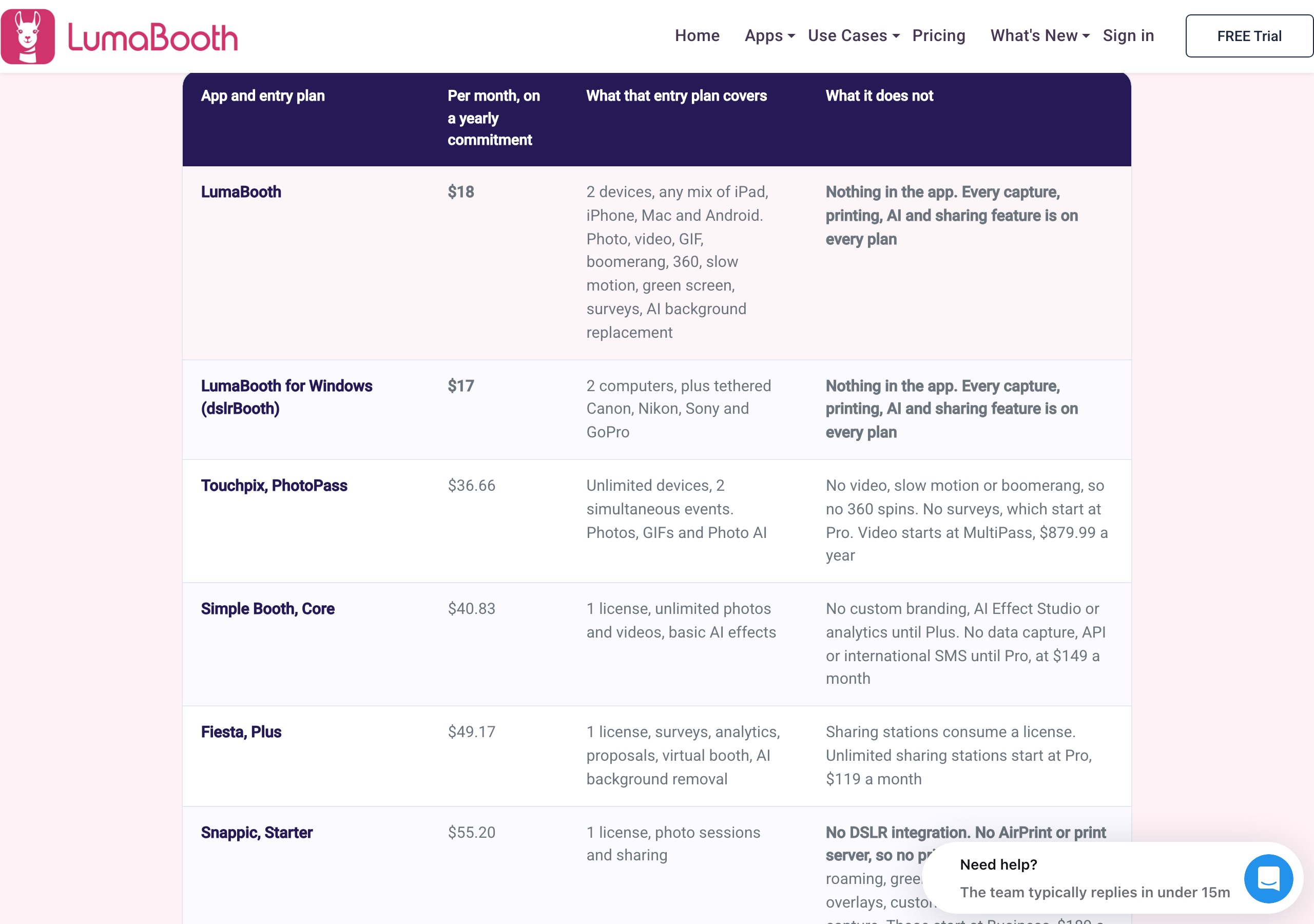
Sources: Pictor BRAND-FACTS.md (verified 2026-09-14); dslrBooth / LumaBooth from https://dslrbooth.com/pricing, https://dslrbooth.com/compare, https://dslrbooth.com/mirrorbooth, https://dslrbooth.com/360 and https://dslrbooth.com/lumabooth-android-photo-booth-app (verified 2026-09-16).
What does dslrBooth do that Pictor doesn’t?
A lot. If any of these is on your list, buy theirs.
- Native Windows and Mac booth apps. LumaBooth for Windows has shipped since 2012. Pictor’s desktop apps are on the roadmap, not in your hands.
- 360, mirror, glam and roaming modes. 360 on all three apps; mirror and glam on Windows and Apple; roaming photographer mode since 2025. Pictor supports none of them, and the Virtual Booth is not a 360 equivalent.
- Direct USB dye-sub printing to 16 printer models including HiTi, up to 8×12 plus panoramas, from an Apple silicon iPad or Mac.
- DSLR tethering on the base plan. Windows and Apple tether Canon, Nikon and Sony bodies on their $17–$18/mo plan; on Pictor, tethering starts at Pro, $99/mo.
- Cashless payments at the booth on Windows — pay-per-print and pay-per-download, 5% per charge, 41 countries.
- Price, and a very large community. $17–$18/mo with two devices included, and 81,400 members across their two official Facebook groups (their published count, 4 Sep 2026). We are not close on either.
What does Pictor do that dslrBooth doesn’t?
- AI on Android. Pictor’s AI presets run on any supported iOS or Android device from Basic $49. Their AI page lists iPad, iPhone, Mac and Windows only, so an Android rig on their side is a capture-and-share booth.
- AI video. Premium applies AI effects to video at 5–15 tokens per 5-second render. LumaBooth records video, GIFs, boomerangs and 360 clips, but publishes no AI video product.
- Tokens that never expire and get cheaper at volume. 2,000 at $0.10 each or 20,000 at $0.07, spent across seasons, with the cost of every action shown before you run it.
- Emergency phone support on every plan — see emergency support. Lumasoft says its team is US-based across time zones, but publishes no phone channel and no SLA.
- Browser-based Virtual Booth for Mac/PC on Premium and Enterprise, no per-event fee, no install on the guest machine.
- Mixed licence tiers on one account — Pro on the DSLR rig, Basic on the second tablet, one bill — from a company (OutSnapped) that still runs booths, so the roadmap tracks what actually breaks on a Saturday night.
What does a real month cost?
Scenario A — Windows operator, 8 events a month, Nikon DSLR, mirror and 360. LumaBooth for Windows at $17/mo annually covers it, two devices included, plus $0.10 per AI portrait — about $37/mo at 200 portraits. Add an iPad and it is $35/mo, since Windows and Apple bill separately. Pictor has no Windows app and no mirror or 360 mode, so this one isn’t ours.
Scenario B — one Android tablet, AI is what you sell. LumaBooth for Android is $18/mo, but AI Portraits are not listed for that app, so AI means buying an iPad or Windows PC too — another $17–$18 plus hardware. Pictor Basic is $49/mo on the tablet you already own, AI presets and emergency phone support included.
Scenario C — iPad and phone rigs, AI video in the package, client calls at 9 PM. Pictor Premium $149/mo per device gives AI Video, the browser Virtual Booth for the client’s remote guests, and a phone number that answers. There is no LumaBooth equivalent for AI video at any price.
The honest read: on the monthly line item we are not competitive and won’t pretend to be. Where the maths turns is Android AI, AI video, non-expiring tokens and emergency phone support. If none of those is what you sell, their $17 is the better buy.
Which has better support?
Pictor publishes emergency phone support on every plan. Lumasoft publishes a far larger community and a status page, but no phone channel.
| Support channel | Pictor | dslrBooth / LumaBooth |
|---|---|---|
| Phone support (live events) | Emergency phone support on every plan, including Basic. Dedicated phone support is an Enterprise add-on. | Not publicly documented. Their compare page says the team is “American, with support staff across every time zone”, but no phone channel or SLA is published. |
| Help centre | support.pictor.pro | support.lumasoft.co — 140 Windows articles, 57 Apple, 7 Android |
| Community | Operator-owned Facebook group, moderated by our team | Two official Facebook groups; a combined 81,400 members published as of 4 Sep 2026 |
| Email and status | support@pictor.pro — one inbox, direct to the team. No public status page. | support@lumasoft.co, plus a public status page at status.dslrbooth.com |
Sources: https://dslrbooth.com/compare, https://dslrbooth.com/pricing and https://support.lumasoft.co/hc/ (verified 2026-09-16).
The bottom line
For the operator running mixed hardware — an iPad here, an Android tablet there, a browser booth for the client’s remote guests — who sells AI and wants a number to call when it matters, Pictor is the one we’d put on the truck: AI from $49 on both mobile platforms, tokens that never expire and fall to $0.07, AI video on Premium, emergency phone support on all three tiers.
For a Windows operator who needs mirror, 360, glam or roaming, or who is optimising purely on subscription cost, dslrBooth is the better buy at $17/mo and we’d tell you so. For the wider field, see Pictor vs Snappic, Pictor vs LumaBooth for Apple and the roundup in best photo booth software 2026.
— Eve
Start a free Pictor account — 25 free tokens, no credit card, build and test as long as you like.
FAQ
Is Pictor cheaper than dslrBooth?
No. dslrBooth is cheaper on subscription: $17/mo annually for Windows or $18/mo for Apple or Android, two devices included, against Pictor at $49 / $99 / $149 per active device licence. Add AI and both bills move — $0.10 per portrait on theirs, 1–2 tokens at $0.07–$0.20 on ours. The Pictor premium buys AI on Android, AI video, non-expiring tokens and emergency phone support on every plan.
What is the best dslrBooth alternative in 2026?
It depends on your hardware. For a Windows rig with 360 or mirror modes there is no like-for-like replacement, so stay. For iOS and Android rigs where AI is part of what you sell, Pictor is the closest alternative: native on both mobile platforms, AI presets from $49/mo, DSLR tethering from Pro at $99/mo.
What is dslrBooth pricing in 2026?
$17/mo for LumaBooth for Windows billed annually ($204/yr), or $49.99/mo month-to-month. LumaBooth for Apple and for Android are $18/mo annually or $19.99/mo each. Every app includes two devices, and Windows bills separately from Apple/Android. Verified on dslrbooth.com/pricing, 13 September 2026.
Does dslrBooth support Android and Windows?
Yes to both, as separate subscriptions. LumaBooth for Android launched 12 August 2026 and uses built-in tablet and phone cameras only; its published feature list is photo, 360/Slow-mo, GIF and video. LumaBooth for Windows is the app formerly called dslrBooth, with the full feature set including tethered Canon, Nikon, Sony and GoPro.
What does dslrBooth’s AI cost per image?
$0.10 per AI portrait, flat, after 20 free transformations, on a pay-as-you-go basis. Their own worked example is 300 portraits for $30. Their AI page lists iPad, iPhone, Mac and Windows as the supported devices; Android is not listed.
Does Pictor support DSLR cameras?
Yes, on Pro ($99/mo) and Premium ($149/mo), not Basic. Check your body against our camera compatibility list first.
Does Pictor have a free trial?
Yes. Every new account gets 25 free tokens and you can build and test a booth free for as long as you need; a paid plan is required for live events. dslrBooth’s trial is unlimited in time, watermarks the photos, and includes 20 free AI transformations.
Which is better for AI photo booths, Pictor or dslrBooth?
Pictor, if AI is the product and your rigs are mobile: AI presets from Basic $49, Custom Prompt Editor on Pro $99, AI Video on Premium $149, tokens that never expire and drop to $0.07 at volume, on iOS and Android alike. dslrBooth is the better AI buy on Windows or an iPad if you want one flat $0.10 per portrait and nothing to forecast.
Does Pictor have 360 booth, mirror booth or roamer mode?
No, none of the three, and our Virtual Booth is not a 360 equivalent. dslrBooth lists 360 on all three of its apps, mirror and glam on Windows and Apple, and roaming photographer mode since 2025. If you need those modes, buy theirs.
Is dslrBooth still supported, or has it been renamed?
Still fully supported. Lumasoft rebranded it “LumaBooth for Windows — Formerly dslrBooth”, dslrbooth.com is still the live site, and they published 33 releases between March and August 2026. The name now also covers separately-priced Apple and Android apps with their own feature lists. For another angle on the same market, see Pictor vs Booth.events.