The Best Photo Booth Software for Operators in 2026 — Compared Honestly (By One of the Companies on the List)
An honest comparison of the best photo booth software for operators in 2026—ranked by ease of use, features, reliability, and pricing by a company on the list.

Nicholas Rhodes
Drafted with AI assistance; reviewed and approved by Nicholas Rhodes before publishing.
We make Pictor. This page isn’t an unbiased third-party review — we’re in the list below. But that’s exactly why you should read it. We compete against these companies every day. We know what they do well, where they beat us, and which ones solve problems Pictor doesn’t. If you’re shopping for photo booth software, the honest answer is this: there’s no single “best” for everyone. It depends on your booth type, your hardware, and how much AI you actually run.
Short Answer: Which Photo Booth Software Should You Buy in 2026?
Short answer: Operators running mixed hardware with AI from day one should start with Pictor at $49/mo, which includes emergency phone support on every plan; DSLR tethering starts on Pro at $99/mo. Pick Snappic ($69–$399/mo) for 360 and mirror rigs, dslrBooth ($17/mo billed annually) for a Windows-only DSLR booth, and BoothLedger ($13/mo) if price is the only thing that matters.
Every competitor number on this page was verified against the vendor’s own live pricing and help pages on 14 September 2026. Where we changed a number since the last update, we show the screenshot we took.
Narrower question? See the AI photo booth software roundup, the wedding software guide, or how to switch from Booth.events.
Which Photo Booth Software Fits Your Booth Type?
Best Platform Coverage: Touchpix
Platforms: iOS, Android, Windows, Mac, Linux, Raspberry Pi
Pricing: PhotoPass $36.66/mo · MultiPass $73.33/mo · Pro $117.33/mo · Enterprise $183.33/mo (billed annually); weekly passes from US$20.89
Standout: Unlimited devices on a plan, AI on every tier, and it runs on essentially any computer you own
Touchpix is the generalist, and the pricing is no longer opaque — the tiers are published. It runs on your iPad and your Android phone and your Windows machine and your Mac, plus Linux and Raspberry Pi if you build your own kiosks. It supports 360 booths, mirror booths, roaming rigs, and DSLR setups (Canon, Nikon, Sony over USB; GoPro natively). Photo AI is on every plan, and AI Pro images run US$0.068–$0.12 each, the cheapest published per-image AI rate in this roundup.
Weakness: Those headline prices are annual-commitment prices, so the real comparison against a month-to-month competitor is less flattering than it looks. As a generalist it isn’t as sharp as the specialists on any single booth type, and support is email-and-ticket rather than a phone number.
Best for: Operators running many booth types on many kinds of hardware who want one licence and don’t want a device count to manage. Full breakdown: Pictor vs Touchpix.
Best Turnkey iPad Package: Simple Booth HALO
Platforms: iPad only
Pricing: $49 · $99 · $149 · $249/mo; weekly passes at $24 and $49; Lite from $15/week
Standout: Bundles hardware (Aura aluminium tower + studio ring light) and software as one product
HALO is iPad-only, but it’s a complete package: the booth, the light, the software, the design system. Under a minute to set up with no tools. The software side includes AI effects, software-side “DSLR-quality” post-processing, printing, guest data capture, and analytics. AI is metered at $0.10 per credit, 1–3 credits per generation, so $0.10–$0.30 per AI image on top of the subscription.
Weakness: No DSLR tethering at all — the “DSLR quality” is post-processing on an iPad capture, not a camera on a tripod. No AI video. No Windows, no Android, no 360 or mirror mode. If you already own booths, you are paying for hardware you don’t need.
Best for: New operators and venues that want one box that arrives ready to run. Full breakdown: Pictor vs Simple Booth.
Best for Mixed iOS + Android Fleets: Pictor
Platforms: Native iOS and Android; browser-based Virtual Booth on Mac and PC (Premium and Enterprise)
Pricing: Basic $49/mo · Pro $99/mo (Most Popular) · Premium $149/mo · Enterprise custom add-on from $1,500/yr. Annual billing saves about 17%
Standout: Emergency phone support on every plan, including the $49 Basic tier
Most booth software treats Android as an afterthought. Pictor ships native iOS and Android at the same feature level, so a mixed fleet runs one app. DSLR and mirrorless tethering is on Pro ($99/mo) and Premium ($149/mo), not Basic. Emergency phone support is also on every plan, not reserved for the top tier the way it is at Booth.events.
AI is token-based and every AI action costs tokens, presets included. Tokens run $0.20 each at 100 for $20 down to $0.07 each at 20,000 for $1,400, and they never expire. An AI image is 1–2 tokens, background removal is 1 token, and AI video is 5–15 tokens per five-second render. The cost is shown before each run, and new accounts get 25 free tokens. At the popular 2,000-token pack that is $0.10–$0.20 per AI image, in the same band as Snappic and Booth.events and above Touchpix.
By tier: Basic gets AI presets and the library. Pro adds the custom prompt editor, digital props, and background removal. Premium adds AI video and the browser Virtual Booth, which has no per-event fee — Snappic charges $25 per event for its equivalent. If you charge guests for prints or upgrades, the Pictor Paywall takes 10% on Pro, 5% on Premium, and 2% with the Enterprise add-on. It is not available on Basic.
Weakness: No 360 booth, no mirror booth, no roamer, no GlamBot. No native Mac or Windows booth app — Virtual Booth is a browser experience, not a desktop booth, and native desktop apps are on the roadmap rather than shipping. Licences are per active device and tier, so a big fleet costs real money. And Android is still a small slice of this industry; if every device you own is an iPad, our platform parity buys you nothing.
Best for: Operators on mixed iOS and Android hardware who want AI and a phone number from the first tier up.
Best Windows DSLR Booth: dslrBooth
Platforms: Windows
Pricing: $17/mo billed annually, or $49.99 month-to-month
Standout: The default Windows DSLR workflow, and the annual price is the cheapest serious Windows option here
dslrBooth is the Windows product from the same company that makes LumaBooth, and the two are separate apps rather than one product with a Windows build. Wireless or USB tether to Canon, Nikon and Sony, plus GoPro and webcams. Green screen, GIF and boomerang, video guestbook, AI Portraits, and fotoShare cloud delivery. AI Portraits are billed per output at $0.10 per portrait.
Weakness: The gap between the annual rate and the month-to-month rate is large — $17 versus $49.99 — so the advertised price assumes a year of commitment. Windows only, so an iPad or Android booth means buying LumaBooth as well. No AI video generation.
Best for: Windows-first operators who run DSLR every weekend and will commit annually. Full breakdown: Pictor vs dslrBooth.
Best Apple DSLR Booth (Now With Android): LumaBooth
Platforms: iPad, iPhone, Mac, and Android — the full Android app shipped on 12 August 2026
Pricing: $18/mo billed annually, or $19.99 month-to-month
Standout: The smallest annual-versus-monthly penalty in this roundup, and Android is no longer missing
LumaBooth is the Apple-side sibling to dslrBooth, and as of August 2026 it also has a real Android app rather than a companion remote. DSLR tethering, green screen, mirror booth mode, video guestbook, AI Portraits at $0.10 per portrait, and fotoShare cloud sync across devices. At $19.99 month-to-month it is close enough to the $18 annual rate that you can run it seasonally without being punished.
Weakness: Two apps and two subscriptions if you run both Windows and Apple hardware. No AI video. No 360 templates.
Best for: Apple-first operators, and anyone who wants DSLR on an iPad without a Windows machine in the case. Full breakdown: Pictor vs LumaBooth.
Best 360 and Specialty Rigs: Snappic
Platforms: iPad, iPhone, and Apple Silicon Macs. No Android
Pricing: Starter $69/mo · Business $189/mo · Premium $279/mo · Scale $399/mo; per-event passes at $29, $79 and $109
Standout: Templates built for 360, mirror, roaming and robot rigs out of the box
Snappic is the specialist for specialty booths, and nothing else in this list matches its template library for 360 and mirror work. DSLR integration starts on Starter at $69/mo. White-label starts on Business. AI-FX starts on Business at $189/mo, which is the number to watch: AI is not available at all on the $69 tier. AI credits are $0.10 each at 1–6 credits per image, so an AI image costs $0.10–$0.60 depending on the effect. Virtual Booth is a $25-per-event add-on with 300 credits included.
Weakness: AI costs $189/mo before you generate a single image. No Android. The per-event Virtual Booth fee adds up fast if digital events are a regular line on your invoices.
Best for: Operators whose business is 360 and mirror rigs, and event-to-event operators who prefer the $29 pass to a subscription. Full breakdown: Pictor vs Snappic.
Best Event-Based Pricing: Booth.events
Platforms: iPad and iOS; browser dashboard. No Android
Pricing: $49 · $79 · $129/mo, or $1,299/yr
Standout: The cheapest published AI credits in this roundup at $8 per 100 credits
Booth.events is built for operators who run a lot of events and want flexible billing. DSLR tether to iPad for Canon, Nikon and Sony. AI Prompts and AI Portraits, guest data capture with GDPR consent screens, hundreds of templates, real-time analytics. AI credits are $8 per 100, so $0.08 each: a standard generation is 1 credit, an AI portrait is 2, and the Pro 2K and 4K models are 3 and 4 credits, putting a generated image between $0.08 and $0.32.
Weakness: No Android, and no Windows or Mac booth app. Phone support is Pro+ only, so the $49 and $79 tiers get email. Extra devices are billed per iPad or Mac on top of the plan. No 360 or roaming support.
Best for: iPad operators who run heavy AI volume and want the lowest per-image cost with a subscription attached. Full breakdown: Pictor vs Booth.events.
Best AI Variety on Any Platform: Activation King
Platforms: Windows, Mac, iOS and Android
Pricing: Promotional $49 · $79 · $149/mo against list prices of $69 · $99 · $199/mo
Standout: The lowest headline credit price here at $0.025 per credit, with a wide AI mode library
Activation King is the other genuinely multi-platform option in this list — Windows, Mac, iOS and Android are all supported, which only Touchpix and Pictor also manage. White-label branding, many AI modes, multilingual interfaces. Credits are $0.025 each, but read the credit costs before you budget: Nano Banana images consume 6–24 credits each, so a generated image lands between $0.15 and $0.60, which is not the cheapest despite the cheapest-looking credit.
Weakness: There is no AI at all on the Starter plan, so the real entry point for an AI-first operator is the middle tier. The headline prices are promotional against a higher list price, so budget against $69–$199 in case the promotion ends. DSLR support is not documented.
Best for: Operators who want AI variety across Windows and mobile and are happy to work in credits. Full breakdown: Pictor vs Activation King.
Cheapest Subscription With AI: BoothLedger
Platforms: Windows 10/11, 64-bit only
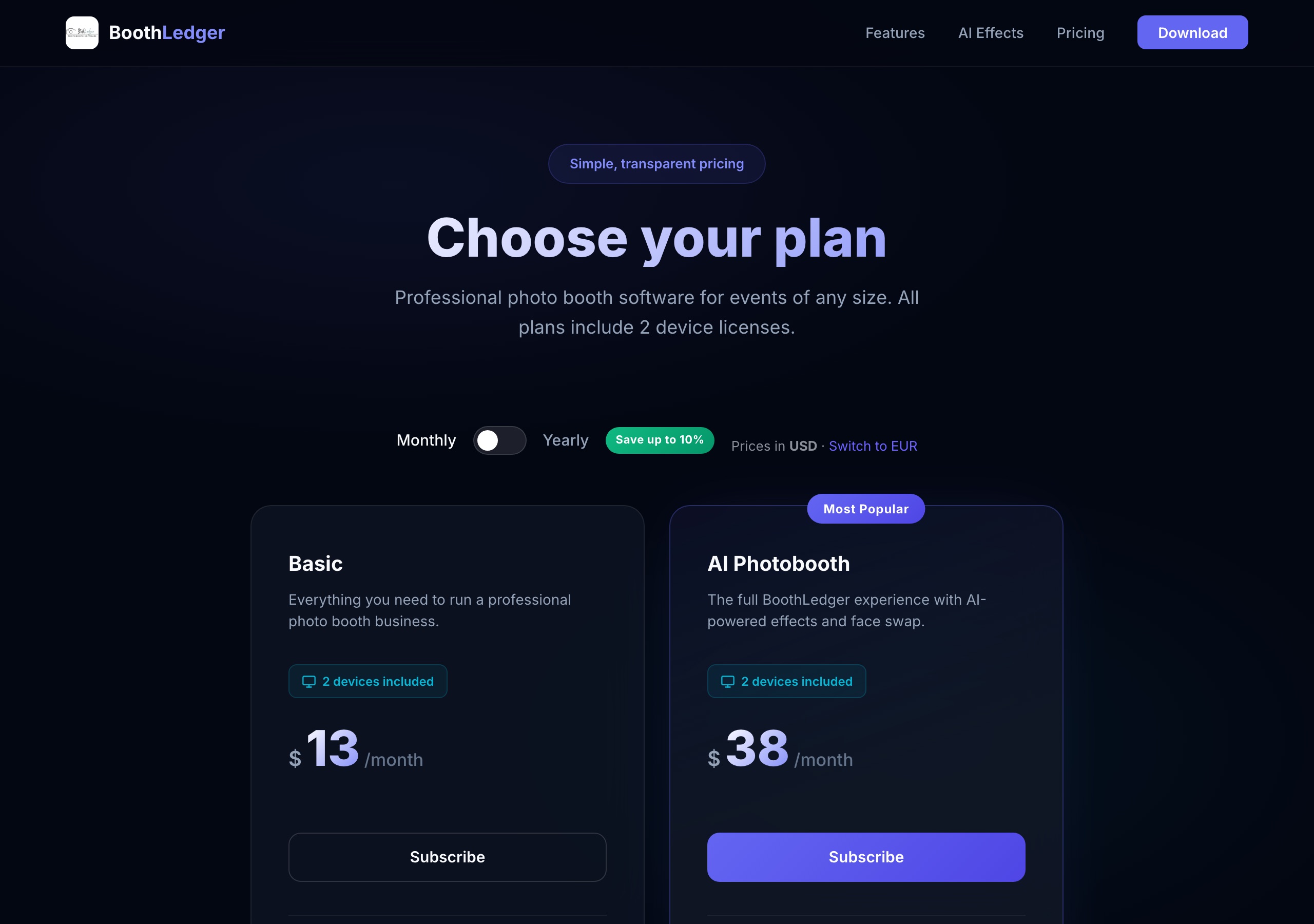
Pricing: Basic $13/mo · AI Photobooth $38/mo, both including 2 device licences; yearly billing saves up to 10%; prepaid terms at $71/$140 (Basic, 6 and 12 months) and $209/$410 (AI). Prices can be switched to EUR
Standout: A Windows DSLR booth with AI face swap and background removal for less than the cost of one print roll per month
BoothLedger is the newest name in this roundup and the cheapest way to get a Windows booth with real AI attached. Basic ($13/mo) covers camera control and capture, QR/email/SMS sharing, a template editor, event management, cloud sync and gallery, and bulk download. AI Photobooth ($38/mo) adds AI photo effects and prompts, face swap, background removal, face enhancement and live swap mode, running on two engines they call Core and Nano Banana Pro, with more than 50 art styles. Both plans include two device licences; extra devices cost 50% of the plan price. There is a 30-day free trial with no card required, and prepaid 6- and 12-month terms for operators whose banks decline recurring international charges.
Weakness: Windows only, with no iPad or Android app at all. Camera support is Canon DSLR plus webcams, with other brands listed as coming soon, so Nikon and Sony shooters are out for now. It is a small vendor, so the community and third-party template ecosystem is thin next to dslrBooth or Darkroom. Their pricing FAQ says the 30-day trial covers Basic features while their AI page says the trial includes full AI access — worth confirming with them before you plan an event around it. Per-image AI cost is not published, so you cannot model AI spend the way you can with Booth.events or Touchpix.
Best for: Windows operators on a Canon who want AI effects at the lowest possible monthly cost and can live with a two-device cap.
Best One-Time Licence: Sparkbooth
Platforms: Windows 10+, macOS 13.7+
Pricing: Premium $149 one-time · DSLR $189 one-time, each a lifetime licence with 3 activations; free 30-day trial
Standout: No subscription and no per-event fee, and version 7.3 added AI photo transformations in September 2026
Sparkbooth has been around since 2009 and is the only product in this roundup you can genuinely buy once. Premium at $149 covers webcams up to 4K; DSLR at $189 adds Canon, Nikon and Sony tethering. Both include commercial use and three activations across Windows and macOS. The 7.3 release in September 2026 added AI photo transformations alongside AI background removal, mirror booth mode, GIF and boomerang, a layout editor, offline operation, and eleven interface languages — so the old line that Sparkbooth has no AI no longer holds.
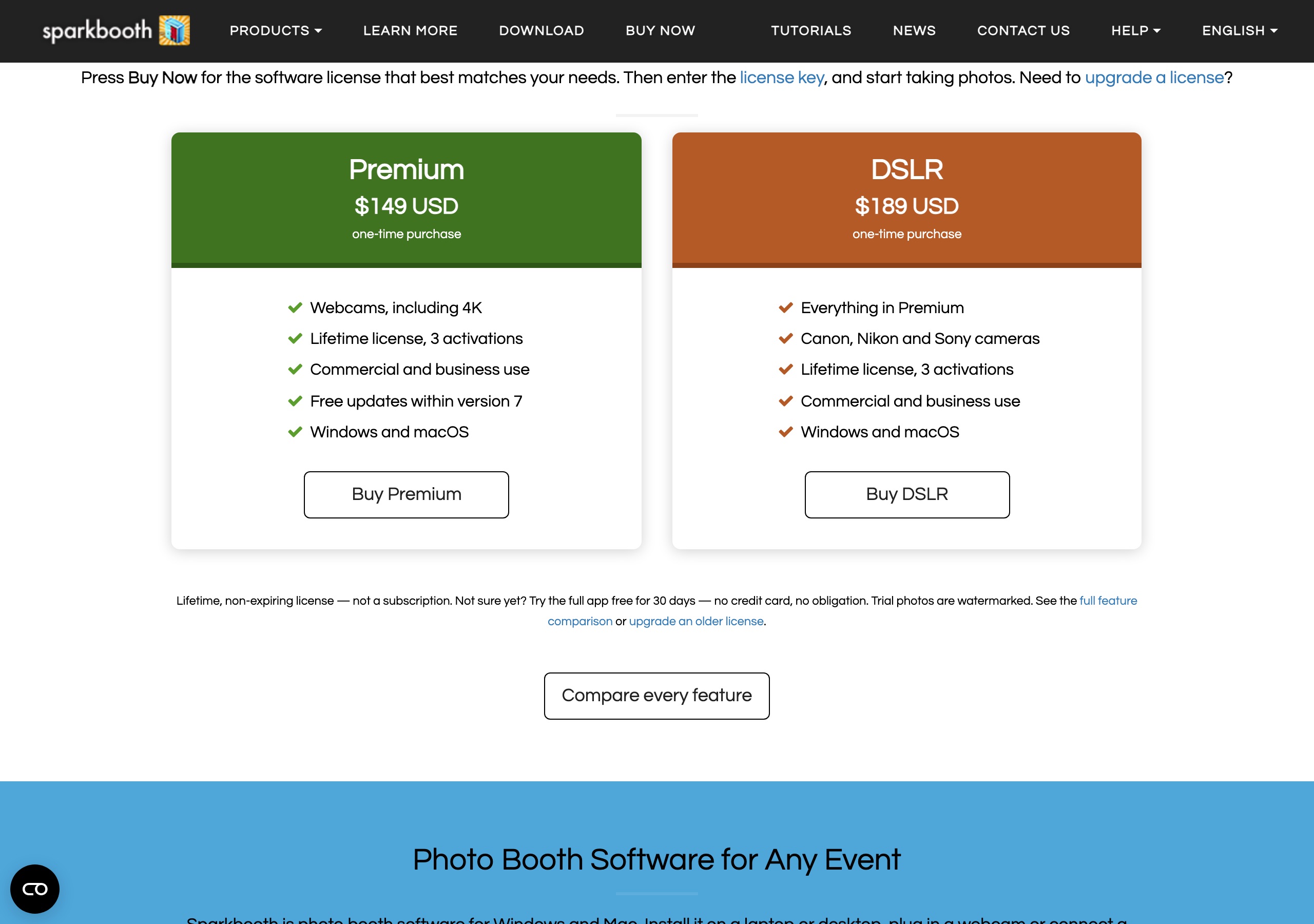
Weakness: No iPad or Android app, so tablet booths are out. No 360 or roaming modes. AI is new here rather than the core of the product, and the per-image cost isn’t published. Free updates are limited to version 7, so a version 8 will likely cost again.
Best for: Budget-conscious operators on a laptop who would rather pay $189 once than $20 a month forever, and anyone building a DIY booth.
Best Windows Perpetual Licence With 360: Darkroom Booth
Platforms: Windows only; iPad used as a remote control via the Booth Control app
Pricing: $195 to upgrade from Booth 2.x to Booth 2025; $95 per additional year of updates and support; paid 10-day temporary licences for overbooked weekends
Standout: Deep Windows feature set including 360 and VR output, plus coin-op, bill acceptors and external hardware control
Darkroom Booth is the old guard, and it earns its place on hardware control. DSLR and mirrorless over tether or wireless, webcams, GoPro, green screen, 360, light painting, quizzes and contests, GIFs and boomerangs, and multi-device management from Booth Control. It is the only product here with built-in support for coin-op and bill acceptors, which matters for permanent installations. The licensing is perpetual with a maintenance plan: the software keeps working when maintenance lapses, you just lose updates and support, and if you let it lapse more than a year the upgrade price goes back to $195.
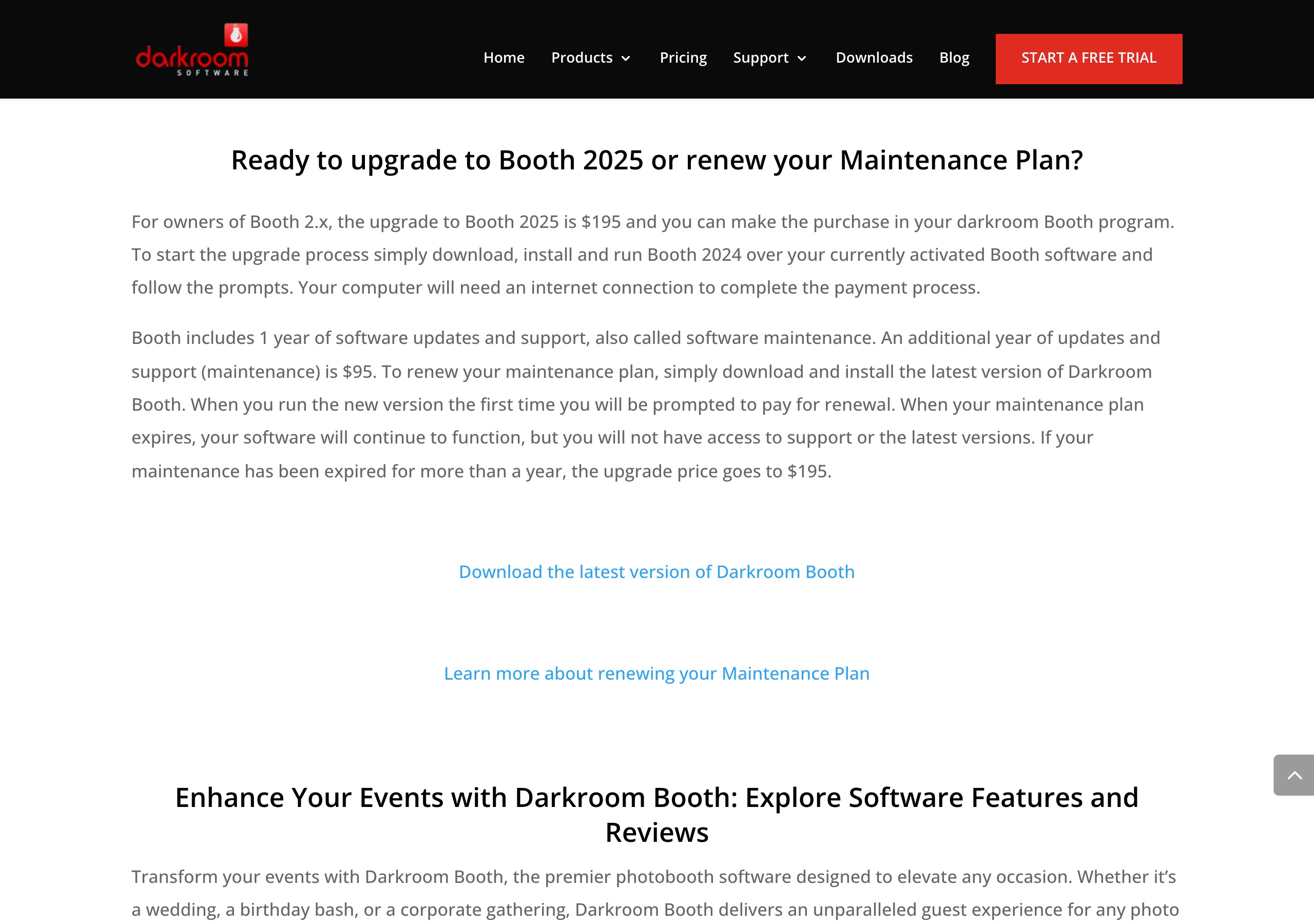
Weakness: Windows only, with no Mac and no native iPad booth. Their published feature list doesn’t mention AI effects. New-purchase pricing isn’t shown on the public site — the published figures are the upgrade and maintenance prices — so you have to ask. The 10-day licence is a paid temporary code for existing owners, not a free trial.
Best for: Windows operators running permanent installs, coin-op, or 360 who prefer to own the software outright.
Photo Booth Software Comparison Table
Competitor pricing as of publish date — verify current pricing on vendor sites. All figures verified 14 September 2026.
| Feature | Pictor | Snappic | dslrBooth | LumaBooth | Simple Booth | Booth.events | Touchpix | Activation King | BoothLedger | Sparkbooth | Darkroom Booth |
|---|---|---|---|---|---|---|---|---|---|---|---|
| Entry price | $49/mo | $69/mo | $17/mo annual ($49.99 monthly) | $18/mo annual ($19.99 monthly) | $49/mo ($15/wk Lite) | $49/mo | $36.66/mo annual | $49/mo promo ($69 list) | $13/mo | $149 one-time | $195 upgrade + $95/yr |
| iOS native | Yes | Yes | No | Yes | Yes (iPad only) | Yes | Yes | Yes | No | No | Control only |
| Android native | Yes | No | No | Yes (since Aug 2026) | No | No | Yes | Yes | No | No | No |
| Windows | Virtual Booth in browser | No | Yes | No | No | No | Yes | Yes | Yes | Yes | Yes |
| Mac | Virtual Booth in browser | Apple Silicon | No | Yes | No | Dashboard only | Yes | Yes | No | Yes | No |
| DSLR tethering | Pro and up ($99) | Starter and up | Yes | Yes | No (post-processing only) | Yes | Yes | Not documented | Canon only | DSLR licence ($189) | Yes |
| Lowest tier with AI | Basic $49 | Business $189 | All plans | All plans | All plans | All plans | All plans | Mid tier $79 promo | AI plan $38 | Included in licence | Not offered |
| Cost per AI image | $0.07–$0.40 (1–2 tokens) | $0.10–$0.60 | $0.10 per portrait | $0.10 per portrait | $0.10–$0.30 | $0.08–$0.32 | $0.068–$0.12 | $0.15–$0.60 | Not published | Not published | N/A |
| AI video | Premium | No | No | No | No | No | Not documented | Yes | No | No | No |
| 360 / mirror | No | Yes / Yes | No / Yes | No / Yes | No / No | No / No | Yes / Yes | No / No | No / Yes | No / Yes | Yes / No |
| Virtual Booth | Premium, no per-event fee | $25/event add-on | No | No | Yes | Yes | Yes | No | No | No | No |
| Phone support | Every plan | Higher tiers | Yes | Pro+ only | Yes | With maintenance | |||||
| Free trial | 25 free tokens | Per-event pass $29 | Yes | Yes | Yes | Yes | Weekly pass $20.89 | 14 days | 30 days | 30 days | Paid 10-day code |
| Best for | Mixed iOS + Android with AI | 360 and specialty rigs | Windows DSLR | Apple DSLR | Turnkey iPad package | High AI volume on iPad | Every platform, one licence | AI variety, multi-platform | Cheapest AI subscription | Buy once, no subscription | Windows perpetual + 360 |
Sources: vendor pricing, help-centre and feature pages, all read on 14 September 2026 — snappic.io, simplebooth.com, activationking.com, booth.events, dslrbooth.com (lumabooth.com now redirects there), touchpix.com, boothledger.com, sparkbooth.com, darkroombooth.com.
FAQ
What is the best photo booth software in 2026?
There isn’t one. For a mixed iOS and Android fleet that needs AI from the first tier, Pictor at $49/mo is the pick (DSLR tethering starts on Pro at $99/mo). For 360 and mirror rigs, Snappic. For a Windows-only DSLR booth, dslrBooth at $17/mo on annual billing. For the lowest monthly cost with AI attached, BoothLedger at $13/mo. Match the software to the booth you actually own.
What is the cheapest photo booth software?
BoothLedger at $13/mo is the cheapest subscription, and Sparkbooth at $149 one-time is the cheapest over any period longer than about a year. Among full-featured subscriptions, dslrBooth is $17/mo and LumaBooth $18/mo on annual billing, Touchpix is $36.66/mo annually, and Pictor, Simple Booth and Booth.events all start at $49/mo.
Which photo booth software has the cheapest AI?
Touchpix, at US$0.068–$0.12 per AI Pro image, with AI included on every plan. Booth.events is next at $0.08–$0.32 per generated image ($8 per 100 credits). Pictor runs $0.10–$0.20 per AI image at the 2,000-token pack, dropping to $0.07 per token at the 20,000 pack. Snappic is $0.10–$0.60 per image and requires the $189/mo Business plan before AI is available at all.
Does Pictor support DSLR cameras?
Yes, on Pro ($99/mo) and Premium ($149/mo), not Basic. Snappic includes DSLR from its $69/mo Starter plan, so it is the cheaper way into DSLR between the two. Simple Booth supports Canon and Sony bodies, with Nikon listed as coming soon.
Does Pictor have a free trial?
Every new Pictor account gets 25 free tokens so you can run AI generations before paying for a token pack, and you can build and test events before you go live. Paid plans start at $49/mo, and annual billing saves about 17%.
Does Snappic work on Android?
No. Snappic runs on iPad, iPhone and Apple Silicon Macs only. If your fleet includes Android tablets, the options that actually run on them are Pictor, Touchpix, Activation King and, since August 2026, LumaBooth.
Does any photo booth software run on Windows and iPad from one licence?
Touchpix and Activation King do — both list Windows, Mac, iOS and Android. dslrBooth and LumaBooth are separate apps and separate subscriptions from the same company, so a mixed Windows and Apple fleet means paying twice. Pictor covers iOS and Android natively and Mac or PC through the browser Virtual Booth on Premium, not as a native desktop booth.
What does Snappic cost in 2026?
Snappic is $69/mo Starter, $189/mo Business, $279/mo Premium and $399/mo Scale, with per-event passes at $29, $79 and $109. AI-FX begins on the $189 Business plan, AI credits are $0.10 each at 1–6 credits per image, and Virtual Booth is a $25-per-event add-on.
What does Booth.events cost in 2026?
Booth.events is $49, $79 and $129 per month, or $1,299 per year. AI credits are $8 per 100. Phone support is limited to Pro+, and there is no Android app.
Does Pictor support 360 booths or mirror booths?
No. Pictor does not support 360 booths, mirror booths, roamers or GlamBot, and Virtual Booth is not a 360 equivalent. If you run a 360 rig, Snappic and Touchpix are the proven specialists, and Darkroom Booth is the Windows option.
Is a subscription or a one-time licence better for a photo booth?
One-time wins on pure cost if your feature needs are static: Sparkbooth DSLR at $189 pays for itself against an $18/mo subscription in about ten months. Subscriptions win when you need AI models that keep changing, cloud galleries, and support — the AI engines in this market were replaced twice in 2026, and a perpetual licence doesn’t get those.
What happens to unused AI credits?
It depends on the vendor, so check before you buy a large pack. Pictor tokens never expire and the cost of each action is shown before it runs. Snappic’s Virtual Booth credits are tied to a $25 event pass. Activation King and Booth.events sell credits in packs; confirm their expiry terms directly with them, because we could not verify an expiry policy either way on their published pages.
Why We’re Being Honest About Our Limits
Here is what we ship: native iOS and Android, DSLR tethering on Pro and Premium, emergency phone support on every plan, tokens that never expire at $0.20 down to $0.07, and browser Virtual Booth on Premium with no per-event fee.
And here is where we lose:
- No 360, mirror, roamer or GlamBot. Snappic and Touchpix own this. If your business is 360, they are the better buy and it isn’t close.
- No native Windows or Mac booth app. dslrBooth at $17/mo annual and Darkroom Booth run circles around a browser Virtual Booth for a full-time desktop DSLR workflow. Native desktop apps are on our roadmap, not shipping.
- We’re not the cheapest. BoothLedger is $13/mo and Sparkbooth is $189 once. If budget is the deciding factor, they win on the number.
- We’re not the cheapest AI either. Touchpix publishes $0.068–$0.12 per image and Booth.events $0.08. Our tokens beat them only at volume, and every AI action costs tokens, presets included. We don’t pretend otherwise.
- No hardware. Simple Booth HALO arrives as a booth, a light and software in one box. We sell software only.
- Android is still a small slice of this industry. Our platform parity is real, and it is worth nothing to an all-iPad operator.
We launched Phase 1 in May 2026 and we’re still filling gaps. Pick based on what your booth needs this season, not what any vendor might build.
Related Reading
- Pictor vs Snappic: pricing, AI costs and platforms
- Pictor vs Simple Booth: iPad bundle versus mixed fleet
- Pictor vs Activation King: AI credits compared
- Pictor vs Booth.events: which AI is actually cheaper
- Pictor vs dslrBooth: Windows DSLR versus mobile
- Pictor vs LumaBooth: now that both have Android
- Pictor vs Touchpix: platform coverage and AI pricing
Ready to Get Started?
Build and test for free, then pick a plan when you go live. Basic is $49/mo with AI presets and emergency phone support. Pro is $99/mo and adds DSLR tethering, the custom prompt editor, digital props and background removal. Premium is $149/mo and adds AI video and the browser Virtual Booth.
Questions? Call or email hello@pictor.pro, or start an account at app.pictor.pro/register.
Can’t wait to see what you make with Pictor.