Pictor vs LumaBooth: An Honest Comparison for Photo Booth Operators
Last updated · All claims sourced from both vendors’ public pages
Last updated 2026-09-14
Pictor vs LumaBooth: The Short Answer
Pick Pictor if you run mixed hardware and sell AI: iOS and Android apps, DSLR tethering from Pro at $99/mo, AI video on Premium, phone support on every plan, tokens that never expire. Pick LumaBooth if price decides it, or you need 360, mirror or glam booth. Biggest difference: LumaBooth is $18/mo annual for two devices with nothing gated; Pictor adds Android DSLR and AI video.
Key facts (verified 13 Sep 2026):
- $17/mo annual on LumaBooth for Windows, $18/mo annual for Apple and Android, two devices included; monthly is $49.99 and $19.99. Pictor is $49 / $99 / $149 a month, per device.
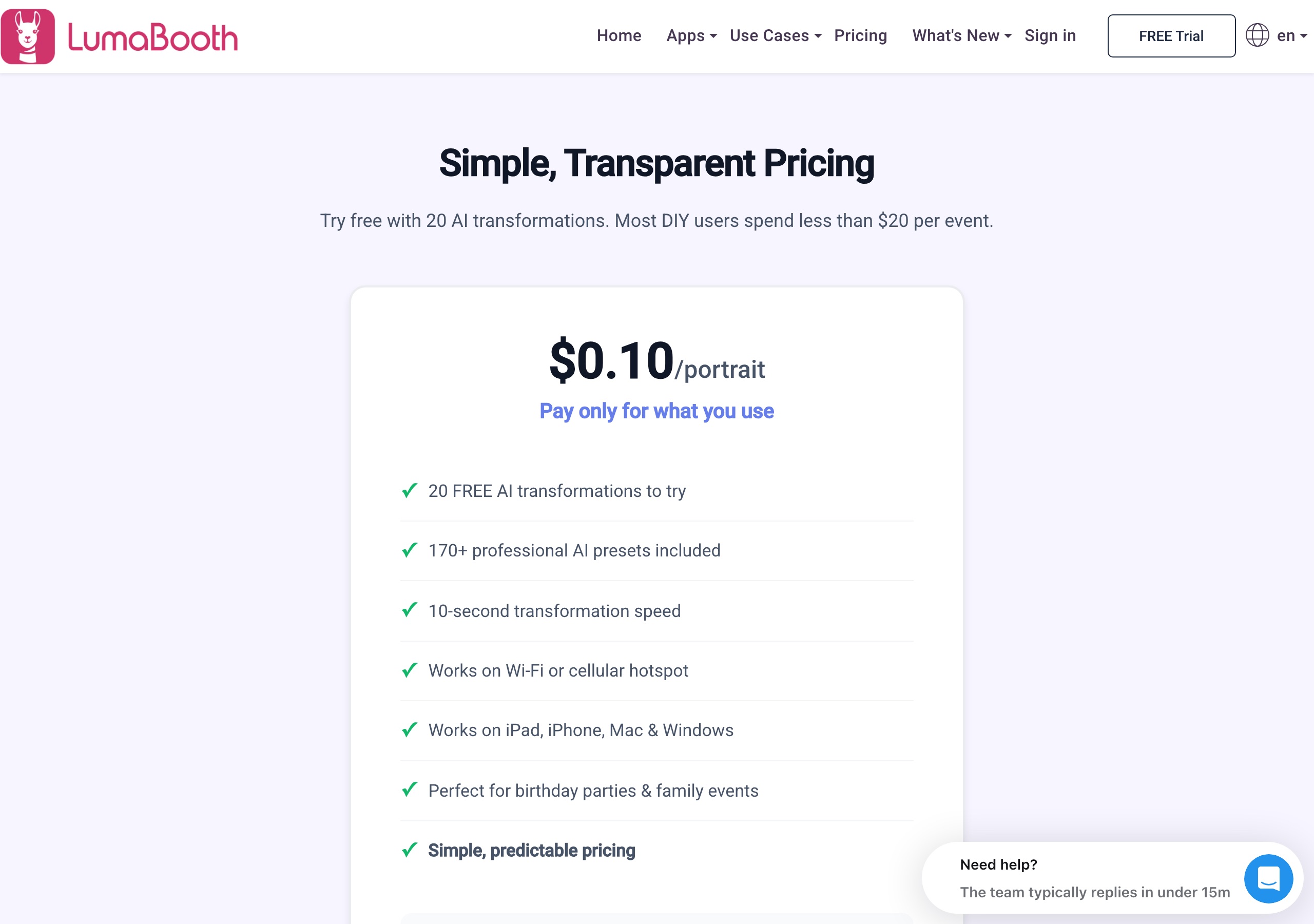
- $0.10 per AI portrait on LumaBooth, flat, 20 free to try. Pictor tokens run $0.20 to $0.07 each, 1–2 tokens per AI image, and never expire.
- DSLR tethering on Pictor Pro and Premium, iOS and Android; not on Basic. LumaBooth includes it on Windows and Apple at $17–$18/mo; LumaBooth for Android is built-in tablet and phone cameras only.
- AI video: Pictor Premium renders it at 5–15 tokens per 5-second clip. LumaBooth publishes no AI video product.
- Emergency phone support on every Pictor plan. LumaBooth publishes no phone support on any plan.
- 360, mirror booth, glam booth, roaming mode and video guest book: LumaBooth has them, Pictor does not.
Quick Verdict
Choose Pictor if: You run mixed hardware and want one AI platform across it — DSLR tethering from iOS and Android on Pro and Premium (camera compatibility), a browser Virtual Booth on Mac and Windows with Premium, AI video as well as AI stills, emergency phone support on every plan, and tokens that never expire. Pictor is the more expensive subscription, and we’re not going to pretend otherwise.
Choose LumaBooth if: You want the lowest subscription price in this category ($17/mo annual on Windows, $18/mo annual for Apple and Android, two devices included in each), you need a 360 booth, mirror booth, glam booth, roaming mode or a video guest book, you want every feature on every plan with no tier to upgrade to, or you print direct over USB to a dye-sub printer from an iPad or Mac.
Everything on this page was re-verified against dslrbooth.com on 13 September 2026. Where we quote their prices we show a screenshot of their page taken that day, so you don’t have to take our word for it.
Is Pictor cheaper than LumaBooth?
No. LumaBooth is cheaper on subscription, and it isn’t close: $216 a year covers two devices with every feature unlocked, against $49/mo for one Pictor Basic licence. The gap closes on AI volume, where the two converge at $0.10 an image and Pictor goes lower in bulk.
| Item | Pictor | LumaBooth for Windows (dslrBooth) | LumaBooth for Apple & Android |
|---|---|---|---|
| Subscription | $49 Basic · $99 Pro (Most Popular) · $149 Premium, per month. Enterprise is a custom add-on from $1,500/yr, not a self-serve tier (full pricing) | $49.99/mo monthly, or $17/mo billed annually (their page says “Save 67%”) | $19.99/mo monthly, or $18/mo billed annually (“Save 17%”) |
| Annual discount | ~17% off month-to-month | 67% off ($204/yr vs $599.88 at the monthly rate) | 17% off ($216/yr vs $239.88 at the monthly rate) |
| What one subscription covers | Per active device and tier; Basic, Pro and Premium licences can be mixed on one account | First two computers included; Windows is billed separately from the Apple/Android subscription | First two devices included, in any mix of iPad, iPhone, Mac and Android |
| Feature tiers | Yes — DSLR from Pro; AI Video and Virtual Booth are Premium | None. Their compare page: “Every app feature is on every plan” | None |
| Trial | Free to build and test, 25 free tokens; paid plan required for live events | Free trial via download; their compare page says it is unlimited and watermarks your photos | Same — free trial via download, watermarked output |
| AI billing | Tokens: $0.20 down to $0.07 each by bundle; 1–2 per AI image, 1 per background removal, 5–15 per 5-second AI video. Tokens never expire, cost shown before each run | $0.10 per AI portrait, flat, with 20 free transformations to try | Same $0.10 per portrait on Apple. AI Portraits are not listed for Android |
| Add-on apps | None — tokens are the only usage cost | HashPrinter $25/mo (Windows + Mac); Booth CoPilot remote control free; fotoShare Cloud basic included | LumaShare sharing station $7.99/mo (iPad, iPhone, Mac, Android); fotoShare Cloud basic included, Business $39.99/mo |
| Guest payments | Pictor Paywall: not on Basic · Pro 10% · Premium 5% · Enterprise 2% | Cashless pay-per-print / pay-per-download; their compare page states 5% per charge, 41 countries | Not listed — their cashless payments page names LumaBooth for Windows only |
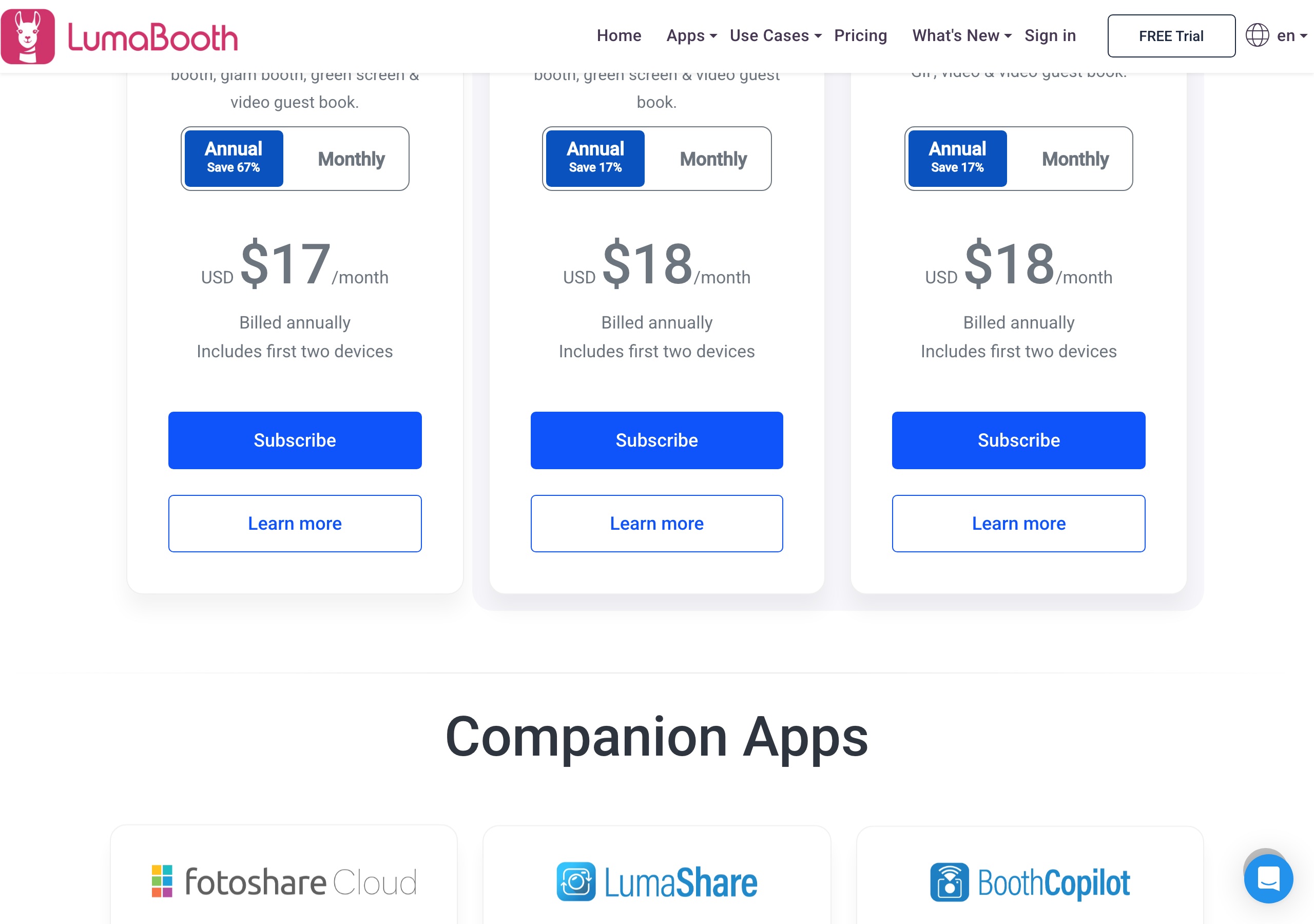
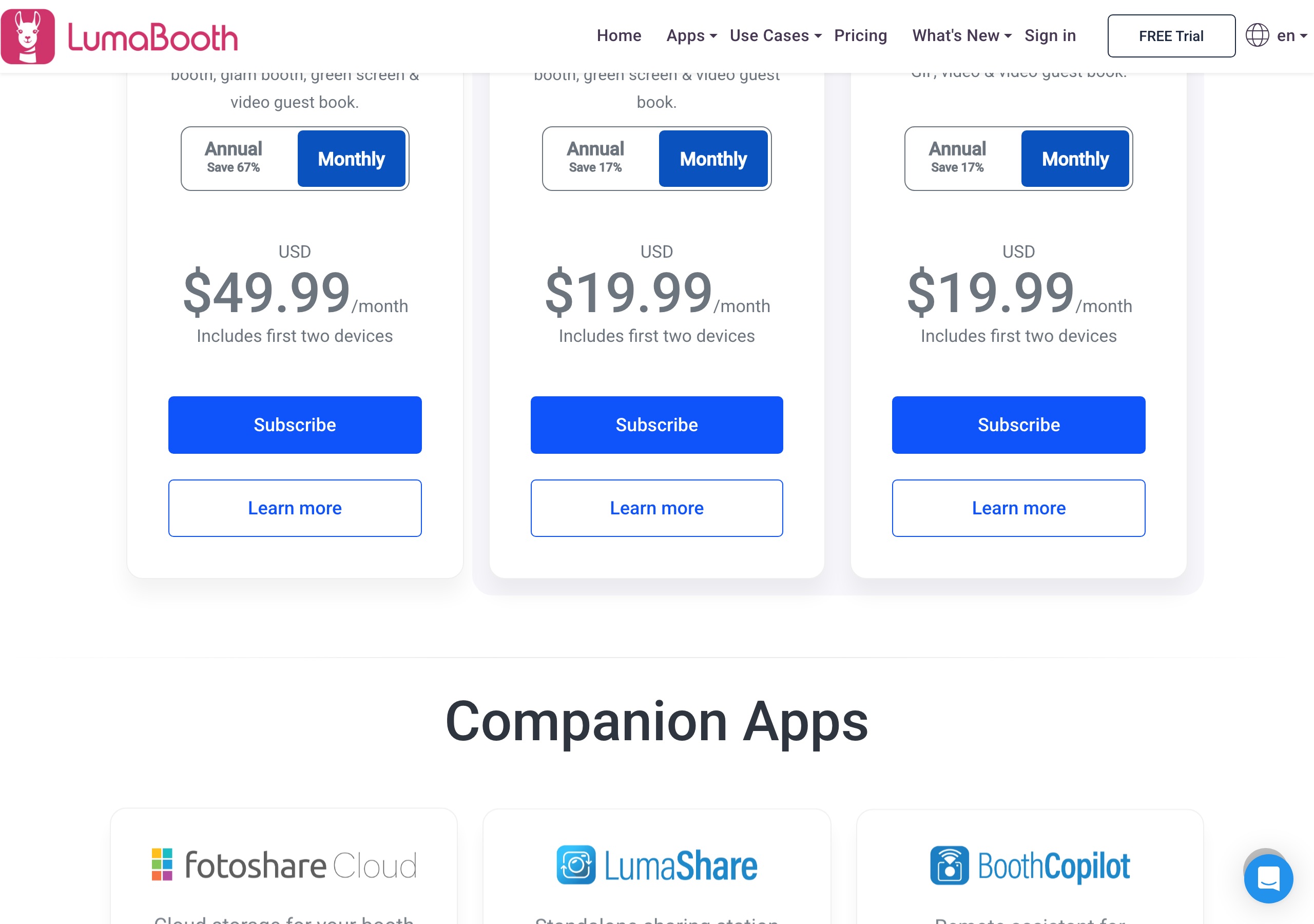
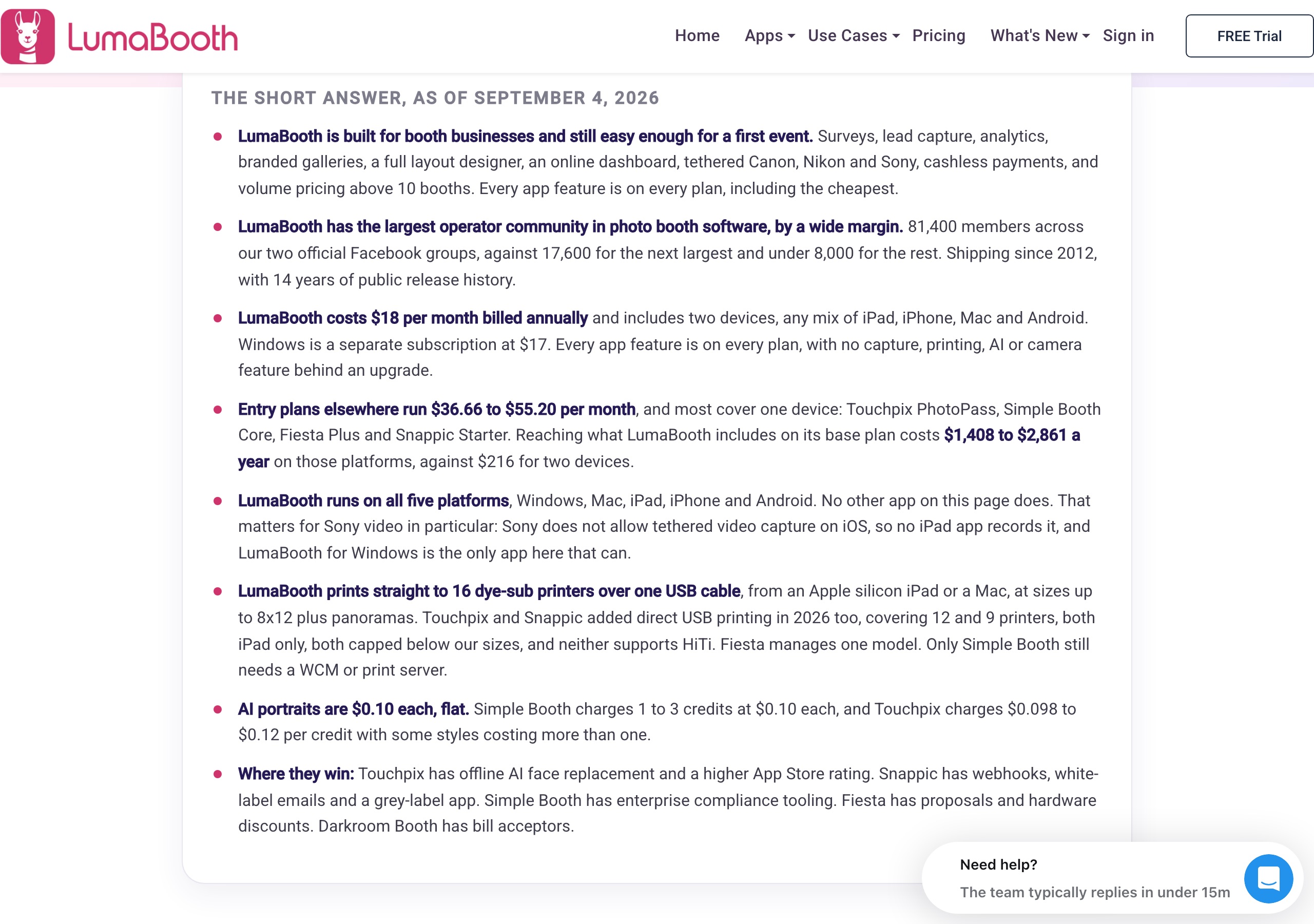
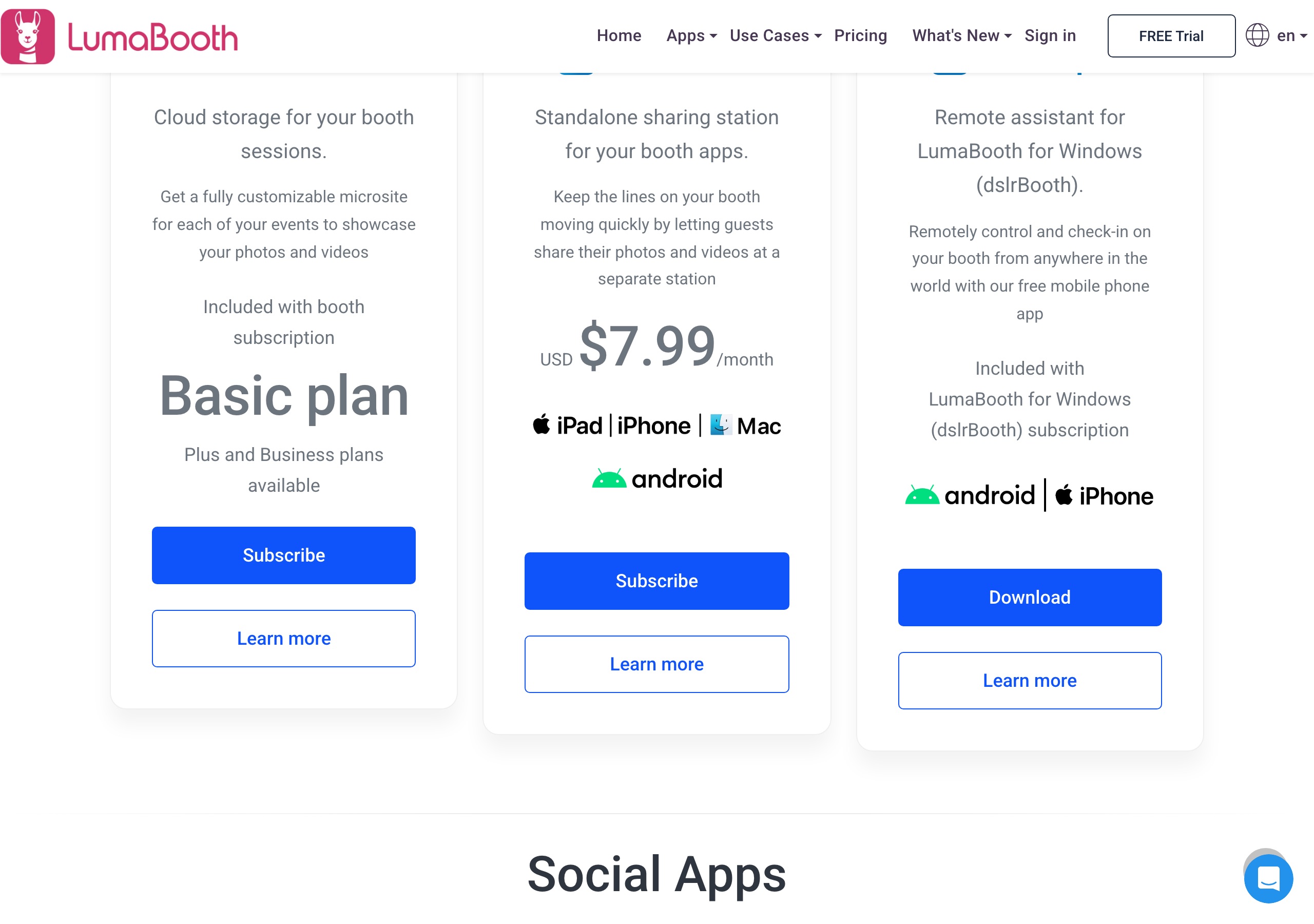
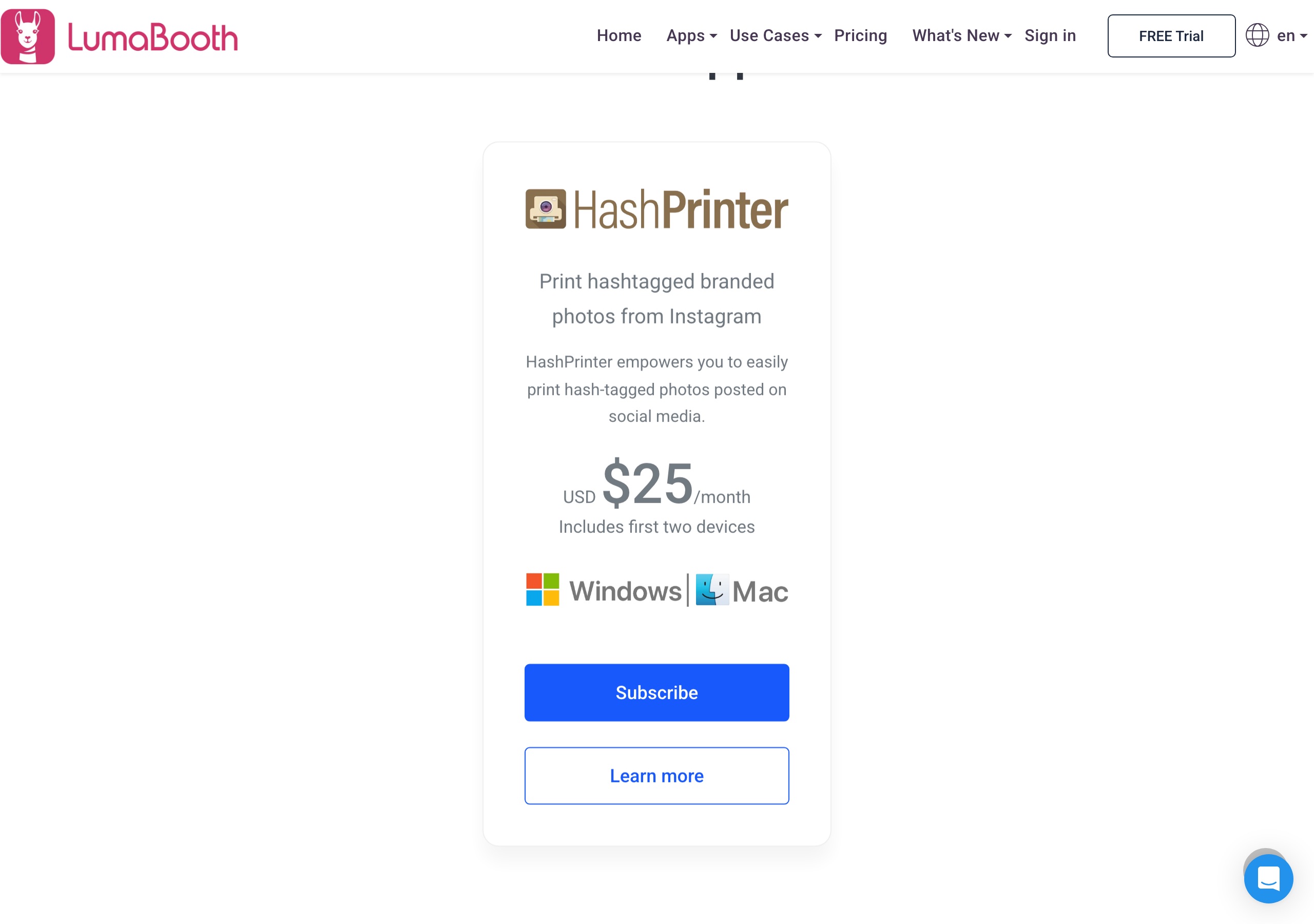
Sources: LumaBooth prices from dslrbooth.com/pricing and /compare (verified 2026-09-16, screenshots above); Pictor pricing from pictor.pro/pricing and /ai-pricing (verified 2026-09-14). Competitor pricing as of publish date — verify current pricing on vendor sites.
Pictor’s honest note: On subscription price LumaBooth wins. What the difference buys on our side is DSLR from an Android device (Pro and up), AI video, the Virtual Booth on Mac and PC, and a phone number answered on a Saturday night.
Which has cheaper AI, Pictor or LumaBooth?
It depends on volume, and the crossover is $0.10 per image. LumaBooth charges a flat $0.10 per AI portrait. Pictor charges tokens: 1–2 per image, at $0.20 each on the smallest bundle, $0.10 on the popular 2,000-token bundle and $0.07 at 20,000. Below that bundle we cost more per image; at and above it we match or beat them.
LumaBooth AI: AI Portraits arrived 18 March 2026 with 170+ presets, and a custom prompt editor (Subject + Scene + Style, with an optional logo, reference image and guest questions) has shipped since, with no tier gate. Their page states about 10 seconds for a preset and around 30 seconds for a custom prompt, and lists AI Portraits for iPad, iPhone, Mac and Windows PC — not Android. LumaBooth publishes no AI video product; its video, GIF, boomerang and 360 capture are standard capture, not AI generation.
Pictor AI: Every AI action costs tokens, including preset generations, and the cost is shown before each run. Basic $49 includes AI Presets and the AI Library; Pro $99 adds the Custom Prompt Editor, Digital Props and Background Removal; Premium $149 adds AI Video. Bundles run 100/$20 ($0.20 each) through 2,000/$200 ($0.10, our most popular) to 20,000/$1,400 ($0.07). Tokens never expire, and signup includes 25 free tokens — the full table is on our AI pricing page.
Where each one wins: LumaBooth gates nothing by tier, so their custom prompt editor sits on the $18 plan while ours needs Pro. Pictor renders AI video, which they don’t sell at any price, and our tokens don’t expire, so a slow January costs nothing and a busy October draws down a bundle bought at $0.07.
Fact check: LumaBooth’s “Why Competitors Can’t Compete” table
LumaBooth’s AI Portraits page carries a table headed “Why Competitors Can’t Compete” that puts competitor pricing at “$200-500/month” and competitor preset libraries at “10-20 random presets”. We checked that against published numbers, including their own.
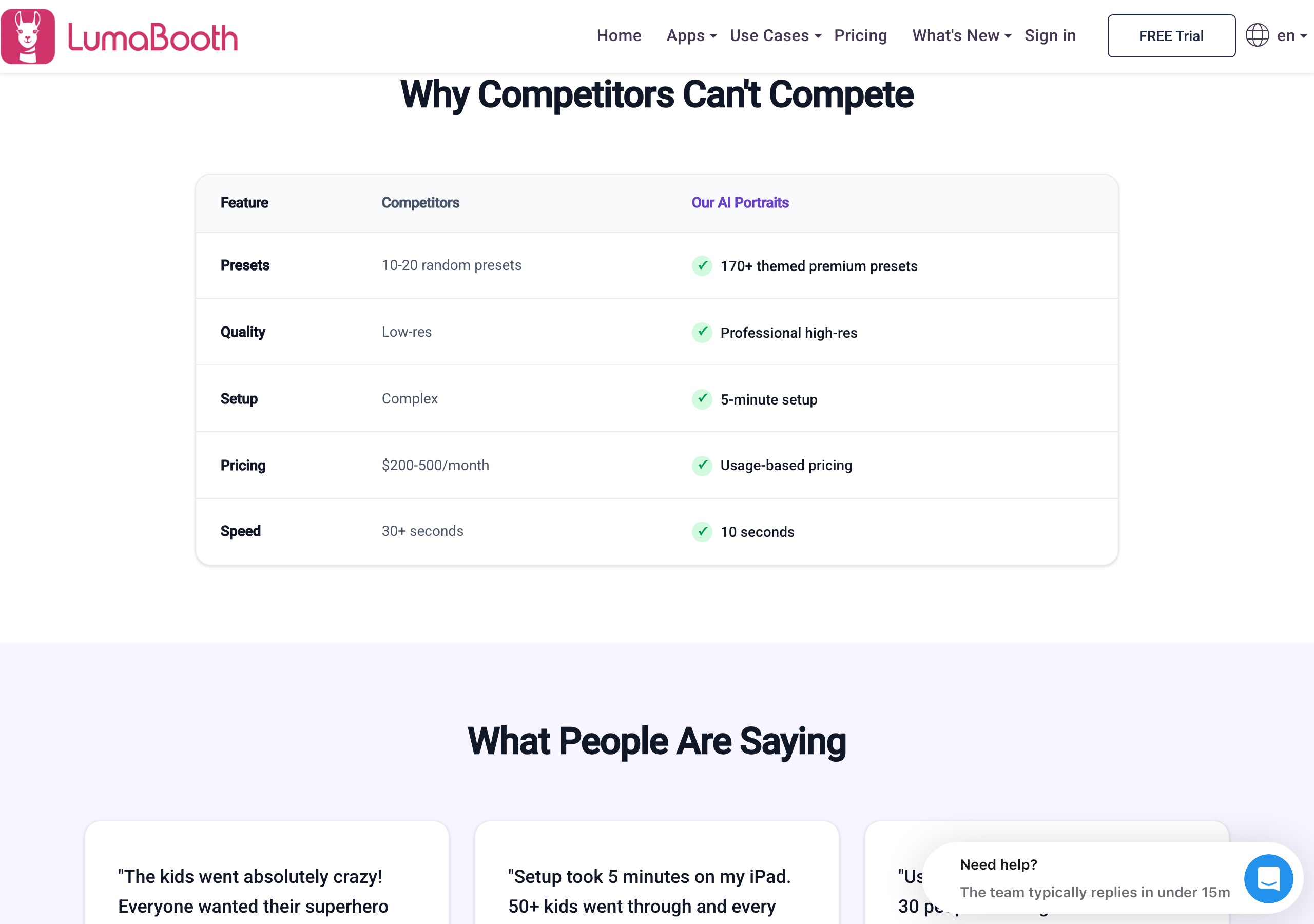
The published numbers don’t support the $200–500/month range as a description of this category. Pictor publishes $49, $99 and $149 a month. LumaBooth’s own comparison page, dated 4 September 2026, puts rival entry plans at $36.66 to $55.20 a month and feature-matched tiers at $1,408 to $2,861 a year — about $117 to $238 a month at the top, well under $200 at the bottom. Two pages on the same site describe the same market with different numbers; the comparison page is the one with sources attached. (We track their Snappic figure too, on our Pictor vs Snappic page.)
The preset row is fair on volume: 170+ published presets is more than we ship in our AI Library. Both platforms also let you write your own prompt, so preset count isn’t the ceiling on either one.
What platforms do Pictor and LumaBooth run on?
Pictor ships native iOS and Android apps on every tier, plus a browser-based Virtual Booth for Mac and Windows on Premium. LumaBooth ships five native builds — Windows, Mac, iPad, iPhone and Android — but only Pictor drives a professional camera from Android.
| Capability | Pictor | LumaBooth for Windows (dslrBooth) | LumaBooth for Apple | LumaBooth for Android |
|---|---|---|---|---|
| Native iOS app | Yes, all tiers | N/A | Yes (iPad, iPhone) | N/A |
| Native Android app | Yes, all tiers | N/A | N/A | Yes — full booth app, shipped 12 August 2026 |
| Native Windows app | On our roadmap | Yes — the original dslrBooth, rebuilt touch-first for v8 | N/A | N/A |
| Native Mac app | On our roadmap | N/A | Yes | N/A |
| Browser booth on Mac/PC | Virtual Booth (Premium and Enterprise only) | No — native app; the browser dashboard configures booths but doesn’t run one | No — native app | No |
| Professional cameras (Canon, Nikon, Sony) | DSLR and mirrorless tethering on Pro and Premium; not on Basic | Yes — Canon, Nikon, Sony, GoPro, webcam | Yes — Canon, Nikon, Sony, webcam, plus built-in cameras | No — built-in tablet and phone cameras only |
| 360 booth | Not supported | Yes | Yes | Yes (360 / slow-mo) |
| Mirror booth | Not supported | Yes | Yes (their mirror booth page lists it; the Apple pricing card doesn’t name it) | Not listed |
| Glam booth / beauty filter | Not supported | Yes | Yes | Not listed |
| Roaming photographer mode | Not supported | Yes (shipped 2025) | Yes | Not listed |
| Green screen / background replacement | Background Removal on Pro and Premium, 1 token per removal | Yes, included | Yes, included | Not listed |
| AI stills | Presets on Basic; Custom Prompt Editor on Pro and Premium; tokens per action | 170+ presets plus custom prompts, $0.10 per portrait | Same, $0.10 per portrait | Not listed on their AI Portraits page |
| AI video | Premium, 5–15 tokens per 5-second render | Not offered | Not offered | Not offered |
| Video guest book | Not supported | Yes | Yes | Yes |
Sources: Pictor BRAND-FACTS (2026-09-14); LumaBooth per dslrbooth.com/pricing, /compare, /ai-portraits, /360, /mirrorbooth, /glambooth and /roaming_photography (all verified 2026-09-16).
What does Pictor do that LumaBooth doesn’t?
Five things, and they are what the extra money buys.
- DSLR tethering from an Android device: LumaBooth for Android runs on built-in cameras only. Pictor Pro and Premium drive a DSLR or mirrorless body from iOS or Android; Basic does not tether.
- AI video: Pictor Premium renders AI video at 5–15 tokens per 5-second clip. LumaBooth’s video, GIF, boomerang and 360 are standard capture; they publish no AI video product.
- Emergency phone support on every plan: Basic, Pro and Premium all include it — see how emergency support works. LumaBooth publishes a help centre, an email address and two Facebook groups, and no phone support on any plan.
- A browser-based Virtual Booth: with Premium, a Mac or Windows PC runs a booth in a browser with nothing to install. One live Virtual Booth per licence, no per-event fee.
- Mix tiers on one account: Basic, Pro and Premium licences can sit side by side, so a backup device doesn’t have to carry a full-price plan.
Pictor is built and used by OutSnapped at real events every weekend, which is why the phone number exists.
What does LumaBooth do that Pictor doesn’t?
More than the list above, and we’re not burying it.
- Price: $17/mo annual on Windows and $18/mo annual for Apple and Android, each including two devices. Our cheapest plan is $49/mo for one device.
- Two devices in one subscription: and on the Apple/Android plan those two can be any mix of iPad, iPhone, Mac and Android.
- No feature tiers: printing, DSLR, 360, green screen, surveys, lead capture and the custom AI prompt editor are all on the cheapest plan. We gate DSLR tethering to Pro, and AI Video and the Virtual Booth to Premium.
- 360 booth on all five platforms, with 120/240 fps capture, speed ramps, overlays and soundtracks. Pictor does not support 360, and the Virtual Booth is not a 360 equivalent.
- Mirror booth with video and audio prompts, on-screen signing and stickers; glam booth with a real-time beauty filter; roaming photographer mode (shipped 2025); and a video guest book on every platform.
- Native Windows and Mac apps — the Windows detail is on our Pictor vs dslrBooth page. Ours is a browser Virtual Booth on Premium; native desktop apps are on our roadmap.
- Direct USB printing: their compare page claims 16 dye-sub printers from an Apple-silicon iPad or a Mac, up to 8×12 plus panoramas.
- Cashless guest payments on Windows: pay-per-print or pay-per-download, no extra hardware, 5% per charge across 41 countries per their compare page.
- 820+ matched design sets included, each with ten print layouts, a welcome screen and overlays.
- A multi-app ecosystem: LumaShare ($7.99/mo), Booth CoPilot (free), HashPrinter ($25/mo), fotoShare Cloud (basic included, Business $39.99/mo).
- Community scale: they publish 81,400 members across their two official Facebook groups. Ours is far smaller.
What does a real month cost on each?
Scenario: 8 events a month, shooting on an iPad with an iPhone as backup, roughly 200 AI generations a month, no 360 and no mirror booth.
Pictor (Pro + Basic, no AI video):
- Pro (iPad) $99/mo — DSLR, Custom Prompt Editor, Digital Props, Background Removal
- Basic (iPhone backup) $49/mo — AI Presets and Library
- ~200 tokens/month ≈ $30 at the 500-token rate ($0.15); $20 if you buy the 2,000-token bundle up front at $0.10, with the balance carrying forward
- Monthly total: roughly $178
LumaBooth (Apple, same scenario):
- One LumaBooth for Apple subscription covers both devices: $18/mo billed annually ($216/yr)
- 200 AI portraits at $0.10 = $20/mo
- LumaShare sharing station, optional: +$7.99/mo
- Monthly total: $38, or $46 with LumaShare
Honest caveat: That is a four-to-one gap and it is real. It widens if you add devices, because LumaBooth includes two per subscription and we license per device. It narrows if you need what our higher tiers carry — AI video is Premium at $149, with no LumaBooth equivalent at any price — and past 2,000 tokens we are the cheaper of the two per image. Run the numbers on your last four events before you decide.
Which has better support when a booth goes down mid-event?
Pictor, on the one channel that matters mid-event: every plan includes emergency phone support. LumaBooth is stronger on everything asynchronous — a bigger help centre, a public status page and 81,400 operators in two Facebook groups.
| Support channel | Pictor | LumaBooth |
|---|---|---|
| Phone support during live events | Emergency phone support on every plan, including Basic | None published on any plan |
| Email support | support@pictor.pro | support@lumasoft.co, published on their compare page and in their site footer |
| Help centre | support.pictor.pro | support.lumasoft.co — 140 Windows articles, 57 Apple, 7 Android, plus LumaShare, Dashboard, hashPrinter and fotoShare |
| Community | Facebook Group (facebook.com/groups/396441729399619) | Two official Facebook groups (Windows and Apple); they publish a combined 81,400 members |
| Status page | Not published | status.dslrbooth.com |
Source: dslrbooth.com/compare, support.lumasoft.co and the dslrbooth.com footer, verified 2026-09-16.
The bottom line
LumaBooth is cheap, flat-priced, feature-complete on its only plan, and runs on five platforms. Pictor is tiered and more expensive, and buys you DSLR from Android (Pro and up), AI video, a browser Virtual Booth on Mac and PC, non-expiring tokens and phone support on every plan. If your clients want 360 spins, a mirror booth or a glam filter, LumaBooth has them today and we don’t. If you run mixed hardware, sell AI, and want someone to pick up the phone, Pictor is the pick — the same case we make against the rest of the field in our best photo booth software guide for 2026.
Both work. Try the free trials, and see which team responds faster when you have a question. The operator matters more than the tool.
— Eve
FAQ
Is Pictor cheaper than LumaBooth?
No, not on subscription. LumaBooth is $17/mo billed annually on Windows and $18/mo for Apple and Android, each including two devices with every feature unlocked; Pictor starts at $49/mo for one Basic device licence. On AI the two converge: LumaBooth is a flat $0.10 per portrait, and a single-token Pictor image is $0.10 at our 2,000-token bundle and $0.07 at 20,000.
What does LumaBooth’s AI cost per image in 2026?
$0.10 per AI portrait, flat, with 20 free transformations to try, verified on dslrbooth.com/ai-portraits on 13 September 2026. There is no tier gate: the 170+ presets and the custom prompt editor sit on the same $17–$18/mo plan. They publish no AI video product.
What is LumaBooth pricing in 2026?
Three subscriptions. LumaBooth for Windows (dslrBooth) is $49.99/mo or $17/mo billed annually. LumaBooth for Apple and Android are $19.99/mo or $18/mo billed annually, on one subscription covering two devices in any mix of iPad, iPhone, Mac and Android; Windows is billed separately. Add-ons: LumaShare $7.99/mo, HashPrinter $25/mo, fotoShare Business $39.99/mo.
Does LumaBooth support Android and Windows?
Yes to both. LumaBooth for Android shipped 12 August 2026 as a full booth app — photo, GIF, video, 360/slow-mo and video guest book — at $18/mo billed annually. It runs on built-in cameras only, with no DSLR support, and their pages don’t list AI Portraits, glam booth or mirror booth for Android. LumaBooth for Windows is the original dslrBooth, shipping since 2012 and rebuilt touch-first for version 8.
Does Pictor support DSLR cameras?
Yes, on Pro ($99/mo) and Premium ($149/mo), not Basic, tethering DSLR and mirrorless bodies from both iOS and Android. That is the one place LumaBooth’s Android app can’t follow: it uses built-in cameras only.
Which is better for AI photo booths, Pictor or LumaBooth?
Pictor, if you sell AI as part of the package: it renders AI video (5–15 tokens per 5-second clip) as well as stills, prices bulk AI down to $0.07 an image, and the tokens never expire. LumaBooth is better for AI stills at low volume: the widest preset library at a flat $0.10, custom prompts included on the cheapest plan.
Does Pictor have a free trial?
Yes. Build and test free for as long as you need, with 25 free tokens on signup; a paid plan is required for live events. LumaBooth’s trial is a free download their compare page describes as unlimited with watermarked photos, plus 20 free AI transformations.
Can I run Pictor on a Windows PC or a Mac?
Yes, through the browser Virtual Booth on Premium and Enterprise — one live Virtual Booth per licence, no per-event fee, nothing to install. Native Mac and Windows apps are on our roadmap. If you need a native Windows booth today, LumaBooth for Windows is the mature choice.
Does LumaBooth do 360, mirror booth or a video guest book?
Yes to all three, and Pictor does none of them. 360 runs on Windows, Apple and Android with 120/240 fps capture and speed ramps; mirror booth and glam booth run on Windows and Apple; the video guest book runs on every platform. If a client has booked a 360 spin, LumaBooth is the software for that job.