Pictor vs Snappic: An Honest Comparison for Photo Booth Operators
A side-by-side look at Pictor and Snappic photo booth software — pricing, AI costs, platform support, and which one fits your events. Built by a booth operator, for booth operators.
Last updated · All claims sourced from both vendors’ public pages
If you’re shopping for photo booth software right now, you may have read a Snappic comparison page that described Pictor as “limited” and “unpredictable.” Snappic has since taken that page down. We’re keeping the record here because those claims were wrong when they were published, and the fix is simple: put the facts side by side and let you decide.
Pictor vs Snappic: The Short Answer
Pick Pictor if you run mixed hardware and want AI from your first plan: native iOS and Android apps, AI presets from $49/mo, and emergency phone support on every plan. Pick Snappic if 360 booths, mirror booths, Glambots or roaming photographers are your core offering. The biggest difference is the AI gate — $49/mo on Pictor, $189/mo on Snappic.
Key facts (verified 13 September 2026)
- $49/mo vs $189/mo — cheapest plan on each platform that turns AI on. Snappic’s help centre says AI-FX “is not available on Starter… and cannot be added as an add-on.”
- $0.10–$0.60 per AI image on Snappic (credits are $0.10 each; an image consumes 1–6) versus 1–2 tokens on Pictor, or about $0.10–$0.20 at the popular 2,000-token bundle.
- Snappic’s AI-FX credits are $0.10 at every bundle size, from 200 for $20 up to 4,000 for $400. Pictor tokens fall from $0.20 to $0.07 as you buy more, and never expire.
- Android: Pictor has a native Android app. Snappic’s supported-device list is iPad Air 2 and later, iPhone 7 and later, and Apple Silicon Macs — no Android.
- Virtual Booth: included with Pictor Premium ($149/mo) with no per-event fee; a $25-per-event add-on on Snappic Business and above, and Snappic’s help centre notes “Virtual Booth does not support AI-FX.”
- Snappic wins on booth types: 360, mirror booth, Glam Robot Arm and roaming photographer modes on Business ($189) and above. Pictor does not offer any of them.
Quick Verdict
Choose Pictor if you want AI presets from your first $49/mo plan, native iOS and Android booth apps, a browser-based Virtual Booth on Mac and Windows with Premium and no per-event fee, and emergency phone support on every plan. Every AI action costs tokens, at the cost shown before you run it, and tokens never expire.
Choose Snappic if you run 360 booths, mirror booths, Glambots or roaming photographers and need them wired into your software today, or you want a one-off per-event pass instead of a subscription. Snappic supports more booth types than Pictor does.
We’d rather you trust the numbers than the marketing. Ours are on our pricing page and our AI pricing page; theirs are screenshotted below.
Everything on this page was re-verified against snappic.com on 13 September 2026 and re-checked on 14 September 2026. Where we quote their prices we show a screenshot of their page taken that day, so you don’t have to take our word for it.
Is Pictor cheaper than Snappic?
Yes, at every comparable tier. Pictor Basic is $49/mo against Snappic Starter at $69/mo, Pictor Pro is $99/mo against Snappic Business at $189/mo, and Pictor Premium is $149/mo against Snappic Premium at $279/mo. The one place Snappic is cheaper is a single occasional gig: their per-event pass starts at $29, and we don’t offer one.
| Item | Pictor | Snappic |
|---|---|---|
| Lowest paid plan | $49/mo (Basic) | $69/mo (Starter, formerly Pro) |
| Mid plan | $99/mo (Pro, “Most Popular”) | $189/mo (Business, formerly Enterprise) |
| High plan | $149/mo (Premium) | $279/mo (Premium, marked “Most Value”) |
| Enterprise / agency plan | Enterprise white-label add-on from $1,500/yr (not a self-serve tier) | Scale, $399/mo (formerly Enterprise Plus) |
| Annual discount | ~17% off monthly | “Save 20%” on the annual tab |
| Per-event option | Not offered | Yes — $29 Starter, $79 Business, $109 Premium per event (no per-event Scale) |
| Extra booth licence | Add licences; Basic, Pro and Premium licences can be mixed on one account | $39 on Starter, $109 on Business, $119 on Premium, N/A on Scale |
| Free trial | 25 free tokens on signup; build and test free, paid plan for live events | 14-day free trial, no credit card required |
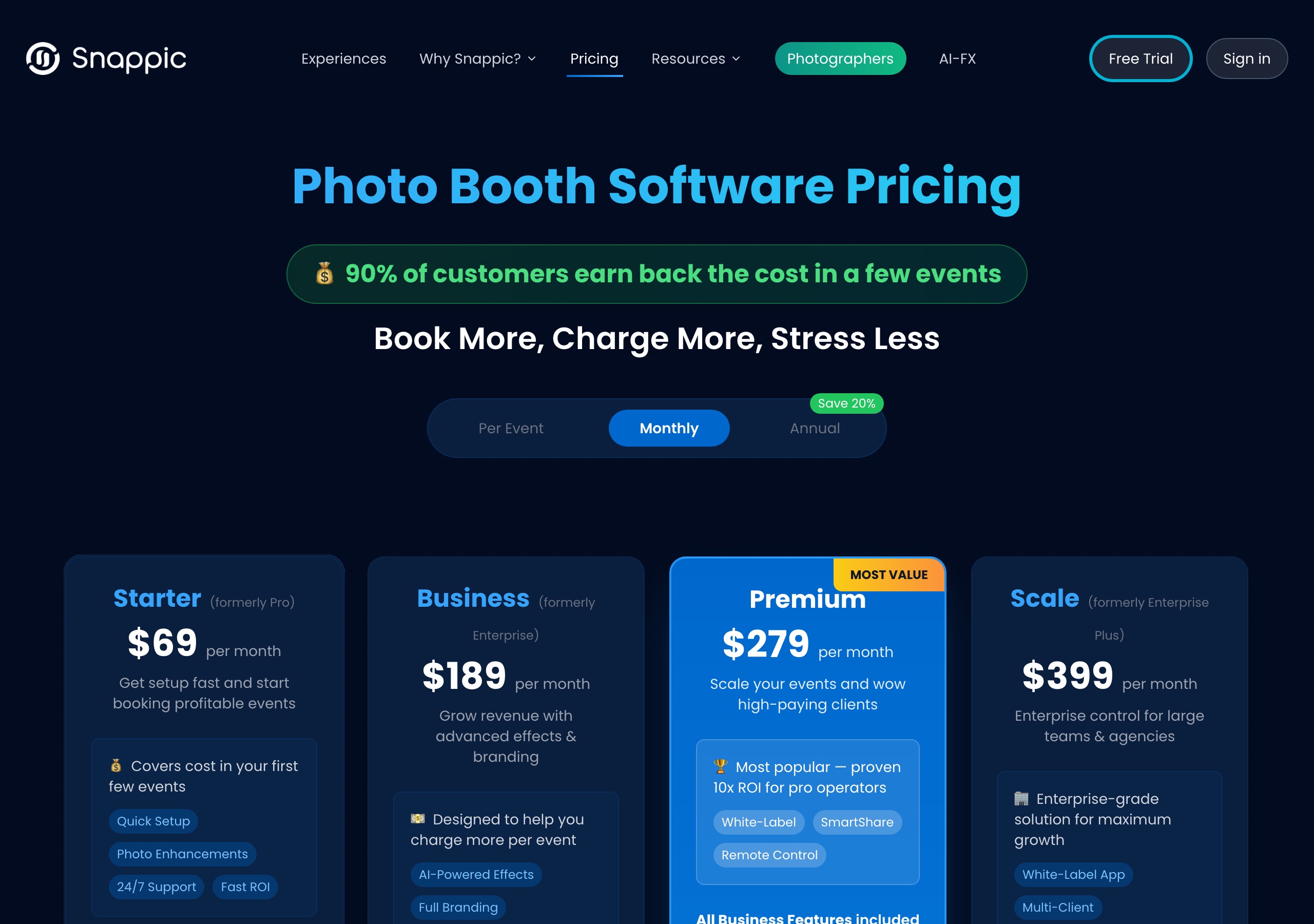
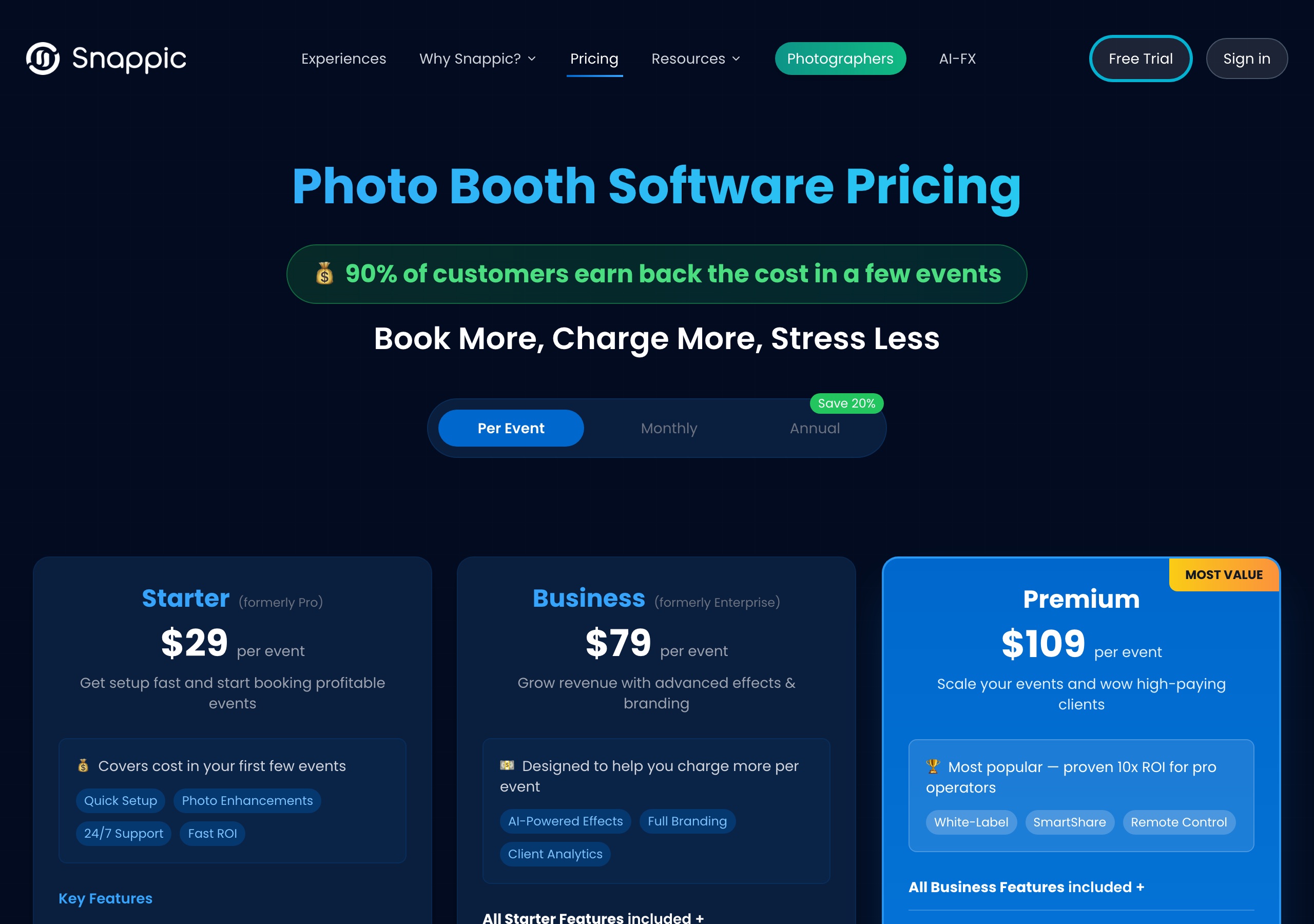
Sources: Pictor pricing from pictor.pro/pricing and pictor.pro/ai-pricing (verified 2026-09-13). Snappic pricing from snappic.com/pricing, Monthly and Per Event tabs (verified 2026-09-13, screenshots above). Competitor pricing as of publish date — verify current pricing on vendor sites.
Pictor’s honest note: Our cheapest plan is $20/mo lower than Snappic’s cheapest, and their per-event pass starts at $29 — genuinely useful optionality we don’t have. But compare the plan you actually need, not the entry plan, because the AI gate sits a long way up their price list.
Which has cheaper AI, Pictor or Snappic?
Pictor, on both halves of the bill. AI costs $140/mo less to unlock — $49/mo on Pictor Basic against $189/mo on Snappic Business — and per image Pictor runs 1–2 tokens (about $0.10–$0.20 at the popular bundle) against Snappic’s published $0.10–$0.60. Snappic is the better pick if you need AI on 360 or Glambot footage, which Pictor can’t capture at all.
What you get on each plan
| AI Feature | Pictor Basic ($49) | Pictor Pro ($99) | Pictor Premium ($149) | Snappic Starter ($69) | Snappic Business ($189) | Snappic Premium ($279) |
|---|---|---|---|---|---|---|
| AI photo effects | Presets only¹ (tokens apply) | Included (tokens apply) | Included (tokens apply) | Not available — and cannot be bought as an add-on | Included (1–6 credits per image at events) | Included (1–6 credits per image at events) |
| AI video effects | Not included | Not included | Included (5–15 tokens per 5-second render) | Not available | Not available | Closed beta² |
| Background removal | Not available | 1 token per image | 1 token per image | Only with the $19-per-event Green Screen add-on, plus BG Removal credits | Included, but BG Removal credits required | Included, but BG Removal credits required |
| Minimum plan to use AI at all | $49/mo | — | — | — | $189/mo | — |
1 Basic includes AI Presets from the library. Custom Prompt Editor, Digital Props and Background Removal require Pro or above; AI Video requires Premium. Every AI action on Pictor costs tokens, including preset generations, and the token cost is shown before each run. The full token ladder is published, not quoted per deal.
2 Snappic’s pricing page marks AI Video “Closed beta” on Premium and Scale; their FAQ adds that it uses the same credit pool as AI-FX and that “an eligible subscription does not automatically grant access.”
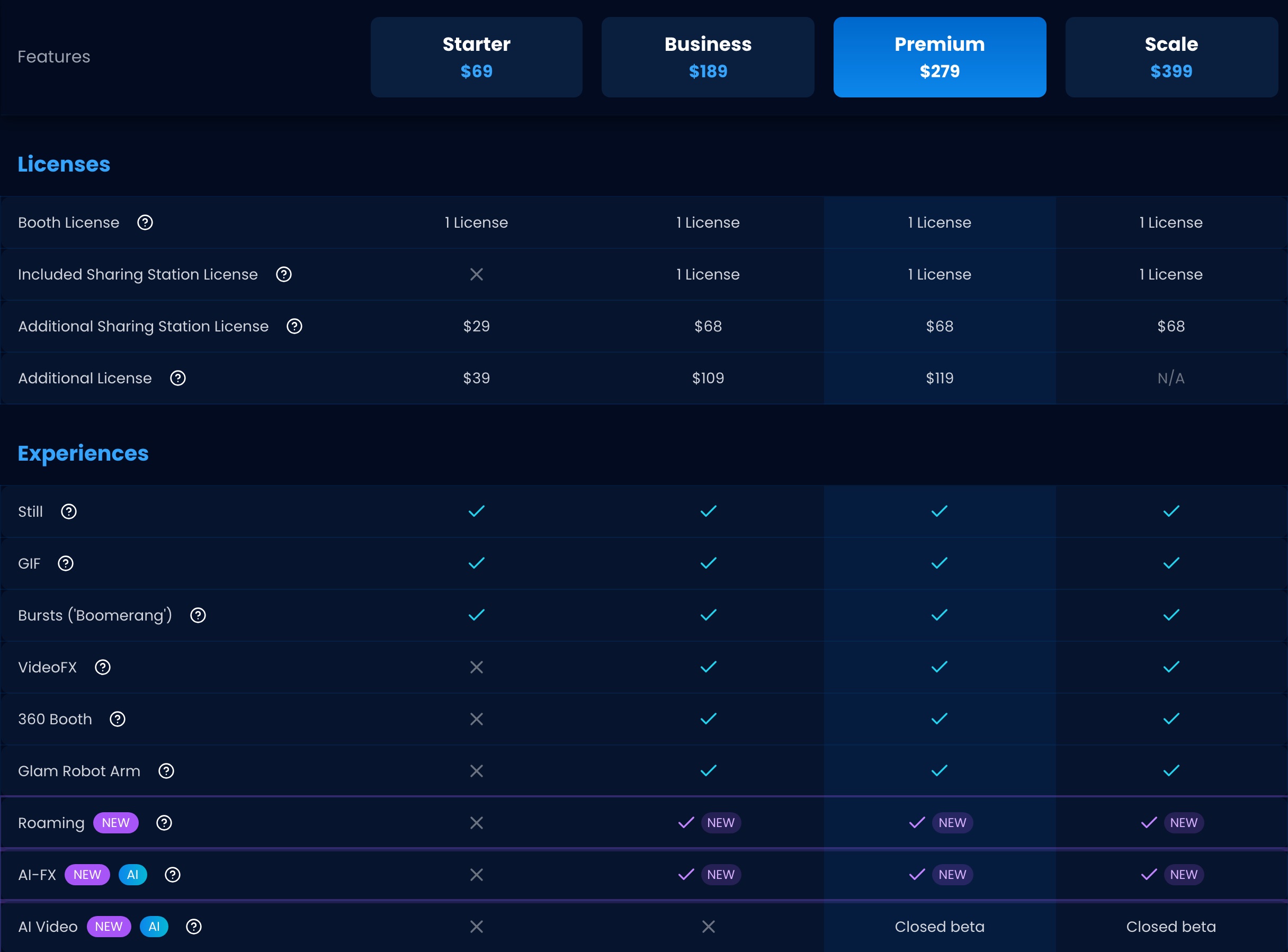
Sources: Snappic feature placement from snappic.com/pricing and the Snappic help-centre article “Setting Up AI-FX (AI Experience)”, which states “AI-FX is not available on Starter (Photo Booth) or Pro Photographer plans and cannot be added as an add-on” (verified 2026-09-13). Pictor feature placement from pictor.pro/pricing (verified 2026-09-13).
What does Snappic’s AI cost per image?
Between $0.10 and $0.60, by their own published rates. Snappic’s Business card lists “Premium AI-FX” as included, meaning the plan unlocks it — each generated image is then billed from a credit balance you buy separately. Their help centre publishes both halves of that maths.
- AI-FX credits are $0.10 each, at every bundle size from 200 for $20 up to 4,000 for $400 — the rate does not drop with volume
- An AI-FX image consumes 1–6 credits depending on effect complexity, so roughly $0.10–$0.60 per image
- Testing an effect on the dashboard costs 0.25 credits per image, so setup burns credits too
- Background removal is a separate pool at $0.15 per removal (100 for $15)
- SmartShare / AI Sharing is a third pool at $0.02 per action (1,000 for $20)
- Virtual Booth runs on a fourth pool at $0.15 per credit (200 for $30); text messaging is a fifth
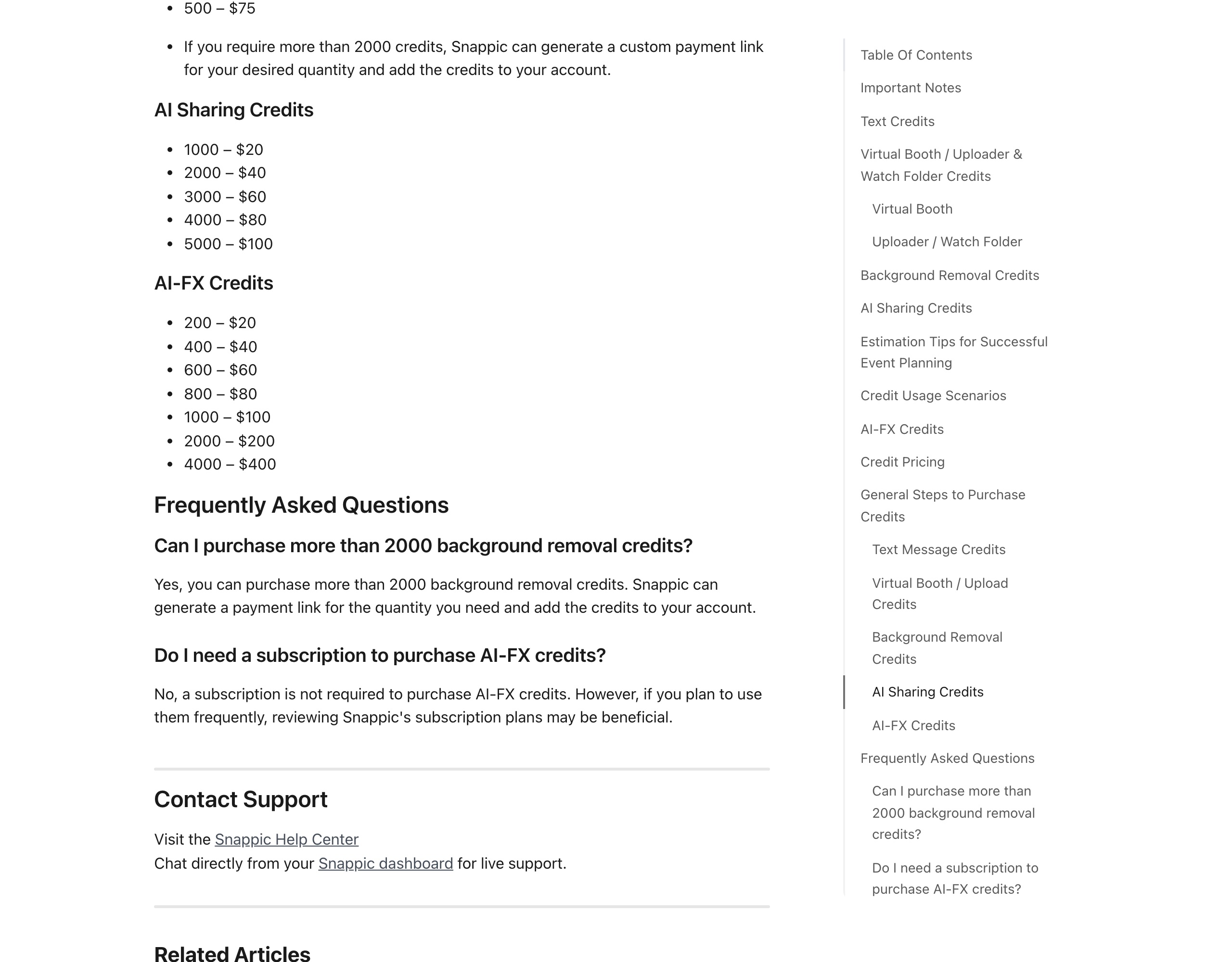
None of that is hidden — Snappic publishes it. The point is that “included” on a plan card and “free to run” are different things on both platforms.
How the two billing models differ
Pictor (token system): one pool covers everything — images, background removal, video, presets. Each action has a fixed published token cost shown in the workflow before the guest triggers it. Bundles run 100/$20 ($0.20 each), 2,000/$200 ($0.10 each, the popular one) and 20,000/$1,400 ($0.07 each). Tokens never expire.
Snappic (credit system): five pools, priced separately — AI-FX, background removal, AI Sharing, Virtual Booth and text. Snappic’s help centre says topped-up credits “remain tied to your account when upgrading your service package”; the credits bundled into a package are different, and their pricing footnote reads “Package credits do not roll over.”
What a 200-guest event with heavy AI looks like
Pictor: 200 AI images at 1–2 tokens each (200–400 tokens) plus 200 background removals at 1 token each (200 tokens). At the popular $0.10/token bundle that is $40–$90 in tokens, and what you don’t use never expires. AI video, if you offer it, is 5–15 tokens per 5-second render.
Snappic: 200 AI-FX images × 1–6 credits × $0.10 = $20–$120, plus $30 for 200 background removals from a separate pool at $0.15, on top of the $189/mo Business subscription that unlocks AI-FX in the first place.
Honest caveat: we can’t quote a guaranteed dollar figure for Snappic, because credit cost per image varies 1–6× with effect complexity and the pools are separate. That range is derived from their published rates, not from a quote. On Pictor your only variables are compute level and bundle size, which is what we mean by predictable: you can quote a client before the event rather than reconcile after it.
What platforms do Pictor and Snappic run on?
Pictor runs native on iOS and Android tablets and phones; Snappic runs on iPads, iPhones and Apple Silicon Macs, with no Android booth app. Both offer a browser-based virtual booth that works on Mac and Windows. If your fleet is Android, or you want the option, that is the single hardest constraint on this page.
| Platform | Pictor | Snappic |
|---|---|---|
| iPad / iOS | Yes | Yes (iPad Air 2 and later, iPhone 7 and later) |
| Android tablet | Yes — native app | Not supported |
| Mac as a booth device | Browser-based Virtual Booth with Premium | Yes — Macs with Apple Silicon are officially supported |
| Windows PC as a booth device | Browser-based Virtual Booth with Premium | Not listed as a supported booth device (Windows is supported for their print server) |
| Native Mac/Windows booth app | On our roadmap | Mac app yes; no Windows booth app |
| Virtual booth (browser-based) | Yes — included with Premium, no per-event fee | Yes — $25-per-event add-on on Business, Premium and Scale (includes 300 Virtual Booth credits); not available on Starter |
| DSLR tethering | Yes — Pro ($99/mo) and Premium ($149/mo); not on Basic | Yes, on every plan |
| GoPro integration | Not yet | Yes, on every plan |
| 360 booth | Not offered | Yes — Business ($189) and above |
| Mirror booth | Not offered | Yes |
| Glambot / robot arm | Not offered | Yes — Business ($189) and above |
| Roaming photographer mode | Not yet | Yes — Business and above (iOS only; Android not supported) |
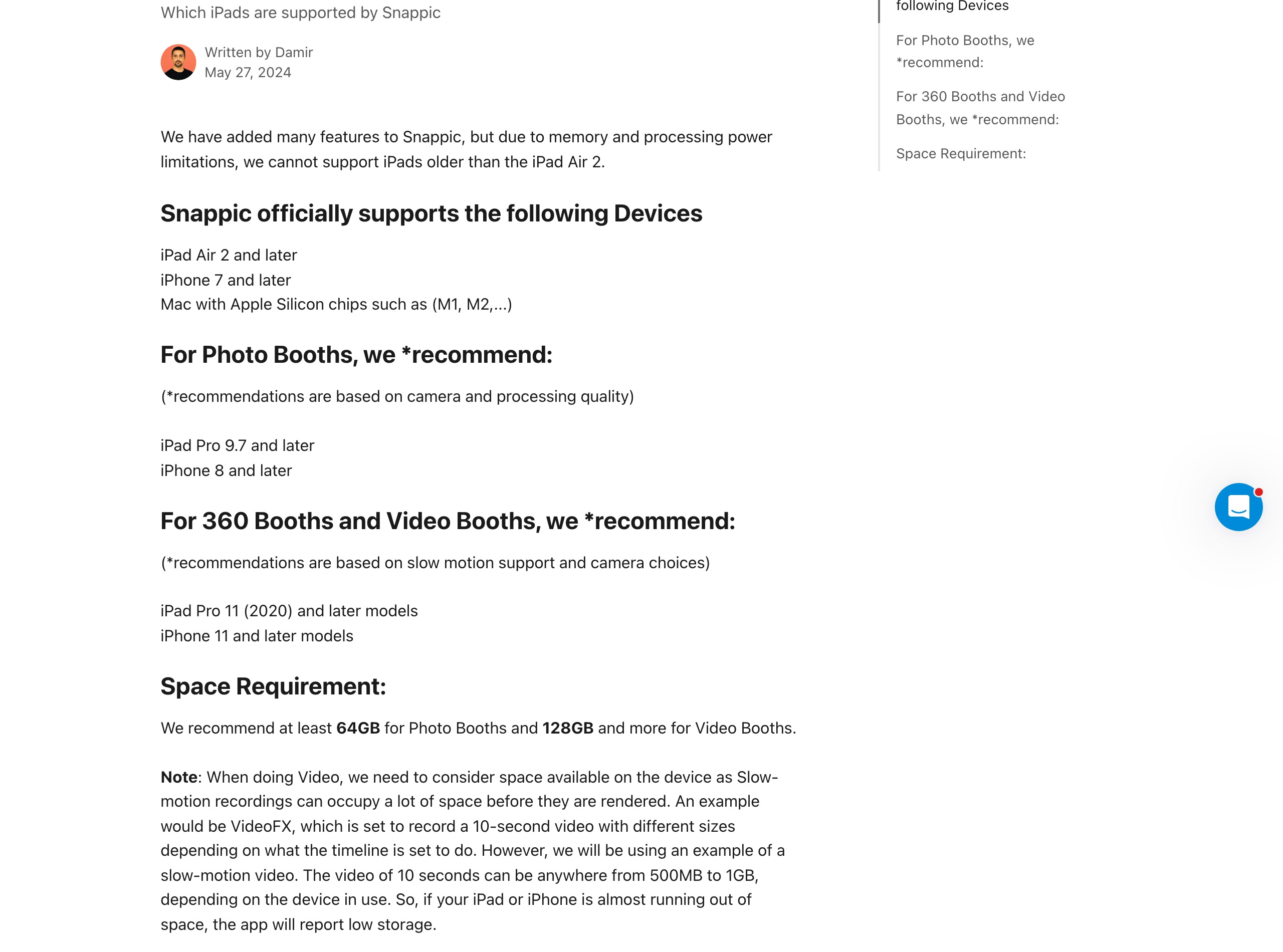
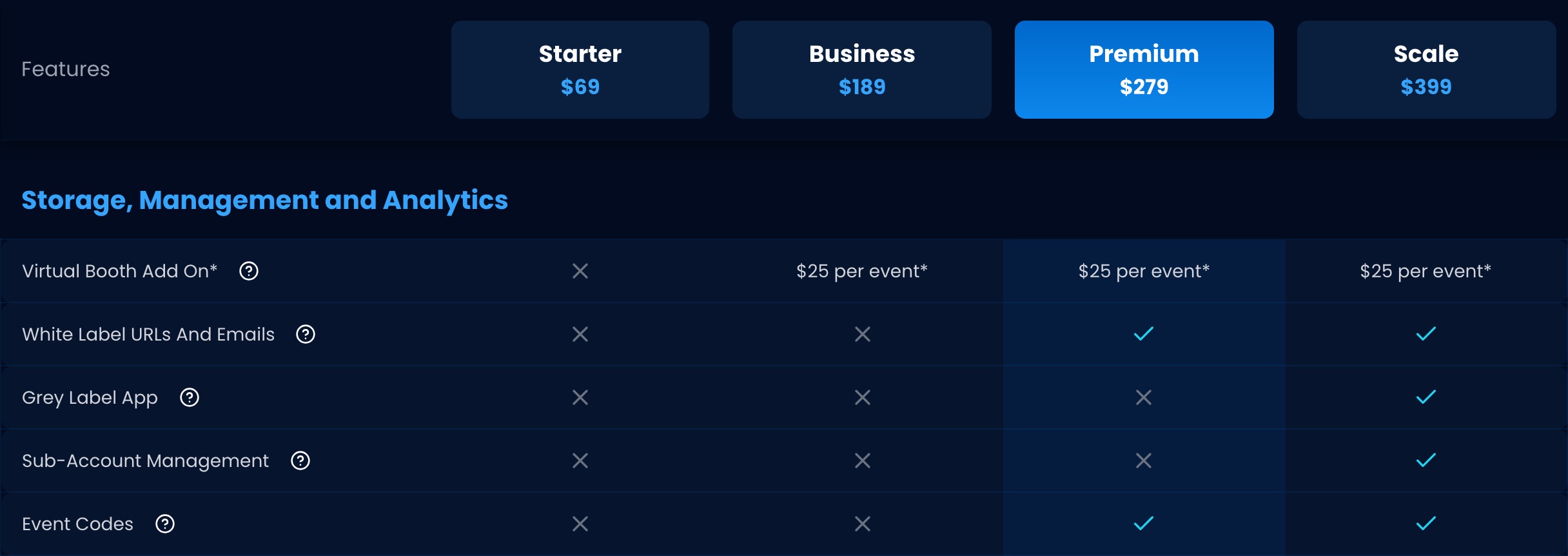
Sources: Snappic platform details from snappic.com/pricing, snappic.com (booth-type list) and the Snappic help-centre articles “Supported Devices”, “Virtual Booth Compatibility” and “Roaming Photography” (verified 2026-09-13, screenshots above). Pictor platform list from pictor.pro/features and pictor.pro/camera-compatibility (verified 2026-09-13).
What does Pictor do that Snappic doesn’t?
Concretely: AI on the entry plan, native Android, a Virtual Booth with no per-event fee, and emergency phone support on every plan.
1. AI photo presets from your first plan
AI photo presets run on every paid Pictor plan from $49/mo, with tokens charged at the cost shown before each run. On Snappic, AI-FX requires Business at $189/mo, and their help centre states it “cannot be added as an add-on” on Starter. That is a $140/mo difference just to unlock the feature, before any usage credits.
2. Android tablet support
We run native on Android tablets. Snappic’s supported-device list is iPads, iPhones and Apple Silicon Macs — no Android, and no workaround. DSLR and mirrorless tethering goes the other way: Snappic includes DSLR on every plan, while on Pictor it starts at Pro, $99/mo (supported cameras).
3. Virtual Booth with no per-event fee
Both platforms have a browser-based virtual booth that runs on any modern Mac or PC, so this is packaging, not capability. Ours is included with Premium at $149/mo, no per-event charge. Snappic’s is a $25-per-event add-on on Business and above, with 300 credits included and more at $0.15 each — and their help centre states “Virtual Booth does not support AI-FX”, so their virtual events run without their AI.
4. Mix-and-match licences
You can run Basic, Pro and Premium licences on the same Pictor account — a Basic licence for a wedding with simple prints, a Premium licence for a corporate activation with heavy AI. One bill, multiple licence types.
5. Emergency phone support on every plan
When something breaks at 11 PM on a Saturday you can call us — every plan includes emergency phone support. Snappic lists 24 Hour Support on every plan and Priority Support from Business up; their published plans and help centre point you to chat from the dashboard and don’t list a phone line.
6. Guest-pays Paywall on Pro and up
Pictor Paywall lets guests pay for prints or premium AI at the booth, at a platform fee of 10% on Pro, 5% on Premium, and 2% with the Enterprise add-on. It is not available on Basic. Snappic added in-app payments on their upper tiers but doesn’t publish a rate, so the two can’t be compared on cost.
7. Built by an operator
Pictor is built and used by a team that runs a working photo booth business; every feature exists because an operator at one of our events needed it. Snappic is a software company building for operators. Both models ship good software — ours comes from a team running events the same weekend you are.
What does Snappic do that Pictor doesn’t?
Quite a lot, verified from their live pricing page and help centre on 13 September 2026:
- 360 booth support — on Business and above, with named OrcaVue and Dreambooth integrations. Pictor offers no dedicated 360 support
- Mirror booth support — they list mirror booths among the hardware they work with; we don’t support them
- Glambot / robot arm — a dedicated Glam Robot Arm experience on Business and above. Pictor doesn’t control the arm; an OrcaVue integration is planned with no confirmed date
- Roaming photographer mode — Business and above (iOS only); we don’t have it
- VideoFX — their video experience for 360 booths, Glambots and video activations, from Business up
- Digital props on the entry plan — included on Starter at $69/mo; on Pictor, Digital Props need Pro at $99/mo
- DSLR tethering on the entry plan — included on every Snappic plan; on Pictor, DSLR and mirrorless tethering need Pro at $99/mo
- Sharing stations and print server — a sharing-station licence from Business (extras $68), a wireless print server, AirPrint and direct USB printing from a compatible iPad
- Per-event pricing — $29 (Starter), $79 (Business) or $109 (Premium). A month of Pictor Basic is $49, so for a single small gig their $29 pass is cheaper
- SmartShare / FaceAI QR linking — facial-recognition delivery of every photo a guest appears in; included on Premium and Scale (400 credits), a $35 add-on on Business (800 credits)
- Moderation, webhooks and LiveConnect remote control — newer upper-tier additions we don’t match feature-for-feature
These are real gaps. We don’t ship features we haven’t used at real events ourselves, which is why some take longer here than at a software-only company.
What does a two-booth setup cost per month?
About $198/mo on Pictor and $298/mo on Snappic before any AI usage — a $100/mo gap. Below is the math for an operator running 8 events a month and using AI on 4. Numbers are illustrative; your cost depends on your event mix and the bundle you buy.
Pictor setup (2 Pro licences + a token bundle)
| Item | Cost |
|---|---|
| 2× Pro licences | $198/mo |
| Token bundle (~80 AI images × 4 events = 320–640 tokens) | ≈$35–$65/mo at the popular-bundle rate ($0.10/token) |
| Total subscription + estimated AI | ≈$233–$263/mo all-in |
Snappic setup (1 Business + 1 additional licence + credits)
| Item | Cost |
|---|---|
| Business plan (cheapest plan that unlocks AI-FX) | $189/mo |
| Additional booth licence on Business | $109/mo |
| AI-FX credits (~80 images × 4 events at 1–6 credits, $0.10 each) | ≈$32–$192/mo |
| Background removal credits, if used | $0.15 per removal, separate pool |
| Total subscription + estimated AI | $298/mo subscription + ≈$32–$192 in credits |
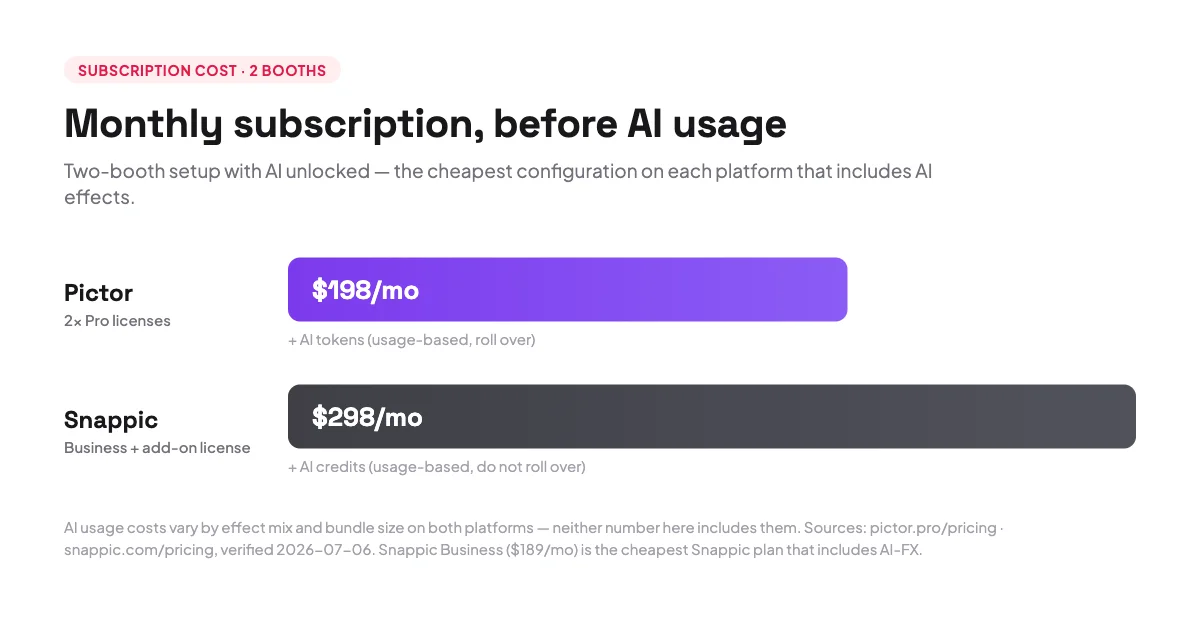
Subscription alone, Snappic costs about $100/mo more for the same number of booths. The variable part is all AI usage, and both estimates come from each vendor’s published per-image rates.
Pictor’s honest note: we win this one for AI-heavy operators. If you barely use AI, or 360s and Glambots are your bread and butter, it goes the other way.
Which has better support, Pictor or Snappic?
Pictor, if you define support as a phone number when a booth dies mid-event: emergency phone support is on every Pictor plan. Snappic publishes 24 Hour Support on all four plans and Priority Support from Business up, delivered through chat from the dashboard, with a dedicated success manager on Scale at $399/mo.
| Support Item | Pictor | Snappic |
|---|---|---|
| Chat support | Yes | Yes — “24 Hour Support” on every plan |
| Priority support tier | Included on every plan | Business, Premium and Scale |
| Emergency phone support | Yes — every plan | Not published; their help centre directs you to chat from the dashboard |
| Dedicated success manager | Premium and Enterprise | Scale plan only ($399/mo) |
| Sub-account management | Pro and Premium | Scale plan only |
| Weekly live AMA with the founder (Show & Tell) | Yes — free, every Wednesday | — |
| Marketing support package | Not offered | Scale plan only |
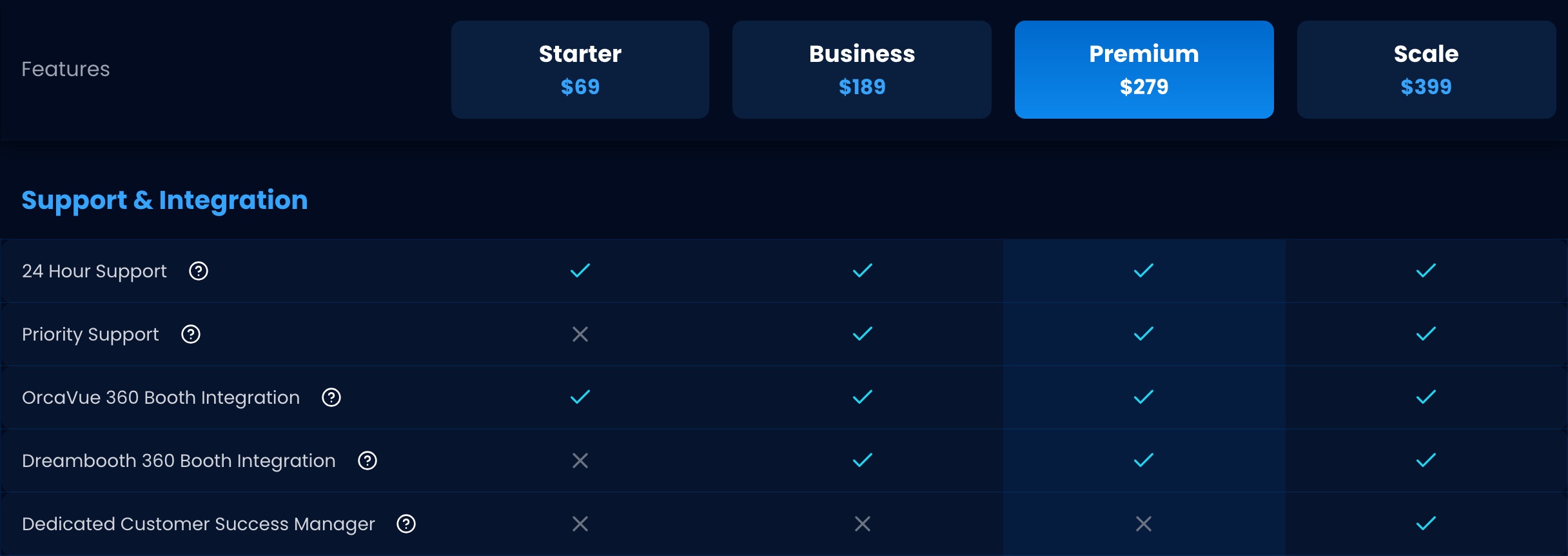
Sources: Snappic support tiers from snappic.com/pricing (verified 2026-09-13, screenshot above). Pictor support tiers from pictor.pro/pricing (verified 2026-09-13). We say Snappic’s phone support is “not published” because no number appears on their site or help centre — not that one doesn’t exist.
Who should choose Pictor, and who should choose Snappic?
Pictor is the better pick if:
- You want AI presets from your first $49/mo plan, not a $189/mo upgrade
- You run Android tablets, or want the option — Snappic has no Android booth app
- You want a virtual booth with no $25 per-event charge, and AI that runs on it
- You want one phone number to call when something goes wrong live
- You want AI costs you can quote up front: one token pool, published rates, no expiry
Snappic is the better pick if:
- 360 booths, mirror booths, Glambots or roaming photographers are a core part of your offering
- You need per-event pricing for occasional gigs — theirs starts at $29
- You want sharing stations, a print server or direct USB printing in the platform
- You want digital props or DSLR tethering on the cheapest plan rather than the middle tier
- You’re already deep in the Snappic ecosystem and switching costs are real
- You want sub-account management and a dedicated success manager at the top tier
Still narrowing the field? Our best photo booth software guide for 2026 covers the wider market, with the same treatment for dslrBooth and LumaBooth.
What operators say
Real operators running Pictor at real events:
“Nicholas Rhodes’ AI Photo Booth Software nails realism and branding — letters on T-shirts stay sharp where most AIs turn to mush.”
Shayn Satten, Milestone Event Group
“For a recent virtual album cover activation, we needed something that could handle heavy branding, realistic AI output, and high volume without falling apart. Pictor made it easy for our team to execute seamlessly — both virtually around the globe and in person — delivering an epic AI experience for every guest.”
Gregory Burt, Photo Booth Support
“Pictor is the only software that is made by a photo booth company, for photo booth companies — and it’s clear in the features that they have delivered and their upcoming roadmap.”
Chris Fall, Roc The Booth
The roadmap is shaped by operators directly: the Creative Board of Advisors is a group of booth owners who pressure-test features before they ship.
The bottom line
If you run 360s, mirror booths and Glambots as your core offering, Snappic is built for that workflow and you won’t find it here.
If you run mixed iOS and Android hardware, want AI from your first $49/mo plan instead of a $189/mo one, want a browser-based Virtual Booth on Mac and PC with no per-event fee, and want a phone number that works at 11 PM on a Saturday — Pictor is the clearer choice, and the numbers above are why.
We’ll be honest about what works and what doesn’t — that’s the only kind of marketing that helps you decide.
— Eve
FAQ
Is Pictor cheaper than Snappic?
Yes at every comparable tier: $49 vs $69 at entry, $99 vs $189 in the middle, $149 vs $279 at the top. On usage, Pictor tokens run $0.20 down to $0.07 each at 1–2 tokens per image; Snappic AI-FX credits are $0.10 each at 1–6 credits per image. Snappic is cheaper for a single one-off gig, at $29 per event.
What is the best Snappic alternative in 2026?
It depends on your hardware. Pictor is the strongest alternative if you run iOS and Android, want AI on a $49/mo plan and want emergency phone support included. If your business is built on 360 booths and Glambots, nothing replaces Snappic’s hardware integrations. dslrBooth and LumaBooth are the other names worth shortlisting.
What is Snappic pricing in 2026?
$69/mo Starter, $189/mo Business, $279/mo Premium and $399/mo Scale, with “Save 20%” on annual. Per-event passes are $29, $79 and $109; additional booth licences $39, $109 and $119. There is a 14-day free trial, no credit card required. Verified on snappic.com/pricing, 13 September 2026.
How much does Snappic’s AI cost per image?
$0.10 to $0.60 per AI-FX image by their published figures — credits are $0.10 each and an image consumes 1–6 depending on effect complexity. That $0.10 holds at every bundle size, 200 for $20 up to 4,000 for $400. Background removal, SmartShare and Virtual Booth draw on separate pools, and dashboard test renders cost 0.25 credits each.
Does Snappic support Android or Windows?
No, not as booth devices. Snappic’s supported-device list is iPad Air 2 and later, iPhone 7 and later, and Macs with Apple Silicon. Android and Windows appear only as guest browsers for their Virtual Booth, plus Windows for their print server. Pictor has a native Android app.
Does Pictor support DSLR cameras?
DSLR and mirrorless tethering is included on Pro ($99/mo) and Premium ($149/mo). Basic runs on the iPad or Android tablet camera. Check the supported camera list before you buy.
Does Pictor have a free trial?
You get 25 free tokens when you sign up, and you can build and test an experience free. A paid plan is required to run a live event. Snappic offers a 14-day free trial with no credit card required.
Which is better for AI photo booths, Pictor or Snappic?
Pictor, for most operators: AI unlocks at $49/mo instead of $189/mo, every action has a published token price shown before it runs, one pool covers images, background removal and video, and tokens never expire. On Snappic, AI-FX needs the $189/mo Business plan, cannot be bought as an add-on on Starter, and does not run on their Virtual Booth. Snappic is the better AI choice only if you need AI on 360 or Glambot capture, which Pictor does not support.
Can I run a Mac or PC as a photo booth with Pictor?
Yes, via our Virtual Booth, which runs in a browser on any modern Mac or PC. It is a Premium and Enterprise feature, one live Virtual Booth per licence, no per-event fee. Native Mac and Windows apps are on our roadmap.
Does Pictor support 360 booths, mirror booths or Glambots?
No. Pictor does not offer dedicated 360, mirror-booth or Glambot support, and our Virtual Booth is not a 360 equivalent. Snappic supports all three from its Business plan at $189/mo.