Pictor vs Touchpix: An Honest Comparison for Photo Booth Operators
A side-by-side look at Pictor and Touchpix photo booth software — pricing, AI costs, platform support, and which one fits your events. Built by a booth operator, for booth operators.
Last updated · All claims sourced from both vendors’ public pages
Pictor vs Touchpix: The Short Answer
Pick Pictor if you bill month to month, run iOS and Android, and want a phone number when something breaks: $49/mo Basic, emergency phone support on every plan, and tokens that never expire from $0.20 down to $0.07. Pick Touchpix if you want unlimited devices per plan, native Windows, Linux or Raspberry Pi booths, or 360 spinner and mirror booth work. The biggest difference is the billing model: Touchpix’s best prices require a 12-month commitment.
Key facts (verified 14 September 2026)
- $49 / $99 / $149 per month (Pictor Basic, Pro, Premium) vs US$36.66 / $73.33 / $117.33 / $183.33 per month billed annually on Touchpix (PhotoPass $439.90, MultiPass $879.99, MultiPass Pro $1,407.99, Multipass Enterprise $2,199.99 per year).
- Month to month, Touchpix costs more: US$60.49 (PhotoPass) and US$122.08 (MultiPass) in their shop, with weekly passes at US$20.89 and US$43.99.
- Touchpix AI usage is cheaper. Their basic AI needs no credits, and AI Pro credits cost $0.068–$0.12 at 1 credit per image. Every Pictor AI action costs tokens, $0.07–$0.20 each at 1–2 tokens per image.
- Unlimited devices on every Touchpix plan, capped instead by 2, 4, 8 or 12 simultaneously active events. Pictor licences are per active device and tier.
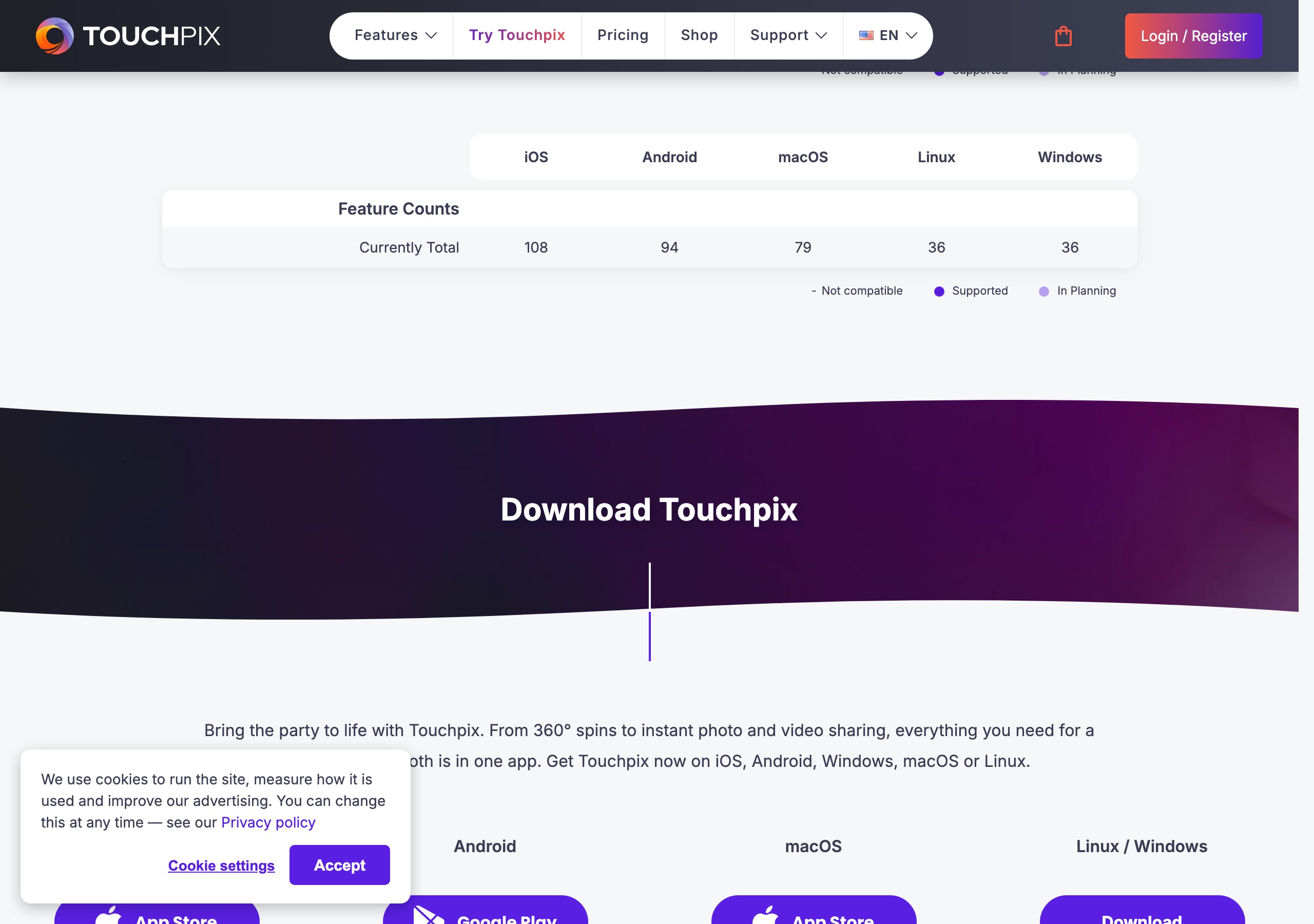
- Touchpix’s Windows and Linux builds carry 36 of 108 features by their own published count (iOS 108, Android 94, macOS 79, Linux 36, Windows 36), with 0 video effects on Windows and Linux.
- Emergency phone support on every Pictor plan. Touchpix publishes 24/7 live chat, email with a one-day average response and a Mon–Thu Zoom slot, but no phone number.
- DSLR and mirrorless tethering on Pictor Pro ($99/mo) and Premium ($149/mo), not Basic. Touchpix supports wired DSLR on all five platforms.
Quick Verdict
Choose Pictor if you want to pay monthly without a 12-month lock, run iPads and Android tablets with a browser-based Virtual Booth on Mac or Windows with Premium, keep emergency phone support on every tier, and buy AI in non-expiring tokens at a price shown before each run.
Choose Touchpix if you run more devices than events, need native Windows, macOS, Linux or Raspberry Pi booths, run 360 spinners, mirror booths or roaming iPads, want basic AI at no per-image cost, or want a one-week pass instead of a subscription. It is a mature product with a 4.8 App Store rating from 6.7K ratings, and we don’t pretend otherwise.
Everything on this page was re-verified against touchpix.com, their shop, their knowledge base and their App Store listing on 14 September 2026. Where we quote their prices we show a screenshot of their page taken that day, so you don’t have to take our word for it.
Is Pictor cheaper than Touchpix?
Month to month, yes. Committed annually, no. Pictor Basic is $49/mo against Touchpix’s cheapest month-to-month option at US$60.49, but Touchpix’s annual PhotoPass works out to US$36.66/mo and annual MultiPass to US$73.33/mo, both below the Pictor tier they sit beside.
| Item | Pictor | Touchpix |
|---|---|---|
| Lowest paid plan | $49/mo (Basic, monthly, no annual lock) | US$36.66/mo billed annually (PhotoPass, US$439.90/yr, photo only) — or US$60.49/mo without the annual commitment |
| Mid plan | $99/mo (Pro, “Most Popular”) | US$73.33/mo billed annually (MultiPass, US$879.99/yr) — or US$122.08/mo monthly |
| High plan | $149/mo (Premium) | US$117.33/mo billed annually (MultiPass Pro, US$1,407.99/yr, yearly only) |
| Enterprise / agency plan | White-label add-on from $1,500/yr | Multipass Enterprise US$183.33/mo billed annually (US$2,199.99/yr, yearly only) |
| Annual discount | ~17% off monthly | “Save 39%” on PhotoPass, “Save 40%” on MultiPass, per their pricing page |
| Weekly / per-event option | Not currently | Yes — PhotoPass Weekly US$20.89, MultiPass Weekly US$43.99, MultiPass Half-yearly US$439.99 |
| What scales the plan | Per active device and tier; Basic, Pro and Premium licences can be mixed on one account | Active events — 2, 4, 8 or 12 at once, with unlimited devices on every plan |
| Gallery storage | Included | 6 months after event creation on every plan; +12 months for US$69.99/yr |
| Free trial | 25 free tokens; build and test free for as long as you need, paid plan required for live events | 14-day free trial, plus a “Request Trial Period” form |
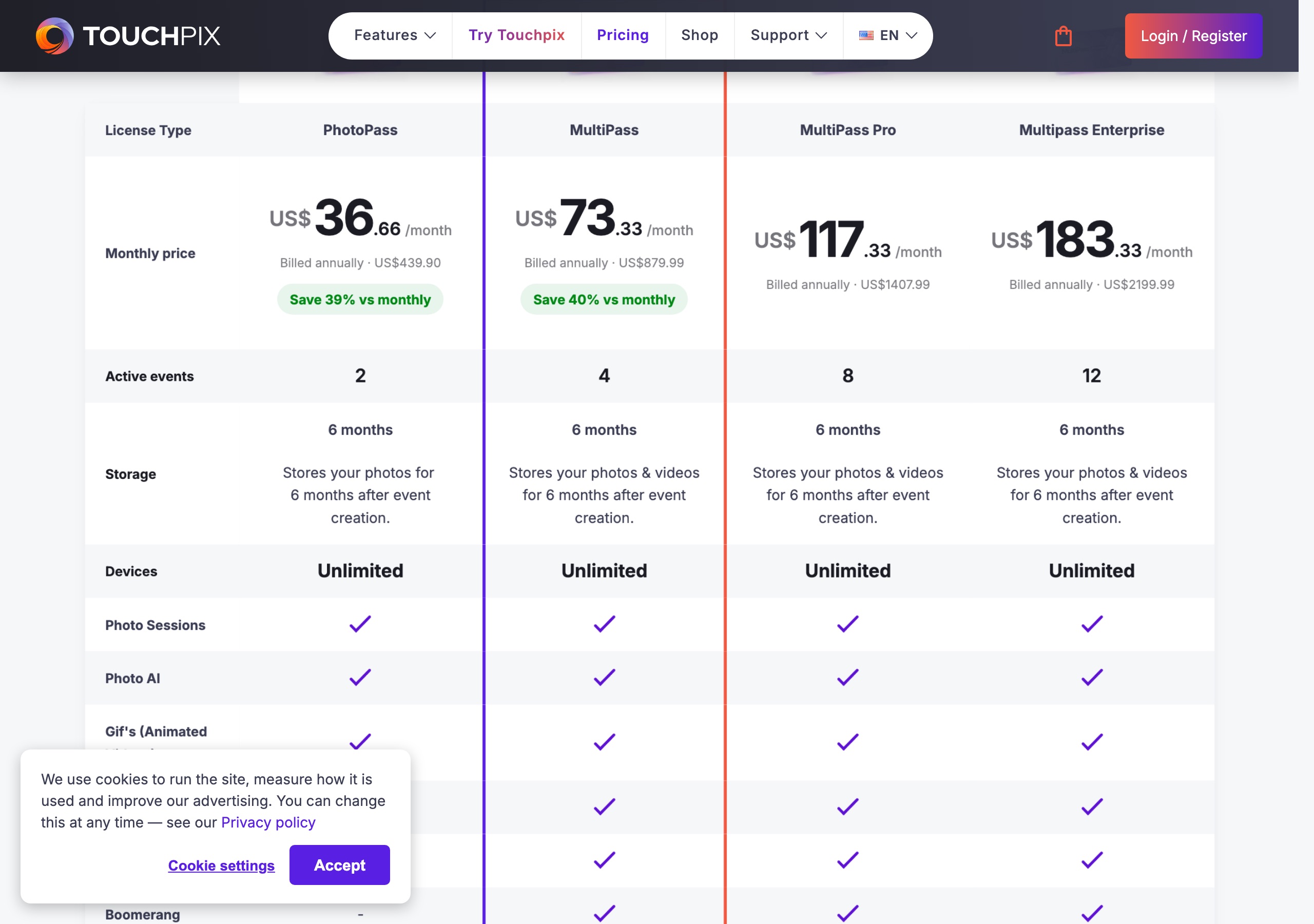
Sources: Touchpix prices from touchpix.com/pricing and their shop (verified 2026-09-14, screenshots on this page). Pictor pricing from pictor.pro/pricing (verified 2026-09-14). Competitor pricing as of publish date — verify current pricing on vendor sites.
Pictor’s honest note: committed for a year, Touchpix is the cheaper subscription at every comparable tier, and PhotoPass Weekly at US$20.89 is genuinely useful for a one-off booking — optionality we don’t have. You trade the 12-month commitment and, on PhotoPass, video: Videos, Slomo and Boomerang are not on that tier. Unlimited devices is the other side of the coin: four iPads at one activation is one active event on Touchpix and four licences on Pictor.
Which has cheaper AI, Pictor or Touchpix?
Touchpix, on usage. Their basic AI set costs no credits at all, and their AI Pro credits work out to $0.068–$0.12 per generation against $0.07–$0.20 per Pictor token. We would rather say that plainly than dress it up.
| AI item | Pictor Basic ($49/mo) | Pictor Pro ($99/mo) | Pictor Premium ($149/mo) | Touchpix (all plans) |
|---|---|---|---|---|
| AI photo styles / presets | AI Presets & Library | + Custom Prompt Editor, Digital Props, Background Removal | + AI Video | Photo AI on every plan; “more than 80 available styles” |
| What AI costs to run | Tokens on every action | Tokens on every action | Tokens on every action | Basic AI: no credits. AI Pro: credits |
| Per standard image | 1–2 tokens = $0.07–$0.40 depending on bundle and compute ($0.10–$0.20 at the popular bundle) | 1 credit = $0.068–$0.12 (built-in filter, custom filter, clothes or faceswap) | ||
| Background generation / removal | Background removal 1 token = $0.07–$0.20 (Pro and Premium) | Background 2 credits = $0.14–$0.24; custom composition 2 credits | ||
| AI video | 5–15 tokens per 5-second render = $0.35–$3.00 (Premium) | 10 credits per generation = $0.68–$1.20 | ||
| Bundles | 100/$20 · 500/$75 · 1,000/$120 · 2,000/$200 · 5,000/$450 · 10,000/$800 · 20,000/$1,400 | 100/US$12 · 200/US$20 · 500/US$49 · 5,000/US$340 | ||
| Free to start | 25 free tokens on signup | 15 free credits for every new account | ||
| Expiry | Tokens never expire | Not published | ||
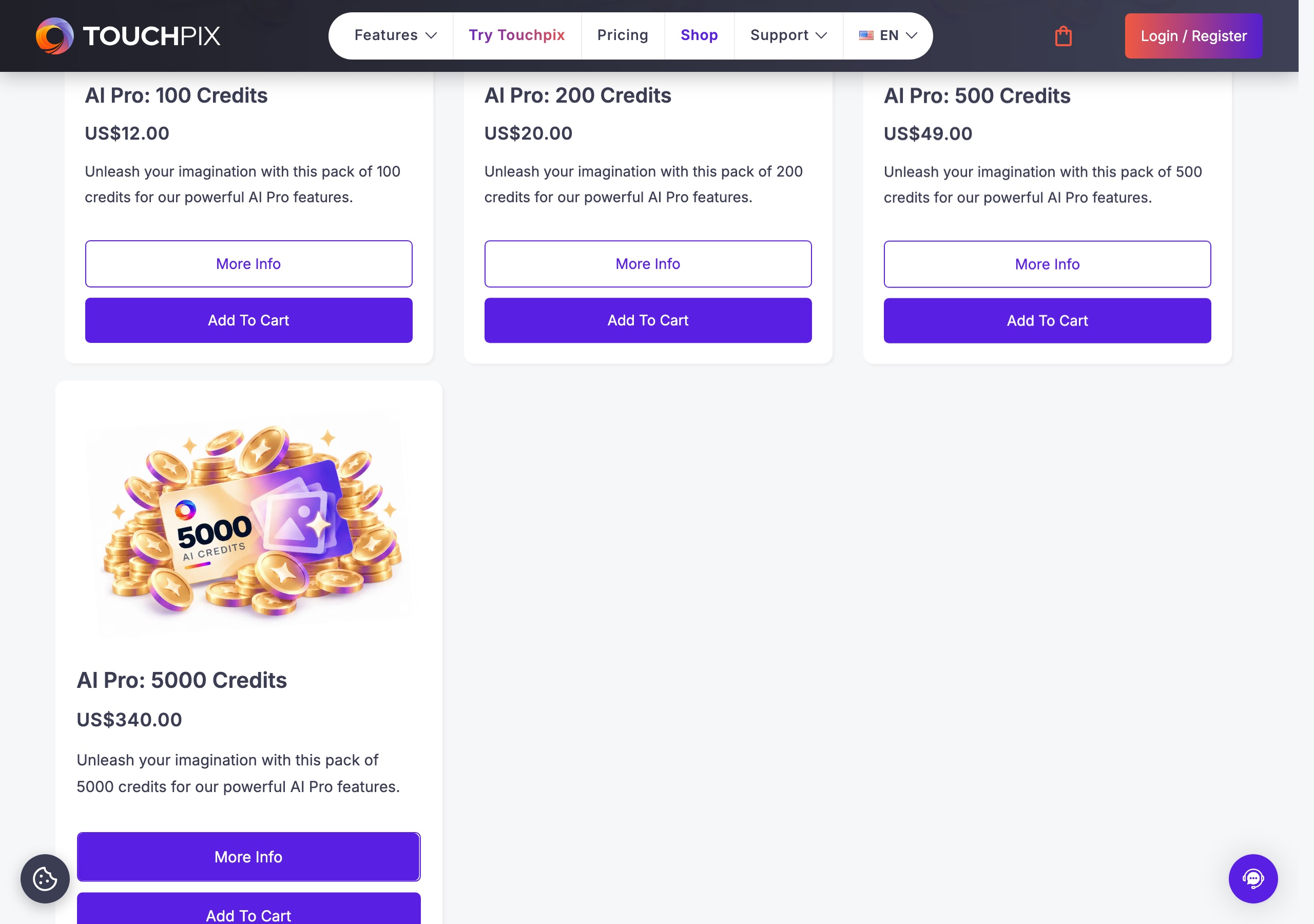
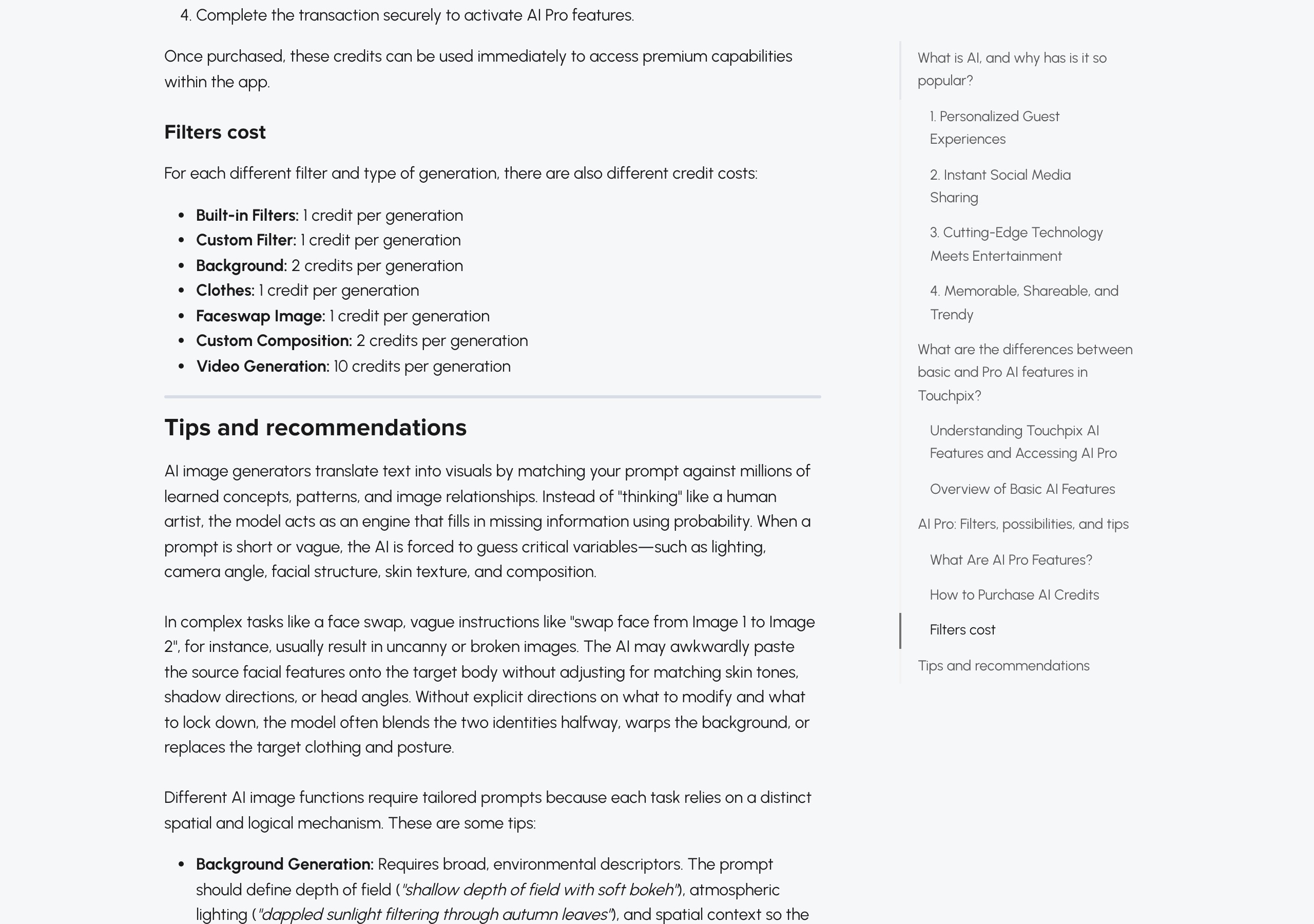
What a 200-guest event with heavy AI actually costs
On Pictor, 200 AI images at 1–2 tokens plus 200 background removals at 1 token is 400–600 tokens. At the popular 2,000-token bundle ($0.10/token) that is $40–$60 on top of the subscription, and whatever you don’t use carries to the next event because tokens never expire. The app shows the token cost before each run.
On Touchpix, the same 200 images cost nothing extra if you stay on their basic AI set, or 200 credits — US$13.60 at the 5,000 pack, US$24 at the 100 pack — on AI Pro. Backgrounds double that to 2 credits each. They do not publish whether credits expire, so ask them before buying a large pack.
Where Pictor comes back is video at volume: 5 tokens for a 5-second render at $0.07 is $0.35 against a flat 10 credits on Touchpix, and AI video is a Premium feature rather than a credit purchase. Full Pictor rates are on our AI pricing page.
Sources: Touchpix credit packs from their shop and per-generation credit costs from their knowledge base article “AI: A definitive guide” (updated 15 August 2026), both verified 2026-09-14. Free-credit count from touchpix.com/ai-photo-booth.
What platforms do Pictor and Touchpix run on?
Touchpix runs on more operating systems: iOS, Android, macOS, Linux and Windows natively, plus a Raspberry Pi build. Pictor is native on iOS and Android, with a browser-based Virtual Booth for Mac and Windows on Premium. Native Mac and Windows apps are on our roadmap.
| Platform or hardware | Pictor | Touchpix |
|---|---|---|
| iPad / iPhone | Yes — native app | Yes — native app (108 features listed) |
| Android tablet | Yes — native app | Yes — native app (94 features listed) |
| Mac | Browser-based Virtual Booth with Premium; native app on our roadmap | Yes — Mac App Store app (79 features listed) |
| Windows PC | Browser-based Virtual Booth with Premium; native app on our roadmap | Yes — download (36 features listed, 0 video effects) |
| Linux | No | Yes — download (36 features listed, 0 video effects) |
| Raspberry Pi | No | Yes — dedicated product page and setup guide |
| DSLR / mirrorless tethering | Yes — Pro ($99/mo) and Premium ($149/mo), not Basic | Wired DSLR on all five platforms; wireless on iOS and macOS, in planning elsewhere |
| GoPro | No | Yes — wired, wireless and Protune on iOS and Android |
| 360 spinner | No | Yes — Bluetooth spinner integrations including Orcavue, Mobibooth, Glambot and Dzen |
| Mirror booth | No | Yes — dedicated mirror booth mode |
| Devices per plan | Per active device and tier; licence types can be mixed on one account | Unlimited, capped by 2/4/8/12 simultaneous active events |
| Virtual booth | Premium and Enterprise, no per-event fee; one live Virtual Booth per licence | Included on MultiPass Pro and Enterprise; US$19.99 for 14-day access on other plans |
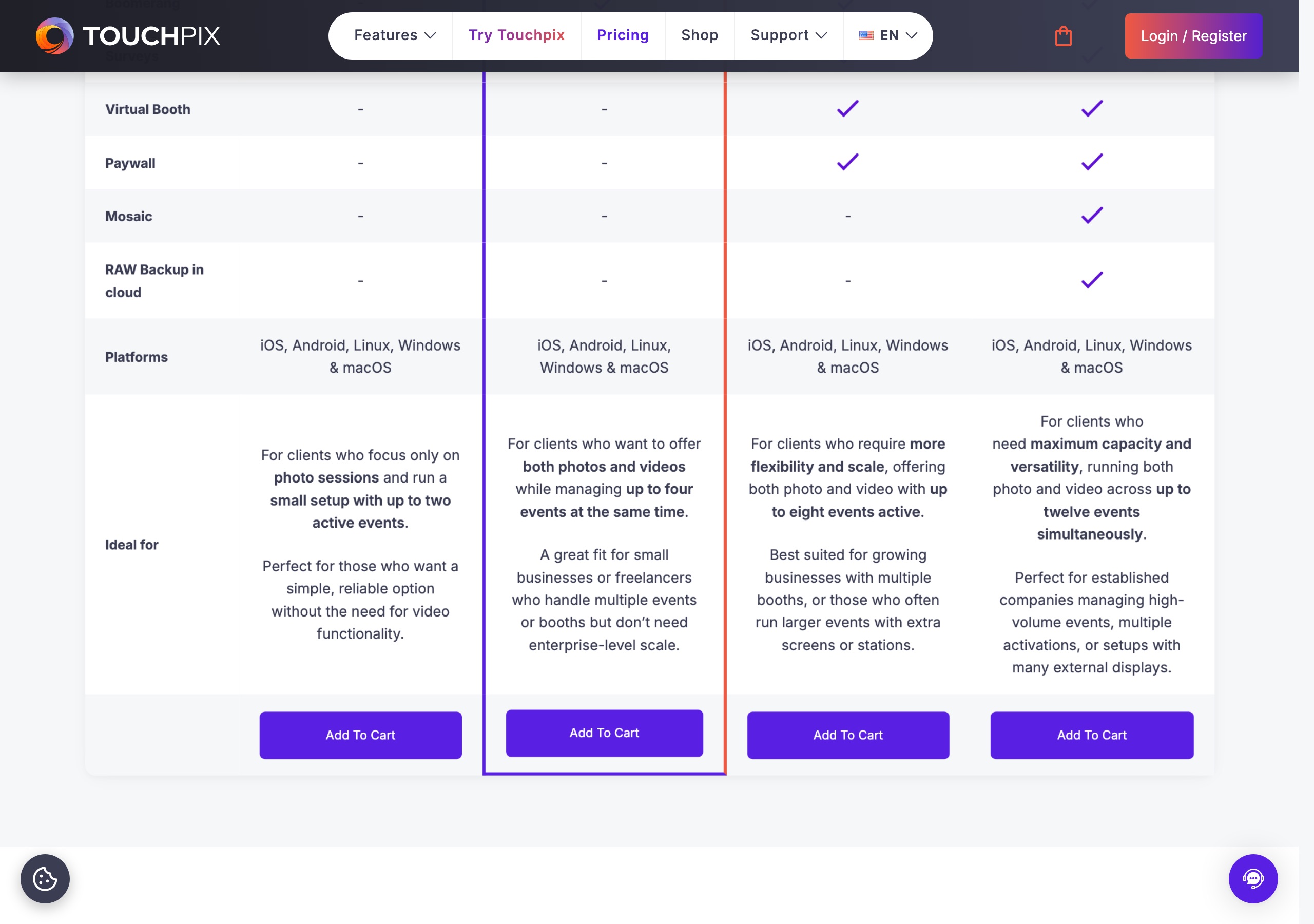
Sources: Touchpix platform support and per-platform feature counts from their platform comparison page, camera and spinner support from the same table, Raspberry Pi from touchpix.com/raspberry-pi-photo-booth, Virtual Booth Extension price from their shop (all verified 2026-09-14).
Fact check: “one license to rule them all”
Touchpix’s pricing and shop pages open with “One license to rule them all… start an event on an iPad and run the next one on Windows.” The licence part is accurate, and one licence covering five platforms is a real advantage over per-platform licensing elsewhere.
The published numbers don’t support reading it as feature parity. Their own platform comparison lists 108 features on iOS, 94 on Android, 79 on macOS and 36 each on Linux and Windows, with Video Effects at 85 on iOS, 27 on Android and 0 on Linux and Windows. If the plan is to start on an iPad and finish on a Windows booth, check the features you sell are in that 36.
What does Pictor do that Touchpix doesn’t?
1. Emergency phone support on every plan
When a booth dies at 11pm on a Saturday you can call us, on Basic, Pro and Premium alike. Touchpix publishes 24/7 live chat in English, Spanish and Portuguese, email with a one-day average response, and a 15-minute Zoom slot Monday to Thursday. Chat at 3am is good; a phone number is different, and they don’t publish one.
2. Month-to-month billing with no annual commitment
Every Pictor tier is available monthly at $49, $99 or $149, added and removed as your calendar changes. Touchpix’s headline prices are annual, MultiPass Pro and Enterprise are yearly only, and their month-to-month equivalents are US$60.49 and US$122.08.
3. AI on the entry plan
Pictor Basic at $49/mo includes the AI Presets & Library. Pro adds the Custom Prompt Editor, digital props, background removal and DSLR and mirrorless tethering; Premium adds AI Video. Every AI action costs tokens at the price shown before it runs — no surprise invoices.
4. Lower paywall fees at the tier most operators buy
Pictor’s Paywall takes 10% on Pro, 5% on Premium, and 2% with the Enterprise add-on. It is not available on Basic. Touchpix’s paywall documentation states 5% per transaction on Enterprise and 10% on all other licences, and their pricing table shows Paywall only on MultiPass Pro and Enterprise. A Pictor Premium licence at $149/mo gets the 5% rate Touchpix reserves for a US$2,199.99/yr plan.
5. Mix-and-match licences on one account
Basic, Pro and Premium licences can sit on one Pictor account with separate renewal dates, so a simple wedding and a heavy corporate activation don’t buy the same tier. Touchpix stacks everything at one plan level and scales by active events.
6. Built by an operator
Pictor is built and used by a team that runs a working photo booth business, so features exist because someone at one of our events needed them. Touchpix is a capable software and hardware company building for operators; the difference is who is standing in the ballroom on Saturday night.
What does Touchpix do that Pictor doesn’t?
A fair amount, and we are not going to bury it:
- Unlimited devices on every plan — run as many stations as you like within your active-event cap. If your bottleneck is devices rather than concurrent events, this is a better model than per-device licensing.
- Native Windows, macOS, Linux and Raspberry Pi apps — Pictor has no native desktop app and no Linux or Pi support. Read the feature counts above before assuming parity, but a Pi booth for the price of a Pi is a real option we don’t offer.
- 360 spinners, mirror booths and roaming — Bluetooth spinner integrations, a dedicated mirror booth mode and roaming iPad workflows. Pictor supports none of these, and our Virtual Booth is not a 360 equivalent.
- GoPro and webcam capture — GoPro wired, wireless and Protune on iOS and Android; webcams on Windows and Linux.
- Basic AI with no per-image cost — face swap, worldswap, generative and cartoon styles are included with the subscription. Every Pictor AI action costs tokens.
- Weekly and half-yearly passes — US$20.89 or US$43.99 for a week, US$439.99 for six months. Pictor is monthly or annual only.
- Mosaic, RAW cloud backup and Advanced Surveys — add-ons from US$25 to US$49.99, bundled into the higher tiers.
- Offline sharing — their Scanpix internet-free sharing works without a connection at the venue. Pictor queues captures locally and sends them when the connection returns, which covers uploads but not guest sharing on a dead network.
- Install base — 4.8 from 6.7K ratings on the US App Store as of 14 September 2026, under developer Propfun.
These are real gaps. We ship features after using them at our own events, which makes us slower than a software-only company.
What does each platform cost per month in real use?
Take an operator running eight events a month with AI on four of them, two stations per event.
| Item | Pictor | Touchpix |
|---|---|---|
| Subscription | 2 × Pro licences = $198/mo, cancellable monthly | MultiPass Pro US$1,407.99/yr ≈ US$117.33/mo, 12-month commitment, unlimited stations |
| AI usage (~320 images) | 320–640 tokens ≈ $32–$64 at the popular bundle | US$0 on basic AI, or ~320 credits ≈ US$22–US$38 on AI Pro |
| Virtual booth | Requires a Premium licence ($149/mo) instead of Pro | Included in MultiPass Pro |
| Rough monthly total | ≈$230–$262, no lock-in | ≈US$117–US$155, committed for a year |
Pictor’s honest note: on that shape of business Touchpix is cheaper, mostly because unlimited devices beat per-device licensing when you run two stations per event. Pictor wins the same comparison at one station per event, or when you want to drop to zero in January without losing a prepaid year.
Which has better support, Pictor or Touchpix?
Pictor, if you define support as reaching a human by phone during an event. Touchpix, if you define it as breadth of channels and languages.
| Support item | Pictor | Touchpix |
|---|---|---|
| Emergency phone support | Yes — every plan | No phone number published |
| Live chat | Yes | Yes — 24/7 in English, Spanish and Portuguese |
| Yes | support@touchpix.com, average response 1 day | |
| Scheduled video call | Available | 15-minute Zoom, Mon–Thu 10am–6pm EST |
| Dedicated phone support | Enterprise | Not stated publicly |
| Knowledge base | Yes | Yes — extensive, with tutorials and webinars |
| App Store rating | — | 4.8 from 6.7K ratings |
| Live founder session | Yes — free Show & Tell every Wednesday | Weekly demo sessions and webinars |
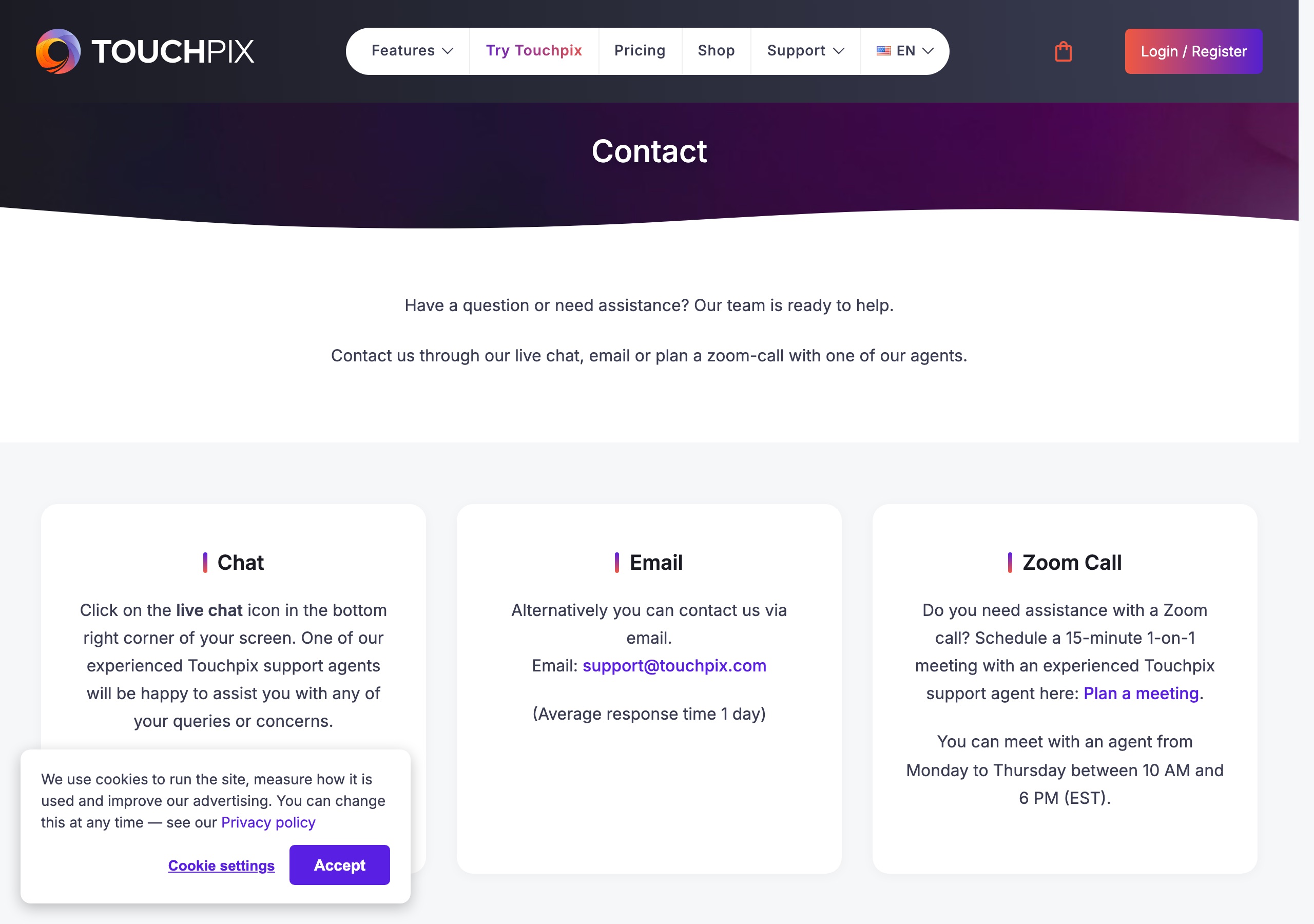
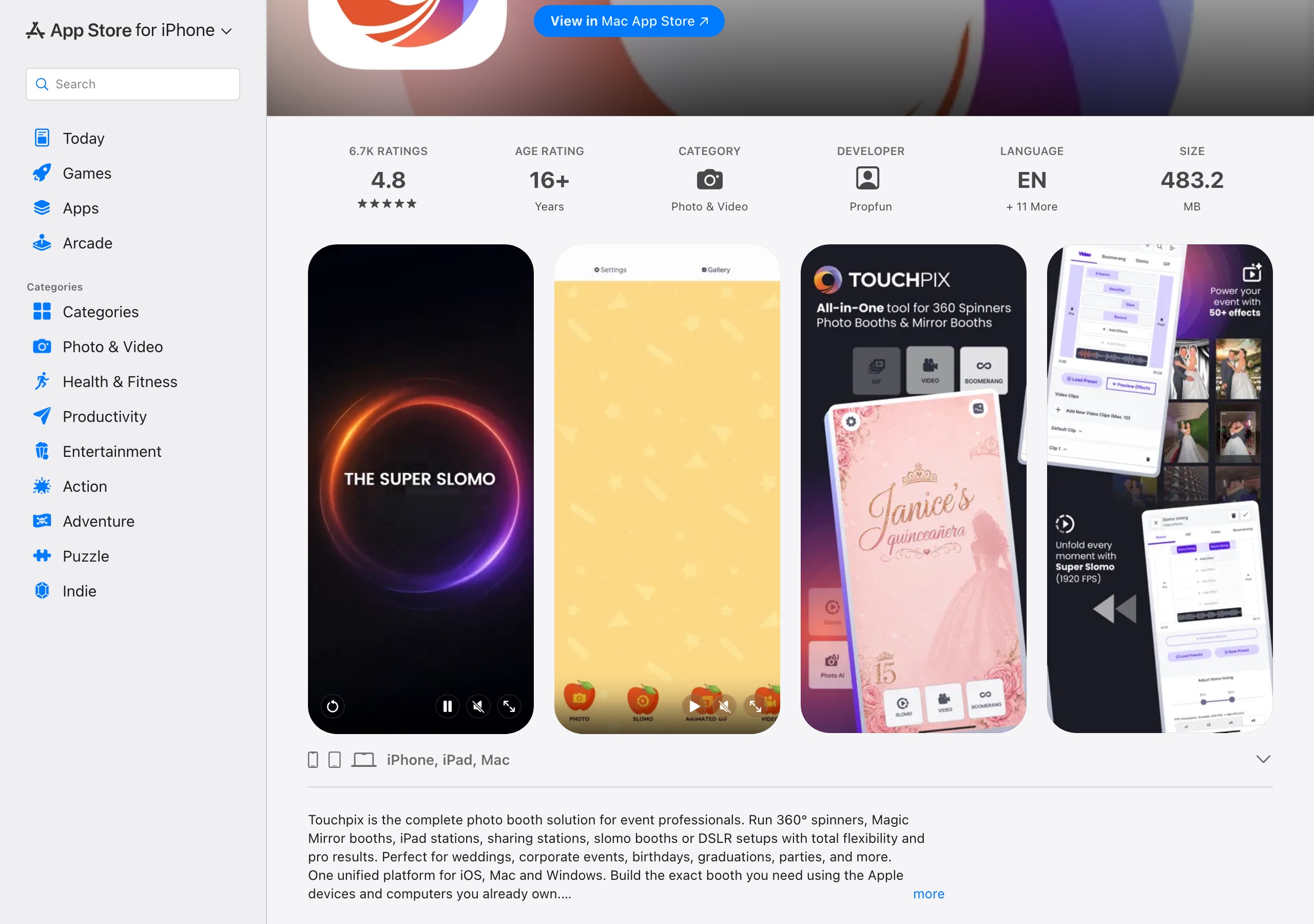
Sources: Touchpix support channels from touchpix.com/contact; 24/7 chat languages from their mirror booth page; App Store rating from the US App Store listing for Touchpix · Photo & Video Booth (all verified 2026-09-14). Pictor support details at pictor.pro/emergency-support.
The Bottom Line
For an operator running iOS and Android who bills month to month and wants a phone number on every plan, Pictor is the clearer fit: $49/mo with AI presets, emergency phone support on all three tiers, non-expiring tokens priced before each run, 5% paywall fees from the $149 Premium tier, and licence types you can mix on one account.
If you run more devices than simultaneous events, need Windows, Linux or Raspberry Pi booths, run 360 spinners or mirror booths, or want basic AI with no per-image cost, Touchpix is built for that and you should try them — their 14-day trial costs nothing. If you’re still narrowing the field, our guide to the best photo booth software in 2026 covers the wider market, and we give the same treatment to Pictor vs Booth.events and Pictor vs dslrBooth.
— Eve
FAQ
Is Pictor cheaper than Touchpix?
Month to month, yes: Pictor Basic is $49/mo against Touchpix’s cheapest ongoing monthly option at US$60.49. Committed annually, no: Touchpix PhotoPass is US$36.66/mo (US$439.90/yr) and MultiPass is US$73.33/mo (US$879.99/yr), both under the Pictor tier beside them. The deciding factor is usually devices: Touchpix gives unlimited devices per plan, Pictor licenses per active device.
What is Touchpix pricing in 2026?
Four annual licences, verified on touchpix.com/pricing on 14 September 2026: PhotoPass US$439.90/yr (2 active events, photo only), MultiPass US$879.99/yr (4 events), MultiPass Pro US$1,407.99/yr (8 events, adds Virtual Booth, Paywall and Surveys) and Multipass Enterprise US$2,199.99/yr (12 events, adds Mosaic and RAW backup). The shop also lists weekly, monthly and half-yearly options from US$20.89.
What is the best Touchpix alternative?
Pictor, for operators on iOS and Android who want month-to-month billing and emergency phone support on every tier. If you need 360 spinners, mirror booths or a native Linux booth, most Touchpix alternatives — Pictor included — won’t cover all of it.
What does Touchpix’s AI cost per image?
Nothing on their basic AI set, which is included with the subscription. AI Pro runs on credits: 1 for a built-in filter, custom filter, clothes swap or face swap, 2 for a background or custom composition, 10 for a video. Packs are US$12/100, US$20/200, US$49/500 and US$340/5,000, so a standard AI Pro image costs US$0.068–US$0.12.
Does Touchpix support Android and Windows?
Yes, both natively, along with macOS, Linux and Raspberry Pi. Check the feature list first: their own platform comparison counts 108 features on iOS, 94 on Android, 79 on macOS and 36 each on Windows and Linux, with 0 video effects on Windows and Linux.
Does Pictor support DSLR cameras?
Yes, on Pro ($99/mo) and Premium ($149/mo) — DSLR and mirrorless tethering is not on the $49 Basic plan. Touchpix supports wired DSLR on all five of its platforms and wireless on iOS and macOS.
Does Pictor run on Mac, Windows, Linux or a 360 spinner?
Mac and Windows run the browser-based Virtual Booth on Premium and Enterprise; native desktop apps are on our roadmap. Linux, Raspberry Pi, 360 spinners, mirror booths and GlamBot are not supported, and our Virtual Booth is not a 360 equivalent. Touchpix covers all of those.
Which is better for AI photo booths, Pictor or Touchpix?
Touchpix for the lowest AI running cost: basic AI is free with the plan and AI Pro credits are US$0.068–US$0.12 per image. Pictor if you want AI on a $49 month-to-month plan, the cost shown before every run, tokens that never expire, and AI video as a Premium feature at 5–15 tokens per 5-second render rather than a flat 10 credits.
Does Pictor have a free trial?
Yes. You get 25 free tokens and can build and test for as long as you need; a paid plan is required for a live event. Touchpix offers a 14-day free trial plus 15 free AI credits on every new account. Running both on your own hardware is the fastest way to decide.
How do I get support if something goes wrong at an event?
Call us — every Pictor plan includes emergency phone support, and the number is in your account dashboard and welcome email. Touchpix’s published channels are 24/7 live chat, email with a one-day average response, and a scheduled Zoom call Monday to Thursday.