Pictor vs Booth.events: An Honest Comparison for Photo Booth Operators
Last updated · All claims sourced from both vendors’ public pages
Pictor vs Booth.events: The Short Answer
Pick Pictor if you run mixed hardware: it is native on iOS and Android, turns any Mac or Windows PC into a browser-based Virtual Booth on Premium, includes emergency phone support on all three plans, and sells non-expiring tokens from $0.20 down to $0.07. Pick Booth.events if your fleet is all iPads and Macs. The single biggest difference is hardware: Booth.events is Apple-only.
Key facts (verified 14 September 2026)
- $49 / $99 / $149 per month (Pictor Basic, Pro, Premium) vs $49 / $79 / $129 (Booth.events Basic, Pro, Pro+; Pro+ Annual $1,299).
- $0.08 per standard AI image on Booth.events (1 credit at $8/100, “beta access”) vs $0.10 on Pictor’s popular bundle; $0.24–$0.32 for their Pro 2K/4K vs $0.20 for a Pictor high-compute image.
- Android: Pictor yes, Booth.events no. Booth.events runs on iPad, iPhone and Mac only; a Mac counts as one of your iPad licences.
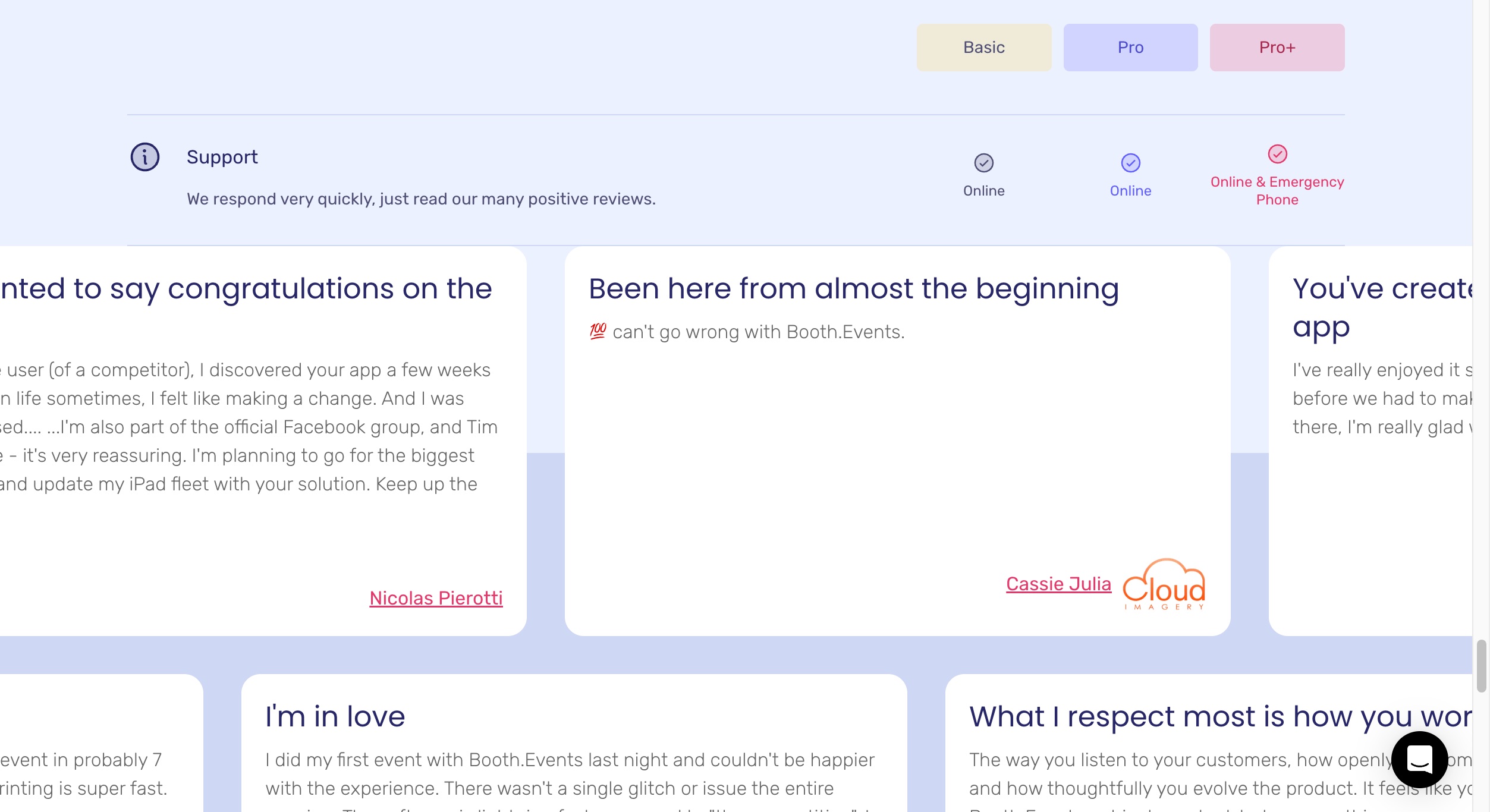
- Emergency phone support on every Pictor plan vs Pro+ only on Booth.events (their support row: Online / Online / Online & Emergency Phone).
- DSLR and mirrorless tethering on Pictor Pro ($99/mo) and Premium ($149/mo), not Basic. Booth.events supports Canon, Nikon and Sony on every plan, including their $49 Basic.
- AI starts at $49 on Pictor and $79 on Booth.events. Their Basic plan and Week Pass can buy credits but can’t use AI Prompts or AI Portraits.
Quick Verdict
Choose Pictor if you run mixed hardware and want AI from day one: native iOS and Android apps, a browser-based Virtual Booth on any Mac or Windows PC with Premium, AI presets from the $49 Basic plan, emergency phone support on every plan, and tokens that never expire at a price shown before each run.
Choose Booth.events if your fleet is iPads and Macs, you want four device licences in one $129/mo plan, you want to start with a $19 week pass, or you want Live Sync, Booth.Bot, AI Portraits, 360 Spinner support and AirDrop sharing. It is a real, polished product and we don’t pretend otherwise.
Everything on this page was re-verified against booth.events on 13 September 2026, after their site relaunch, and re-checked against their live pricing page, help centre and App Store listing on 14 September 2026. Where we quote their prices we show a screenshot of their page taken that day, so you don’t have to take our word for it.
Is Pictor cheaper than Booth.events?
Not on subscription price. Booth.events is cheaper at the mid and top tiers — $79 and $129 against Pictor’s $99 and $149 — and their $129 Pro+ bundles four device licences. Both entry plans are $49.
| Item | Pictor | Booth.events |
|---|---|---|
| Lowest paid subscription | $49/mo (Basic) | $49/mo (Basic — 1 iPad/Mac or iPhone, no AI Prompts) |
| Mid plan | $99/mo (Pro, “Most Popular”) | $79/mo (Pro — 1 iPad/Mac + unlimited iPhones) |
| High plan | $149/mo (Premium) | $129/mo or $1,299/yr (Pro+ — 4 iPads/Macs + unlimited iPhones) |
| Extra devices | Add licences; Basic, Pro and Premium can be mixed on one account | Pro+ only: $40/mo or $349/yr per extra iPad/Mac |
| Enterprise / agency plan | White-label from $1,500/yr | Not listed; Pro+ includes white-label app and custom domain |
| Annual discount | ~17% off monthly | Pro+ Annual $1,299 (≈16% off monthly) |
| Weekly / per-event option | Not currently | Yes — 1 Week Pass $19 (unlimited Basic events for 1 week); 4 × Pro Event Credits $99 (never expire) |
| Free trial | 25 free tokens; build and test free for as long as you need, paid plan required for live events | 3 free events (100 photos each, gallery live one week), no card; then a free 2-week Pro/Pro+ trial with unlimited events and 200 AI credits |
| AI usage billing | Tokens: $0.07–$0.20 each depending on bundle; never expire | Credits: $8 per 100, labelled “beta access”; buyable on any plan, but AI Prompts and AI Portraits aren’t available on Basic or the 1 Week Pass. 200 free credits for new Pro/Pro+ subscribers |
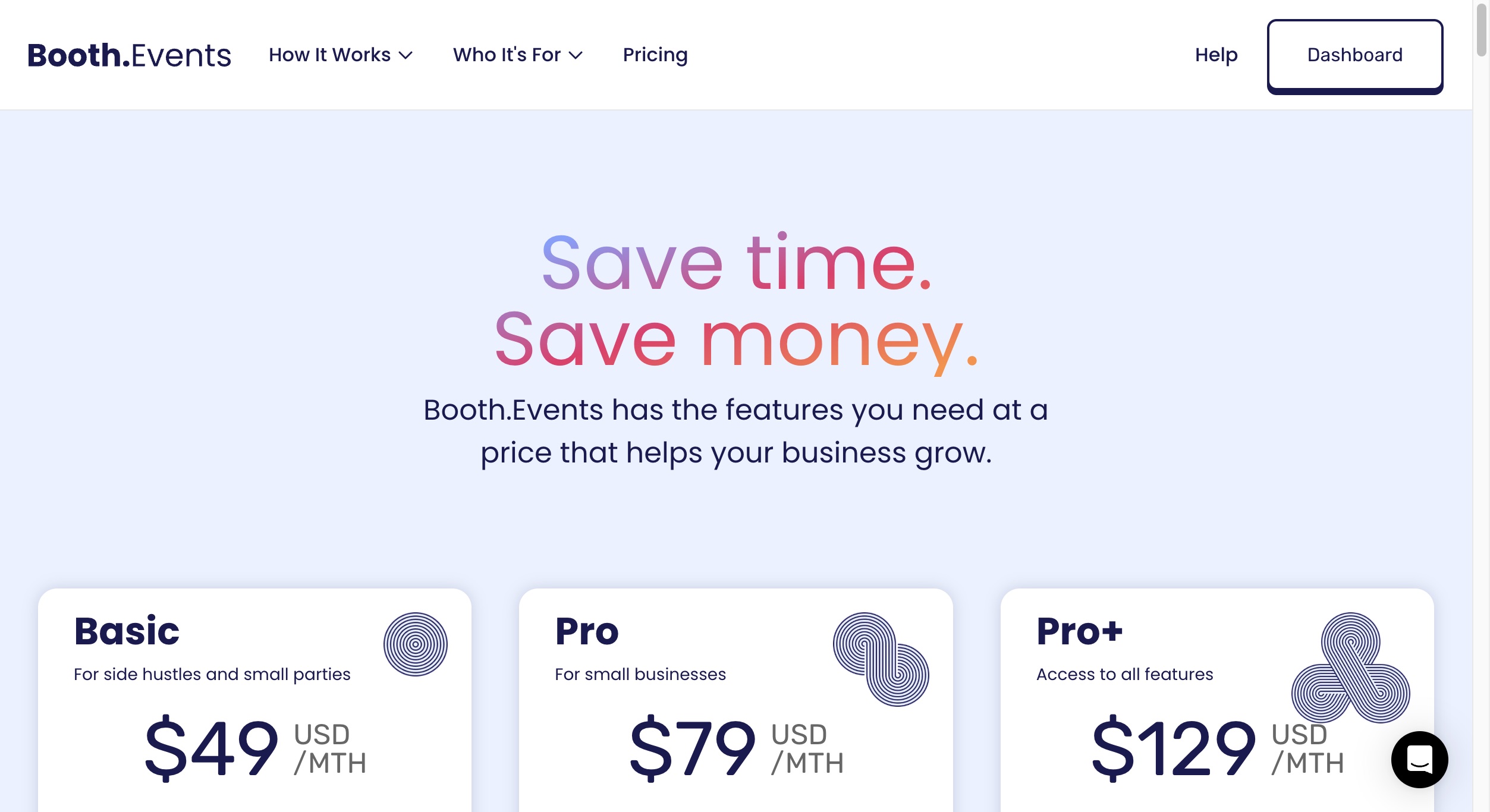
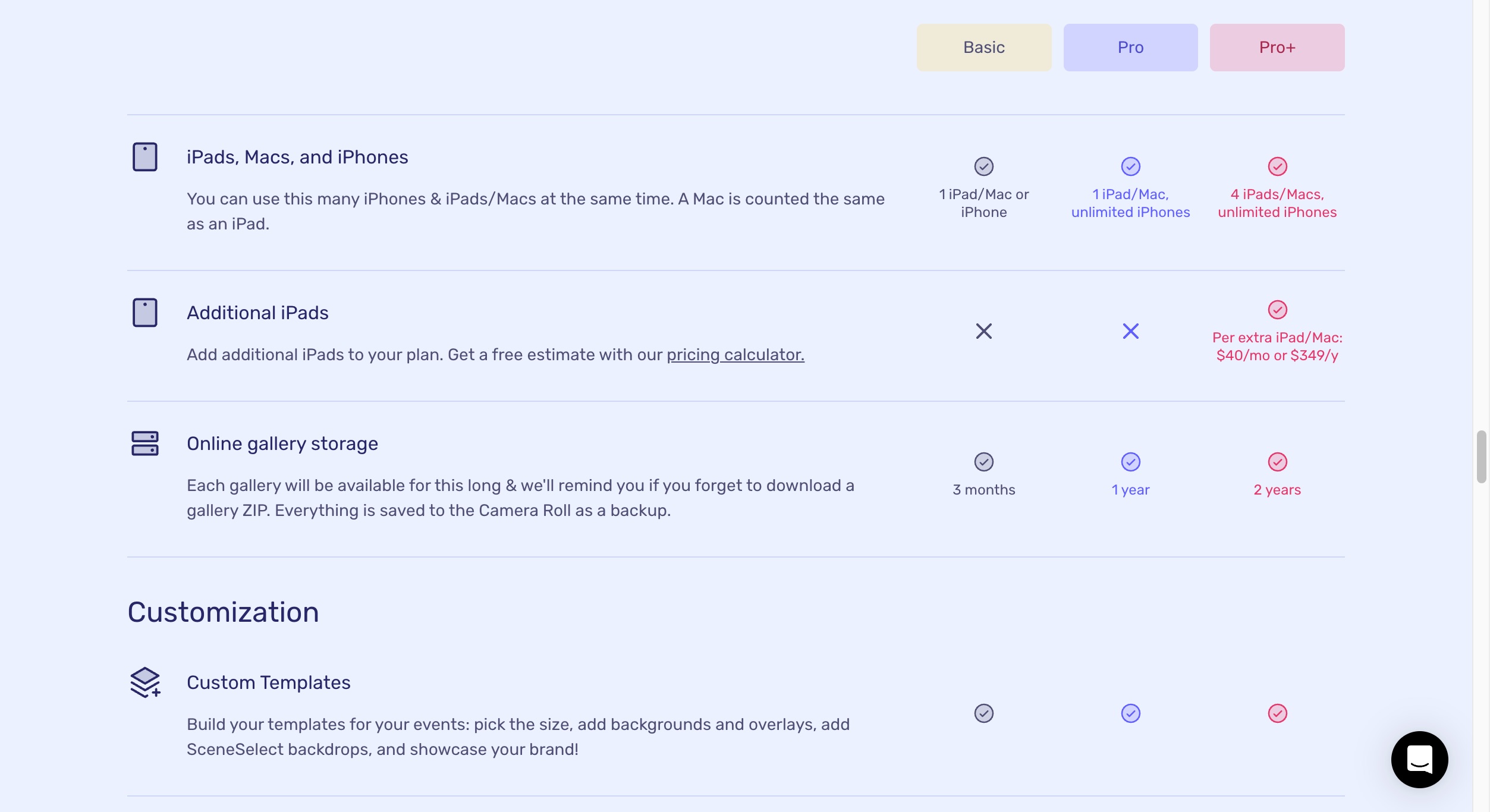
Sources: Booth.events prices from booth.events/pricing and booth.events/getting-started (verified 2026-09-13, screenshots above; re-checked live 2026-09-14 — unchanged). Pictor pricing from pictor.pro/pricing and pictor.pro/ai-pricing (verified 2026-09-14). Competitor pricing as of publish date — verify current pricing on vendor sites.
Pictor’s honest note: On subscription price alone Booth.events wins at the mid and top tiers, and Pro+ bundles four device licences. If you run one iPad and one event a year, their $19 Week Pass is genuinely useful — optionality we don’t have today. What changes the maths is what’s bundled: phone support on every Pictor plan, AI from the entry tier, and the hardware you’re allowed to run a booth on.
Fact Check: “Best Token Prices in the Industry”
Booth.events’ relaunched homepage says they have the “Fastest AI & best token prices in the industry”. We checked their claim against their own published rates and the rest of the industry’s.
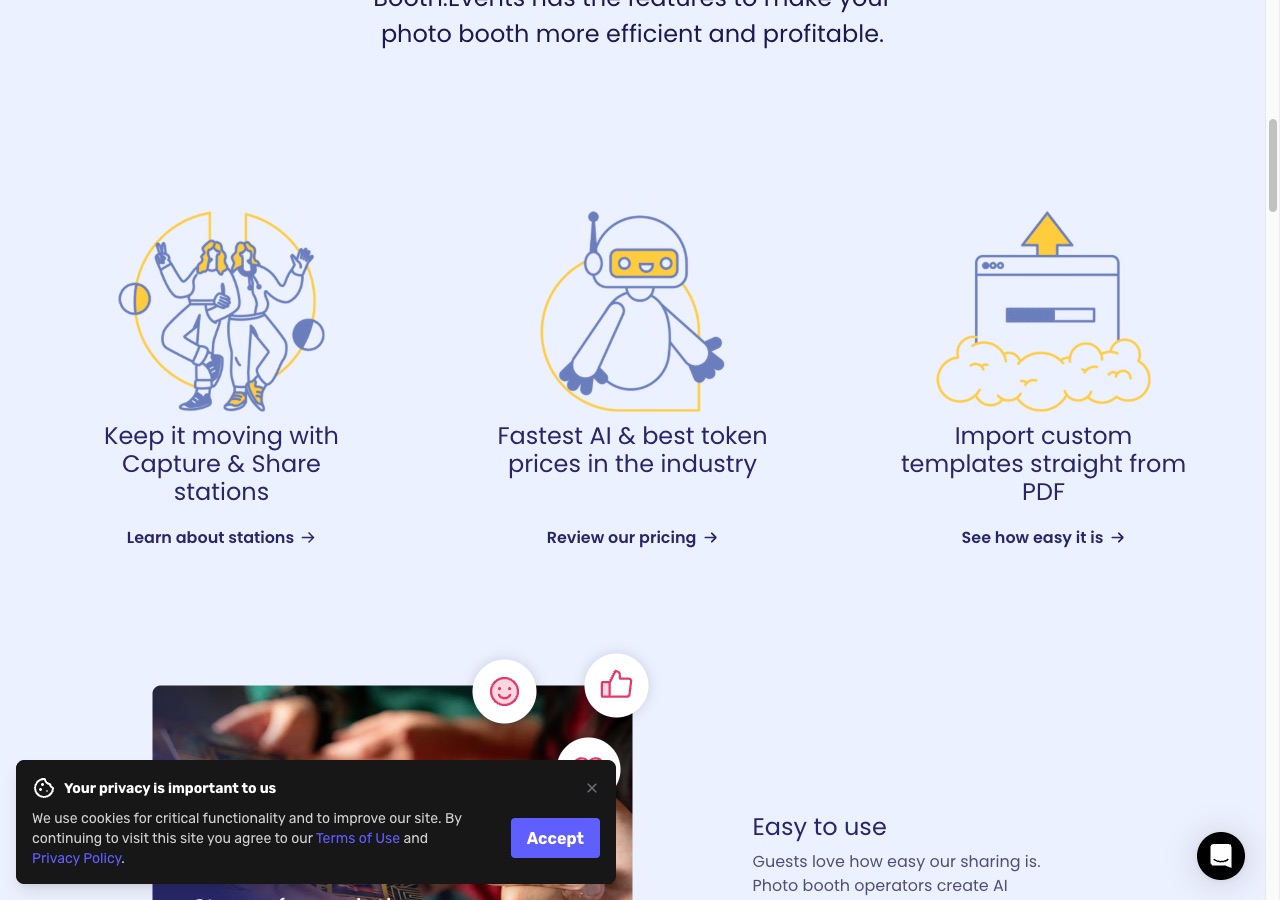
Booth.events doesn’t sell tokens; it sells credits at $8 per 100, labelled “beta access”. Their help centre publishes the credits per generation. Multiply the two for a real per-image price:
| Vendor | Effect | Published unit price | Units per image | Cost per image |
|---|---|---|---|---|
| Booth.events | AI Prompt — Nano Banana (standard) | $0.08 per credit | 1 credit | $0.08 |
| Booth.events | AI Prompt — Nano Banana Pro 2K | $0.08 per credit | 3 credits | $0.24 |
| Booth.events | AI Prompt — Nano Banana Pro 4K | $0.08 per credit | 4 credits | $0.32 |
| Booth.events | AI Portrait (Pro+ only; rerolls charged again) | $0.08 per credit | 2 credits | $0.16 |
| Pictor | AI Image, low-compute | $0.07–$0.20 per token ($0.10 on the popular 2,000-token bundle) | 1 token | $0.07–$0.20 ($0.10 popular) |
| Pictor | AI Image, high-compute | same | 2 tokens | $0.14–$0.40 ($0.20 popular) |
| Breeze FX (pay-per-use AI service, not a booth platform) | Image Prompt | published per image, volume-tiered | — | from $0.065 |
| Breeze FX | Face Swap | published per image, volume-tiered | — | from $0.032 |
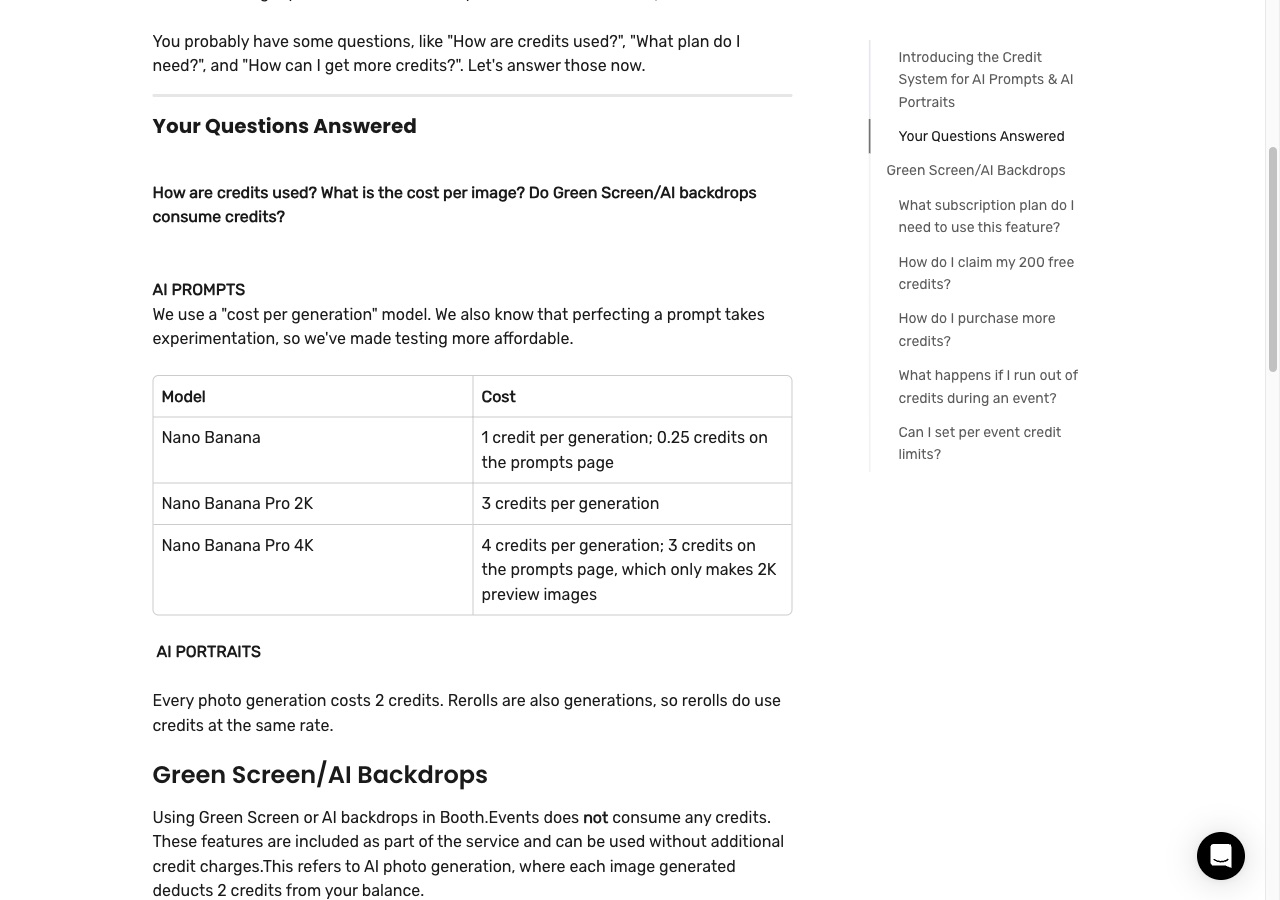
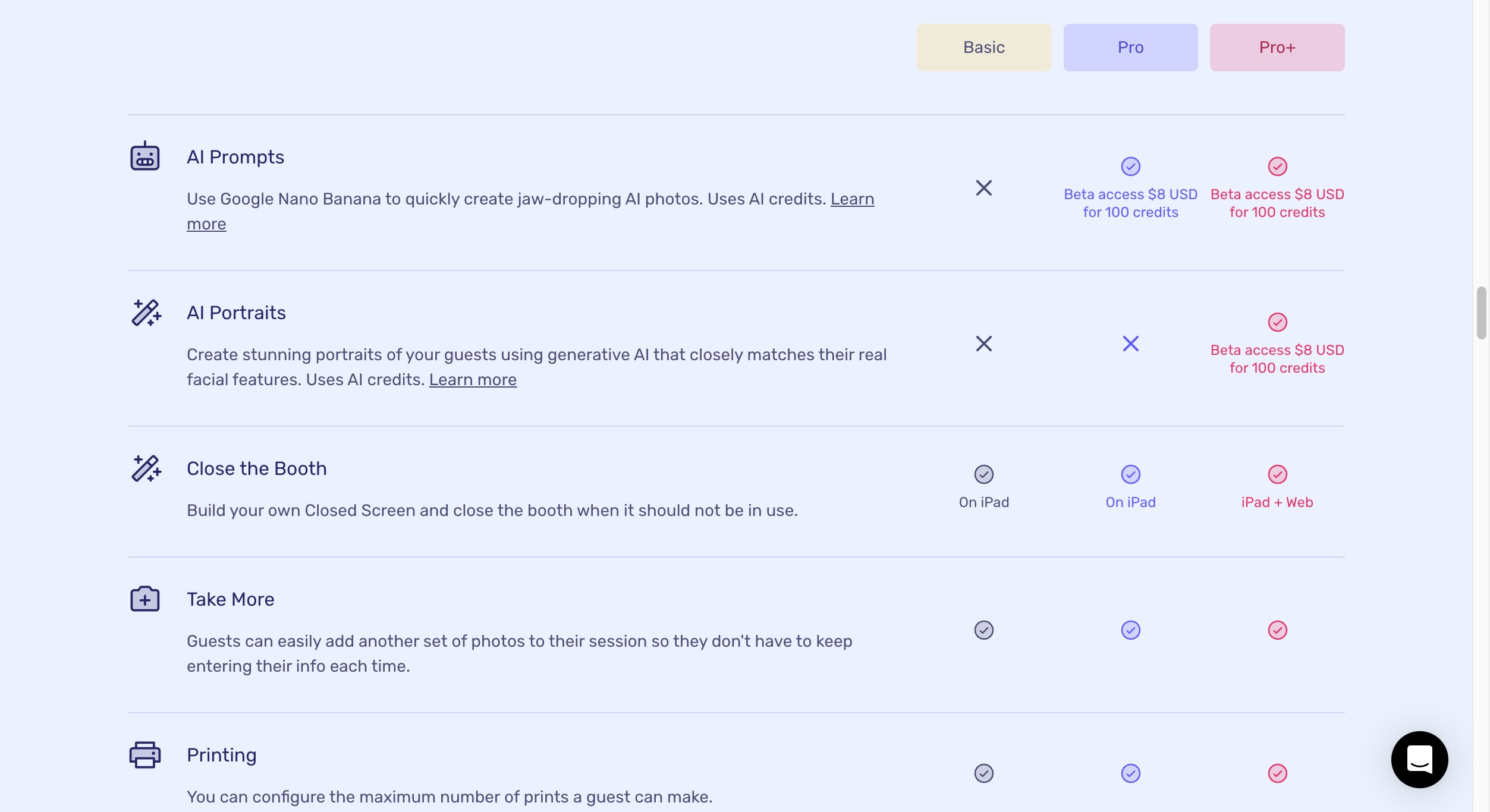
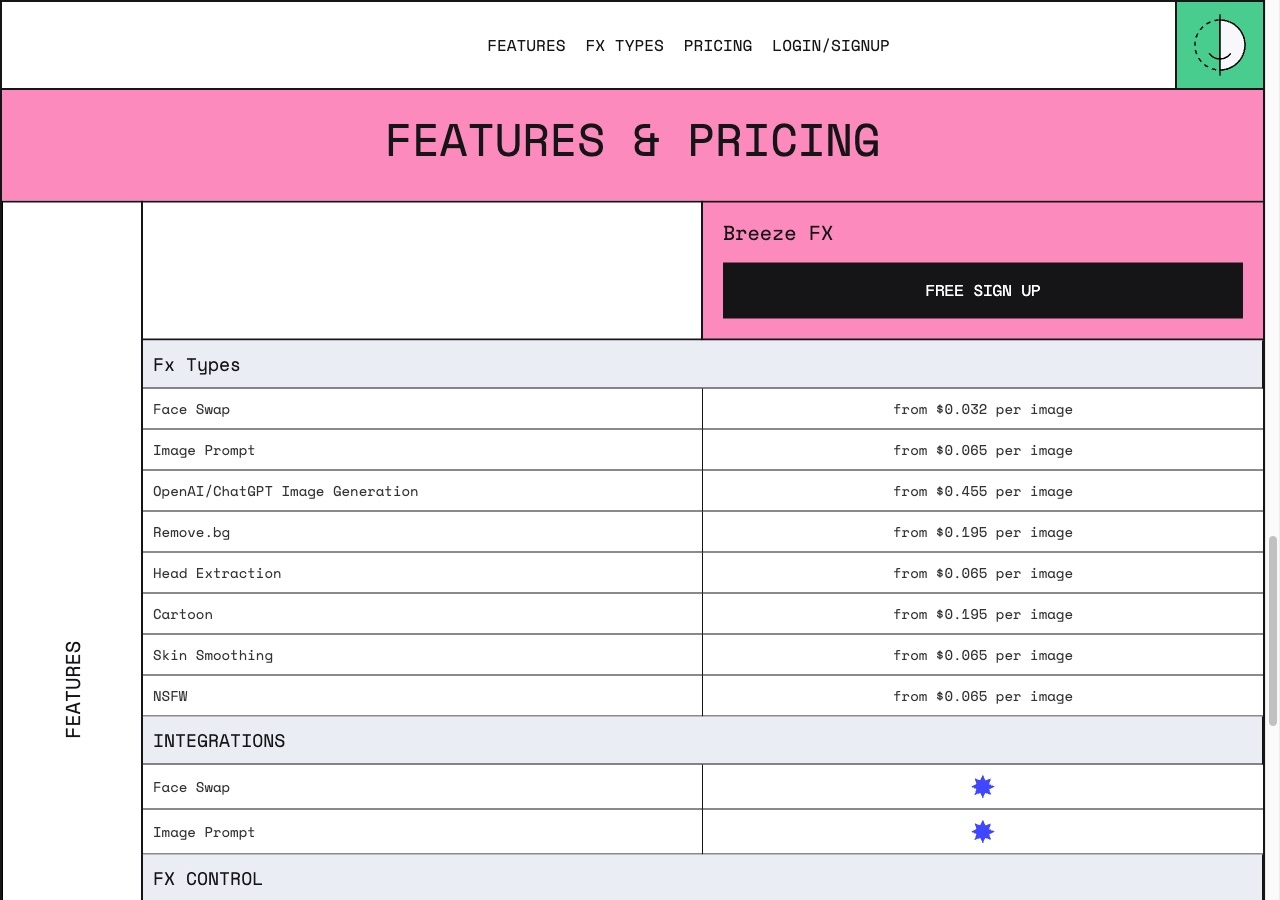
What’s true: at $0.08 per standard Nano Banana image, Booth.events is cheaper than Pictor’s most popular token bundle ($0.10 per low-compute image). Credit where due.
What the published numbers don’t support: “best in the industry” is a superlative, and other vendors publish lower rates. Breeze (the vendor behind Breeze Booth and DSLR Remote Pro) publishes Breeze FX image generation from $0.065 and face swap from $0.032 per image, pay-per-use, no subscription — those are volume-tiered floor prices, and Breeze FX is an effects service you run alongside booth software rather than a competing booth platform, so read it as a rate comparison rather than a product comparison. Pictor’s 10,000- and 20,000-token bundles work out at $0.08 and $0.07 per low-compute image, equal to or below Booth.events, though reaching those rates takes an $800 or $1,400 purchase. And at the quality tier that matters for a paid event, their Pro 2K/4K images cost $0.24–$0.32 against $0.20 for a Pictor high-compute image.
Three things to read before you compare rates: (1) Booth.events’ $8/100 is labelled “beta access” on their own pricing page, so treat it as introductory, not locked. (2) credits can be bought on any plan, but AI Prompts and AI Portraits aren’t available on Basic or the 1 Week Pass, so the $49 tier has nothing to spend them on. (3) AI Portrait rerolls are charged again at 2 credits each. In their favour: new Pro and Pro+ subscribers get 200 free credits, and testing a prompt on their prompts page costs 0.25 credits (standard) or 3 credits (Pro 4K, which returns a 2K preview). Pictor tokens never expire, the price is shown in-app before every run, and AI presets start on Basic.
“Fastest AI” is a speed claim we can’t test from outside. Their page at booth.events/feature/ai-likeness-preservation says AI photos appear on the iPad in 10–20 seconds; other pages of theirs say 15. We publish no equivalent benchmark, so we won’t argue it either way.
Which has cheaper AI, Pictor or Booth.events?
Booth.events is cheaper for standard-quality images ($0.08 vs $0.10); Pictor is cheaper at the high-quality tier ($0.20 vs $0.24–$0.32) and on volume bundles, and is the only one of the two with AI on a $49 plan. Here is what sits on each tier.
What you get on each plan
| AI feature | Pictor ($49 / $99 / $149) | Booth.events ($49 / $79 / $129) |
|---|---|---|
| AI photo effects / prompts | AI Presets & Library from Basic; Custom Prompt Editor from Pro | Not on Basic; AI Prompts (Google Nano Banana) on Pro and Pro+ |
| Prompt helper | Custom Prompt Editor (Pro, Premium) | Booth.Bot — describe an idea, get a prompt (Pro, Pro+) |
| AI video effects | Premium (5–15 tokens per 5-second render) | Not listed on their features or pricing pages |
| AI Portraits (likeness-preserving) | Not packaged as a separate feature | Pro+ only — 2 credits per generation, rerolls charged |
| Background removal / replace | Pro and Premium, 1 token per use | All plans, unlimited, no credits |
| Glam filter | AI Glam Filters & Skin Retouching (Soon) | All plans, unlimited, no credits |
| Billing | Tokens, never expire, cost shown before each run | Credits, $8/100 (beta); not usable on Basic or the Week Pass |
Sources: Booth.events feature placement from booth.events/pricing, booth.events/feature/booth-bot and the help-centre AI Credit FAQ (verified 2026-09-13, re-checked 2026-09-14; screenshots above). Pictor feature placement from pictor.pro/ai-pricing.
How the billing actually works at an event
Pictor (tokens): every AI action costs a fixed, published number of tokens, preset generations included, and you see that cost before the guest triggers the effect. Bundles run from $20 for 100 tokens to $1,400 for 20,000, and unused tokens never expire.
Booth.events (credits): AI Prompts and AI Portraits draw on a separate credit balance bought on top of a Pro or Pro+ subscription, $8 per 100 credits, 1–4 credits per live-event image by model and resolution (0.25–3 when testing on their prompts page). Glam filter, colour filters and background replacement use no credits on any plan.
Honest caveat: your real number depends on the quality tier your clients expect and the bundle you buy. Both platforms publish their rates; run the math on your last four events with your actual effect mix.
What platforms do Pictor and Booth.events run on?
Pictor runs native on iOS and Android tablets and phones, plus a browser-based Virtual Booth on Mac and Windows with Premium. Booth.events is Apple-only: native iPad app, iPhones as capture devices on Pro and Pro+, and Macs that count as an iPad licence. Their Apple focus is real and worth respecting.
| Platform | Pictor | Booth.events |
|---|---|---|
| iPad / iOS | Yes (native) | Yes (native, App Store) |
| iPhone | Yes (native) | Yes — unlimited iPhones on Pro and Pro+ |
| Android tablet | Yes (native) | Not offered |
| Mac | Yes — browser-based Virtual Booth with Premium, no app install | Yes — runs on Mac; “a Mac is counted the same as an iPad” licence |
| Windows PC | Yes — browser-based Virtual Booth with Premium; a native Windows app is on our roadmap | Not offered |
| DSLR / mirrorless cameras (Canon, Nikon, Sony) | Yes — Pro ($99/mo) and Premium ($149/mo), not Basic | Yes — all plans, incl. the $19 Week Pass |
| 360 booth hardware | Not yet | Yes (360 Spinner Booth support) |
| Roamer / roaming photographer | Not yet | Yes — Roamer mode (booth.events/people/roamer) |
| Virtual booth (browser-based, guests on their own device) | Yes — Premium and Enterprise only, no per-event fee | Not offered; their “Remote-In” (Pro+) controls your own iPads and Macs from a browser, a different thing |
Sources: Booth.events platform list from booth.events/pricing compare table (verified 2026-09-13, re-checked 2026-09-14; screenshot above) and booth.events/people/roamer. Pictor platform list from pictor.pro/pricing; camera models at pictor.pro/camera-compatibility.
Pictor’s honest note: if your fleet is iPads and Macs, Booth.events’ Apple experience is among the most polished in this market. Where we differ is that Pictor runs native on Android and in a browser on any Windows PC, so your software doesn’t dictate your hardware procurement.
What does Pictor do that Booth.events doesn’t?
1. Native Android tablet support
Pictor runs native on Android tablets; Booth.events is Apple-only. If you already run Android, or buy it because the hardware is cheaper, that is a structural difference rather than a feature checkbox.
2. Windows PC booth mode, and Mac without installing anything
The Pictor Virtual Booth runs in a browser on any modern Mac or Windows PC on Premium, so a laptop you already own becomes a booth. Booth.events runs on Mac (counted as one of your iPad licences) and has no Windows option.
3. AI presets from the $49 plan
Pictor Basic includes AI photo presets; Pro adds the Custom Prompt Editor, digital props, background removal and DSLR and mirrorless tethering; Premium adds AI Video. Every AI action costs tokens at the price shown before it runs. Booth.events supports DSLR cameras on Basic, which we don’t, but their $49 tier has no AI Prompts or AI Portraits.
4. Tokens that never expire, at a price that isn’t “beta”
Pictor token bundles are one-time purchases from $0.20 down to $0.07 per token, and unused tokens never expire. Booth.events’ credit price is marked “beta access” on their own pricing page, which means it can move.
5. Mix-and-match licences on one account
Basic, Pro and Premium licences run on the same Pictor account, so you match the plan to the event and keep one bill.
6. Emergency phone support on every plan
When something breaks at 11 PM on a Saturday you can call us, on any plan. On Booth.events, emergency phone support is Pro+ only.
Pictor is also built and used by OutSnapped, a working photo booth company. Booth.events is a software company building for operators, and has shipped an excellent Apple product over many years. Both models produce good software; ours comes from a team running events the same weekend you are.
What does Booth.events do that Pictor doesn’t?
Quite a lot, and pretending otherwise would waste your time:
- Four device licences bundled into Pro+ at $129/mo — cheaper than four Pictor licences
- 1 Week Pass ($19) and 4 × Pro Event Credits ($99) for occasional operators; we have no per-event option
- Cheaper standard-quality AI images — $0.08 against $0.10 on our popular bundle
- Booth.Bot — describe an idea in plain English and it writes the AI prompt (Pro and Pro+)
- AI Portraits with likeness preservation on Pro+; we have no packaged equivalent
- Unlimited background replacement and Glam Filter on every plan, with no credits charged
- Live Sync — their dashboard pushes changes to running events without relaunching
- Import templates straight from PDF, free on all their plans
- Scheduled Events, Remote-In and webhooks (all Pro+) for drop-offs and fixed installs; in-booth guest payments via Stripe or Nayax are announced for October 2026 on Pro+ (announced, not shipped)
- Roamer mode, 360 Spinner support and AirDrop sharing on iPad
- Booth LED control over Bluetooth for ATA, Danny Max and Mobibooth booths plus SP-110E/SP-630E/SP-107E controllers (the SP-107E is used by Salsa 1; they state they are not affiliated with PBSCO)
- A mature iPad app rated 4.8 on the US App Store (4.77 average from 923 ratings, checked 14 September 2026)
These are real gaps. We don’t ship features we haven’t used at real events ourselves, which is why some take us longer than they would at a software-only company. If 360 or roamer work fills your calendar, they are the better pick today.
What does each platform cost per month in real use?
For an Apple-only two-booth fleet, Booth.events is cheaper per month on today’s beta credit pricing: roughly $155–$206 against $230–$262 for Pictor. The working, at each vendor’s published rates, for two booths and 8 events a month with AI on 4 of them (320 AI images):
| Item | Pictor (2 Pro licences) | Booth.events (Pro+) |
|---|---|---|
| Subscription | $198/mo (2 × $99) | $129/mo (covers up to 4 iPads/Macs) |
| 320 standard AI images | $32 (1 token each, popular bundle) | $25.60 (1 credit each) |
| 320 higher-quality AI images | $64 (2 tokens each) | $76.80 (Pro 2K, 3 credits each) |
| Total | $230–$262/mo, phone support included | $154.60–$205.80/mo, phone support on Pro+ |
The Pictor case is what the subscription buys rather than the subscription itself: Android and Windows hardware, AI presets from $49, phone support on every tier, and tokens at a published, non-beta price that never expire. If your fleet is Apple and you value Live Sync, Booth.Bot and AirDrop polish, Booth.events is a strong choice — run their free events and 2-week trial before you commit.
Which has better support, Pictor or Booth.events?
Pictor includes emergency phone support on all three plans; Booth.events includes it on Pro+ only. Both run a knowledge base, email support and an active Facebook community.
| Support Item | Pictor | Booth.events |
|---|---|---|
| Online chat / messaging support | Yes | Yes |
| Emergency phone support | Yes — every plan | Pro+ only |
| Email support | Yes | Yes |
| Knowledge base + tutorials | Yes (support.pictor.pro) | Yes (help.booth.events) |
| App Store rating | — | 4.8 (4.77 average, 923 ratings, US App Store, 14 Sep 2026) |
| Active community | Pictor Facebook group; live Show & Tell every Wednesday | Booth.events Community Facebook group |
Sources: Booth.events support tiers from booth.events/pricing compare table and booth.events/feature/help-and-support (verified 2026-09-13, screenshot above); App Store rating from the iTunes lookup API for app id 1519464692 on 2026-09-14. Pictor support details at pictor.pro/emergency-support.
The Bottom Line
For an operator on mixed hardware who wants AI from day one and a phone number on every plan, Pictor is the clearer fit: native Android plus a browser Virtual Booth on Mac and Windows, AI presets from $49/mo, emergency phone support on all three tiers, and non-expiring tokens at a published rather than beta price.
If your fleet is Apple, you value App Store polish and Live Sync, and you want a $19 week pass or free events before subscribing, Booth.events is built for exactly that and you should try them. If you’re still narrowing the field, our guide to the best photo booth software in 2026 covers the wider market, and we have the same side-by-side treatment for Pictor vs Snappic and Pictor vs LumaBooth.
— Eve
FAQ
Is Pictor cheaper than Booth.events?
No, not on subscription price. Both start at $49/mo, but Booth.events’ Pro is $79 against Pictor’s $99, and their Pro+ is $129 with four device licences against Pictor Premium at $149. On AI usage it splits: their standard image is $0.08 against $0.10 on Pictor’s popular bundle, while their Pro 2K/4K images at $0.24–$0.32 cost more than a Pictor high-compute image at $0.20.
What is Booth.events pricing in 2026?
$49/mo Basic, $79/mo Pro, $129/mo Pro+ or $1,299/yr Pro+ Annual, verified on booth.events/pricing on 14 September 2026. Extra iPads or Macs are $40/mo or $349/yr on Pro+ only. A $19 1 Week Pass and 4 × Pro Event Credits at $99 need no subscription, and AI credits are $8 per 100 at “beta access” pricing.
What is the best Booth.events alternative?
It depends on your hardware. If you run Android tablets or Windows PCs, or want AI on a $49 plan with emergency phone support included, Pictor covers all of it. If your calendar is 360 Spinner or Roamer work, Booth.events does that today and Pictor does not.
Does Booth.events really have the “best token prices in the industry”?
No — the published numbers don’t support the superlative. Their credits work out to $0.08 per standard image and $0.24–$0.32 for Pro 2K/4K, at “beta” pricing. Breeze publishes Breeze FX image generation from $0.065 and face swap from $0.032 per image with no subscription, and Pictor’s volume bundles reach $0.07 per token. Screenshots of every source are in the fact check above.
What does Booth.events’ AI cost per image?
$0.08 for a standard Nano Banana image, $0.24 at Pro 2K, $0.32 at Pro 4K and $0.16 for an AI Portrait — $8 per 100 credits at 1, 3, 4 and 2 credits per generation. Testing a prompt on their prompts page costs 0.25 credits (standard) or 3 (Pro 4K, 2K preview), and new Pro/Pro+ subscribers get 200 free credits.
Does Booth.events support Android or Windows?
No. Booth.events runs on iPad, iPhone and Mac only, and a Mac counts as one of your iPad licences. Pictor is native on iOS and Android, and its browser-based Virtual Booth runs on Mac and Windows with Premium.
Does Pictor support DSLR cameras?
Yes, on Pro ($99/mo) and Premium ($149/mo), not the $49 Basic — Canon, Nikon and Sony DSLR and mirrorless bodies, the same vendors Booth.events supports. Booth.events includes camera support on every plan, Basic included.
Which is better for AI photo booths, Pictor or Booth.events?
Pictor, if you want AI on the entry plan and on mixed hardware: presets from $49/mo, custom prompts and background removal on Pro, AI video on Premium, billed in non-expiring tokens at the price shown before each run. Booth.events, if you are Apple-only and want the cheapest standard-quality image ($0.08) plus AI Portraits and Booth.Bot, accepting that their AI starts at $79.
Does Pictor have a free trial?
Yes. You get 25 free tokens and can build and test for as long as you need; a paid plan is required for a live event. Booth.events offers 3 free events of up to 100 photos each with no credit card, then a free 2-week Pro or Pro+ trial with 200 AI credits. Trying both side by side is a reasonable way to decide.
How do I get support if something goes wrong at an event?
Call us — every Pictor plan includes emergency phone support, and the number is in your account dashboard and welcome email. On Booth.events, emergency phone support is Pro+ only.