Pictor vs Fiesta (PBSCO): Keep Your Booth, Switch the Software
Keep your PBSCO Salsa or Guac and switch the software. Pictor vs Fiesta on price, phone support, printing, AI and the LED trade-off, verified 5 October 2026.
Last updated · All claims sourced from both vendors’ public pages
Pictor vs Fiesta (PBSCO): The Short Answer
If you own a Salsa or Guac and Fiesta is costing you sleep, you can keep the booth and change the software. Salsa and Guac are iPad booths, and Pictor runs on the same iPad, with emergency phone support on every plan and Guac’s Canon EOS R100 on Pictor Pro and Premium. The trade-off is the lights: outside Fiesta, PBSCO’s LEDs run in Lamp Mode, a solid white.
Key facts (verified 5 October 2026)
- $49 / $99 / $149 per month (Pictor Basic, Pro, Premium) vs $59 / $119 per month (Fiesta Plus, Pro), or $49 / $99 a month if you pay Fiesta annually.
- Phone support: emergency phone support on every Pictor plan. On Fiesta, phone support is Pro only; Plus gets email, AI chat and 7-day support.
- Printing: on every Pictor plan, through the Print Partner App on a Windows or Mac computer. Fiesta lists Printing under Pro, not Plus.
- One licence per booth: on Pictor, every booth running at the same time needs its own licence (three booths, three licences), and each can be on a different plan within one account. Fiesta Plus says “Run 1 booth at a time.”
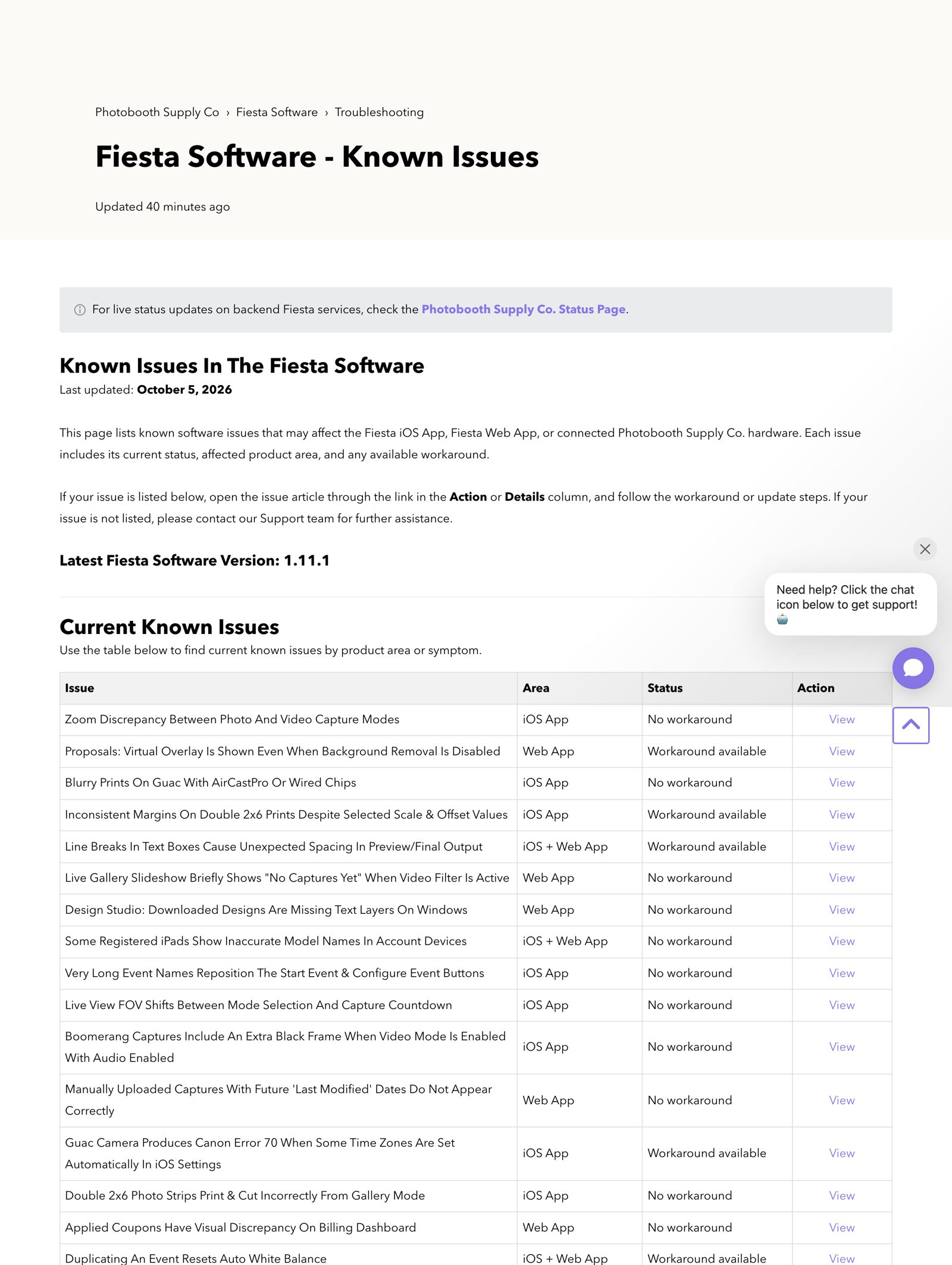
- Open bugs: PBSCO’s own Known Issues page lists 17 current Fiesta issues, 12 of them marked “No workaround” (last updated 5 October 2026).
- App Store: Fiesta is rated 3.6 out of 5 from 158 ratings.
Quick Verdict
Choose Pictor if you want a phone number to call on a Saturday night without paying for a top tier, AI from the $49 plan, and the freedom to run your Salsa or Guac on software you choose. Pictor runs natively on iOS and Android, tethers Canon, Nikon and Sony cameras on Pro and Premium, and bills AI in tokens that never expire, with the cost shown before every run.
Stay on Fiesta if the full LED sequences are part of what you sell, you run a Tortilla 360 booth (Pictor doesn’t support 360), or you rely on Fiesta’s business extras: proposals, the starter website, the marketing content library and the hardware discounts that come with a subscription.
Everything on this page was verified against photoboothsupplyco.com, PBSCO’s support site and the App Store on 5 October 2026. Where we quote PBSCO, we show a screenshot of their page taken that day, so you don’t have to take our word for it.
Can I run Pictor on my Salsa or Guac booth?
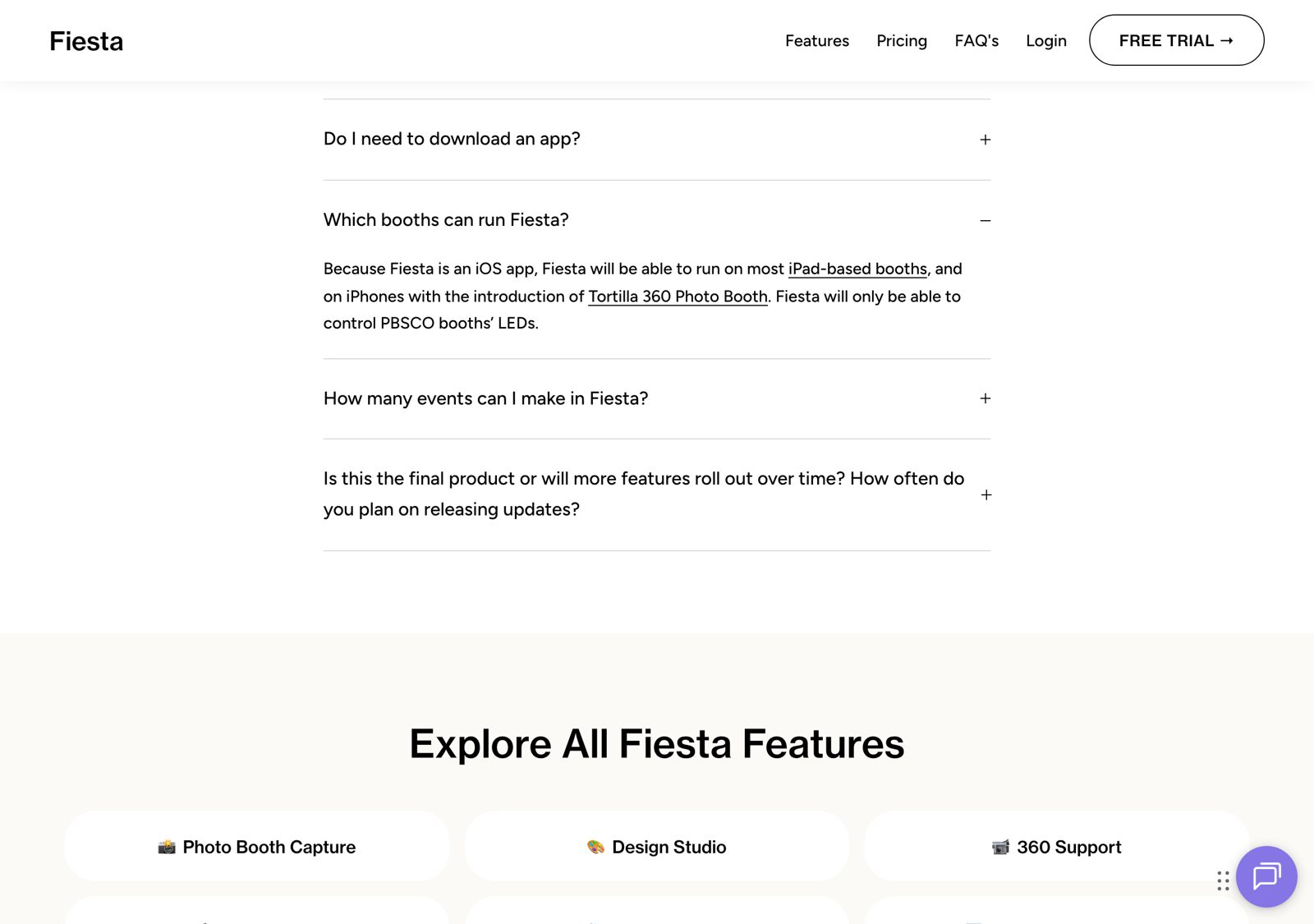
Yes. PBSCO’s booths are built around an iPad, and PBSCO says so itself: “Because Fiesta is an iOS app, Fiesta will be able to run on most iPad-based booths.” The same is true the other way round. Any iPad app, Pictor included, can run on the iPad inside a Salsa or a Guac.
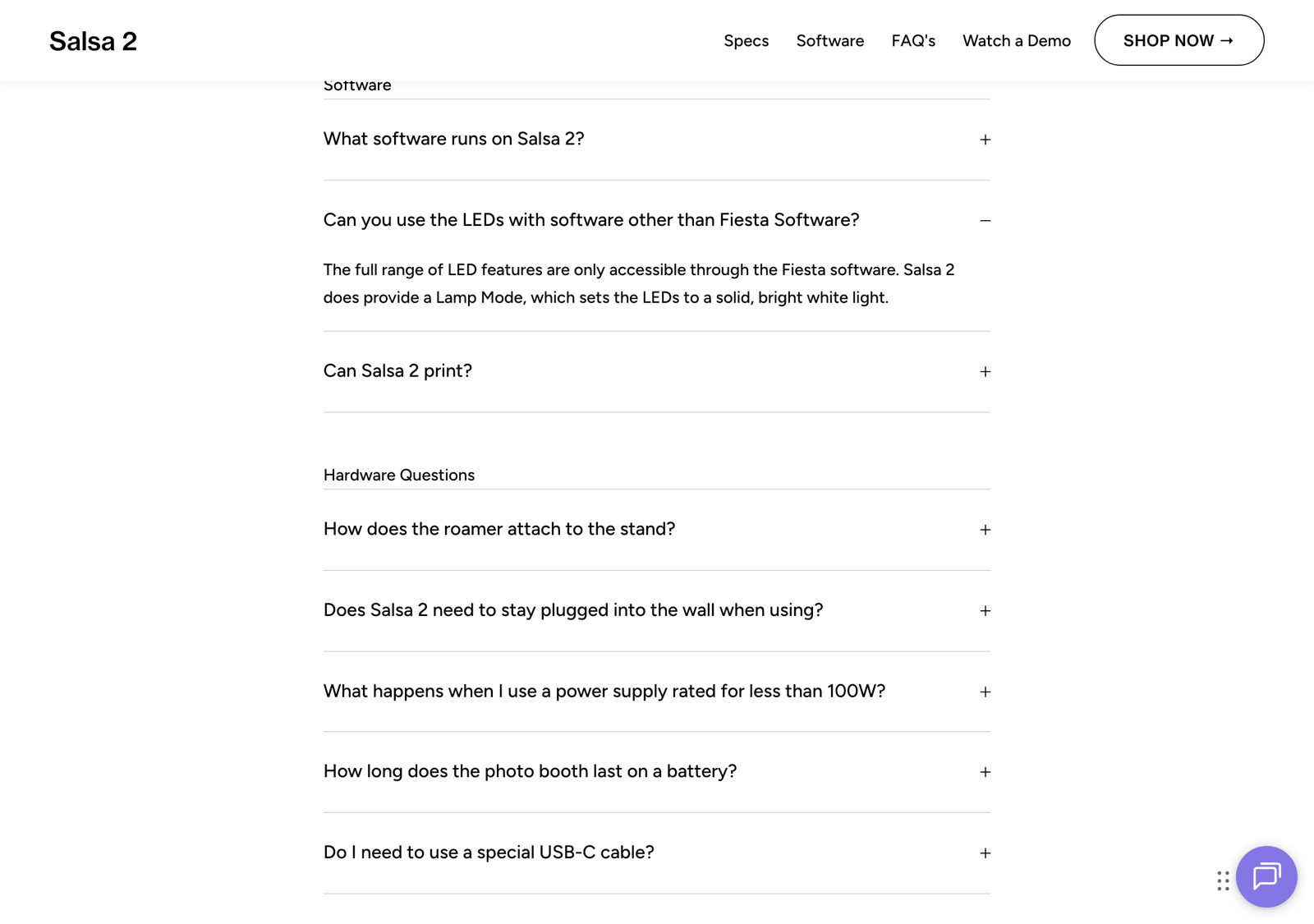
What changes is the lighting. PBSCO’s Salsa 2 FAQ says the full range of LED features is only available in Fiesta, and that other software gets Lamp Mode, which sets the LEDs to a solid, bright white. For most events that is a perfectly good key light. If your clients book you for the colour sequences, it is a real loss, and you should weigh it.
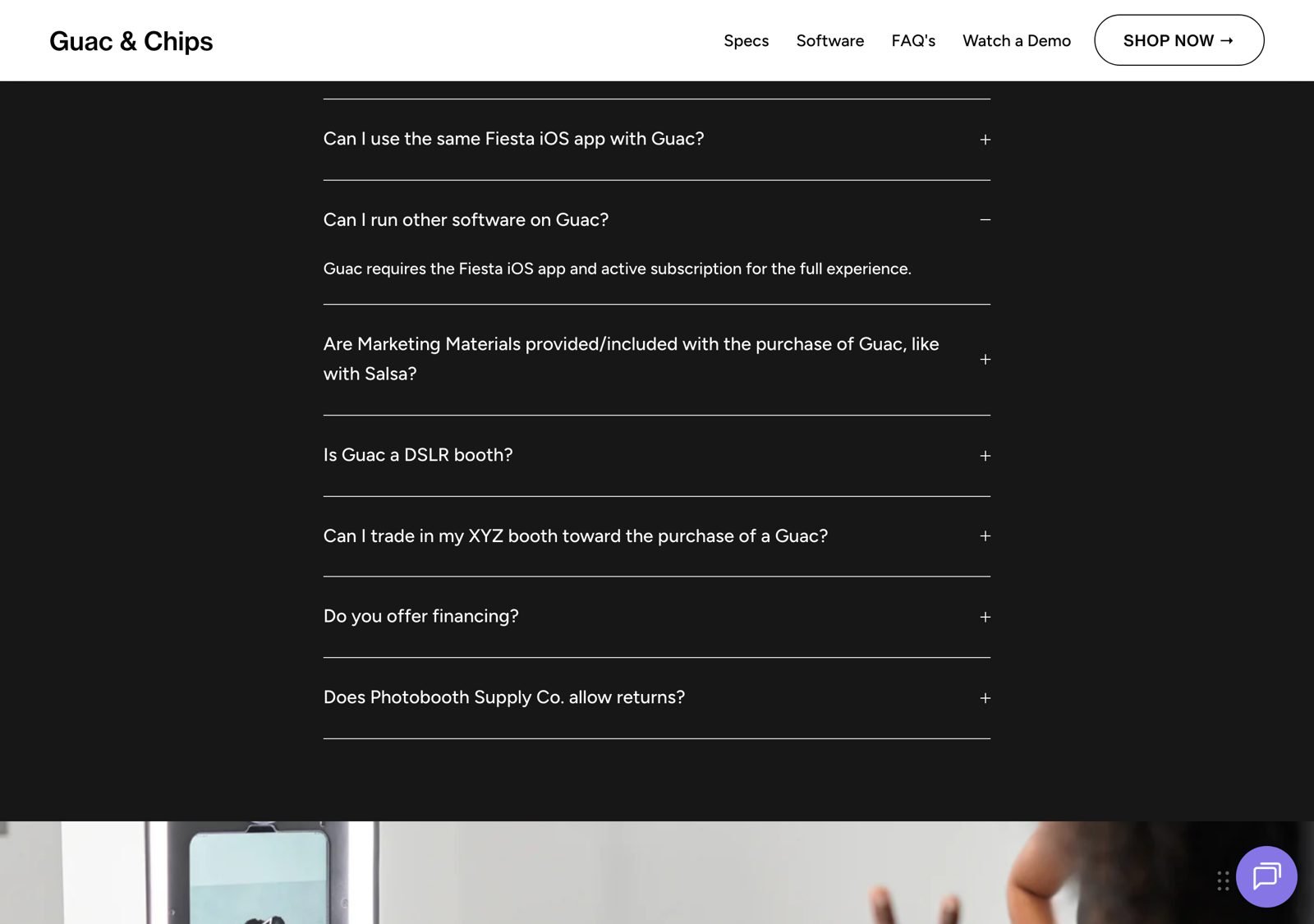
Guac is a Salsa-style iPad booth with a Canon EOS R100 and a flash. PBSCO says “Guac requires the Fiesta iOS app and active subscription for the full experience,” meaning the LED sequences and PBSCO’s own camera integration. Pictor works with the R100 on the Pro and Premium plans (DSLR and mirrorless tethering is not on Basic), and the LEDs fall back to Lamp Mode as on Salsa.
Why are PBSCO owners looking at other software?
Fiesta replaced the older Salsa app, and the move has not been smooth for everyone. You don’t need to take that from us. PBSCO publishes its own list of open Fiesta problems, which is to their credit, and on 5 October 2026 it showed 17 current issues, 12 of them marked “No workaround”. Several land where operators feel it most at an event: a zoom discrepancy between photo and video capture modes, blurry prints on Guac with AirCastPro or wired Chips, Double 2×6 strips that print and cut incorrectly from Gallery Mode, and a Guac camera error tied to iOS time-zone settings.
The App Store tells a mixed story. Fiesta has its share of five-star reviews and a 3.6 average from 158 ratings. The critical reviews cluster around price and reliability; one two-star review from May 2026 sums it up: “I would be willing to pay this price if it simply just worked how it was supposed to.”

Every piece of event software has bugs, Pictor included, and we won’t pretend otherwise. What matters on a Saturday night is whether you can reach a person. That is where the two products differ most.
Can I call someone if my booth goes down mid-event?
On Pictor, yes, on every plan. Emergency phone support is included with Basic, Pro and Premium; the number is in your account dashboard and welcome email. On Fiesta, phone support is a Pro feature. Fiesta Plus includes email support, an AI chat assistant and 7-day support, but no phone line.

Is Pictor cheaper than Fiesta?
Month to month, yes: $49 against $59 at the entry level and $99 against $119 at the next level. If you pay Fiesta annually, its Plus and Pro work out to $49 and $99 a month, the same as Pictor’s monthly prices, and Pictor’s own annual billing takes about 17% off. So the honest summary is that the subscriptions are close, and the difference is in what each plan includes.
| Pictor Basic | Pictor Pro | Pictor Premium | Fiesta Plus | Fiesta Pro | |
|---|---|---|---|---|---|
| Monthly price | $49 | $99 | $149 | $59 ($49 billed annually) | $119 ($99 billed annually) |
| Phone support | Emergency phone | Emergency phone | Emergency phone | No (email, AI chat, 7-day) | Yes |
| Printing | Every plan, via the Print Partner App on a Windows or Mac computer; any printer your computer’s drivers support (DNP recommended) | Not listed on Plus | Yes | ||
| DSLR / mirrorless | No | Yes | Yes | Guac’s Canon EOS R100 (bundled with Guac) | |
| AI | AI Presets & Library | + Custom Prompt Editor, Background Removal | + AI Video | AI Background Removal and AI Masks listed in plan comparison | |
| Booths | One licence per active booth; plans can be mixed on one account | “Run 1 booth at a time” | Not stated on pricing page | ||
| 360 booth | Not supported | 360 Capture on Pro (Tortilla) | |||
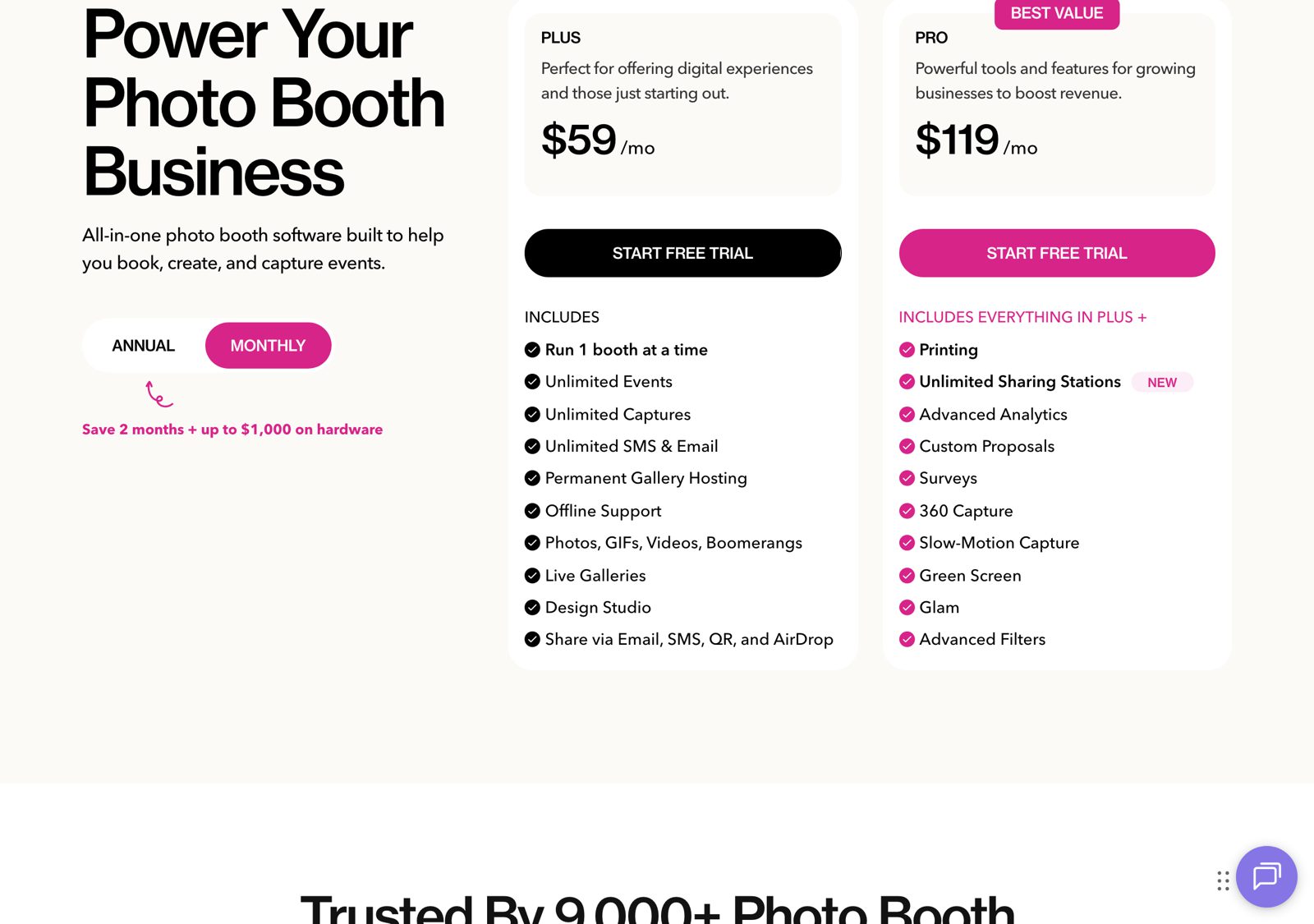
AI is billed separately on Pictor. Every AI action costs tokens, from $0.20 each in a 100-token bundle down to $0.07 in the largest; an AI image is 1–2 tokens, and tokens never expire. The exact cost of every effect is on our AI pricing page, and the plans are on pricing.
Sources: photoboothsupplyco.com/pages/fiesta-pricing (Monthly and Annual views), photoboothsupplyco.com/pages/fiesta-software, /pages/salsa-2, /pages/guac-booth, support.photoboothsupplyco.com “Fiesta Software – Known Issues” and the Fiesta App Store listing, all captured 2026-10-05. Competitor pricing as of publish date — verify current pricing on vendor sites.
What platforms do Pictor and Fiesta run on?
Pictor has native apps for iOS and Android, so a mixed fleet of iPads and Android tablets runs one app. On Mac or Windows, Pictor runs as a browser-based Virtual Booth on the Premium plan; native Mac and Windows apps are on our roadmap. Fiesta is iOS-only plus the web: PBSCO’s FAQ says “Fiesta can run on the web, on your iPad, and on your iPhone,” and no Android app is listed. If every booth you own is a PBSCO iPad booth, both cover you; if you also run Android tablets, only Pictor does.
Source: photoboothsupplyco.com/pages/fiesta-software, FAQ “Do I need to download an app?”, checked 2026-10-05.
How do I switch from Fiesta on my Salsa or Guac?
You don’t have to switch on a Saturday. Both apps live on the same iPad, so you can test Pictor alongside Fiesta before you change anything for a client.
- Check your iPad. Salsa 2 takes 2018-or-newer 12.9”/13” iPad Pro or Air models, and Guac takes the 12.9” iPad Pro (3rd–6th gen) or 13” iPad Pro (7th gen), per PBSCO. Install Pictor from the App Store on that iPad.
- Create a free account at app.pictor.pro/register. You get 25 free tokens and can build and test for as long as you need; a paid plan is required for live events.
- Set the LEDs to Lamp Mode and do a test session under your usual event lighting.
- Guac owners: choose Pro or Premium and tether the Canon EOS R100 (see camera compatibility).
- Rebuild one event you run often, print a few strips, and send test shares, before you cancel anything.
If you get stuck, call us. That is the point.
What does Pictor do that Fiesta doesn’t?
- Emergency phone support on every plan. On Fiesta, phone support is Pro only.
- Printing on every plan. Pictor prints through the Print Partner App on any plan. Fiesta lists Printing under Pro.
- Android. Native Android apps alongside iOS. Fiesta lists iPad, iPhone and web.
- Custom AI prompts and AI video. Pictor Pro adds a Custom Prompt Editor and Premium adds AI Video. Fiesta’s plan comparison lists AI Background Removal and AI Masks; custom prompts and AI video were not listed on 5 October 2026.
- Tokens that never expire. AI usage is billed in tokens with the cost shown before every run; unused tokens carry over indefinitely.
What does Fiesta do that Pictor doesn’t?
- Full LED control on PBSCO booths. Only Fiesta drives the LED sequences; Pictor gets Lamp Mode.
- 360. Fiesta supports 360 capture and the Tortilla 360 booth. Pictor doesn’t support 360 booths. If 360 is your business, stay.
- Hardware discounts. A Fiesta subscription takes $250–$1,000 off PBSCO booths (Salsa 2 $2,999 MSRP, Guac & Chips $7,999, Tortilla $3,499).
- Business extras. Fiesta Pro includes custom proposals, surveys and advanced analytics, Fiesta includes a starter portfolio website, and PBSCO’s marketing content library comes with any PBSCO hardware purchase. Pictor doesn’t build proposals or websites itself; for booking and proposals we work with BoothBook.
- Unlimited SMS and email sharing and permanent gallery hosting are listed on every Fiesta plan.
Shopping more widely? Our 2026 photo booth software roundup compares eleven platforms, and we have head-to-heads with Snappic and Booth.events, two other options PBSCO owners ask us about.
The bottom line
If the LED sequences or 360 are central to what you sell, Fiesta is still the natural fit for PBSCO hardware, and the subscription prices are close. If what keeps you up on a Friday night is reliability and getting a person on the phone, Pictor runs on the booth you already own, includes emergency phone support and printing on every plan, and lets you test on the same iPad before you change anything for a client.
FAQ
Can I use Pictor on a PBSCO Salsa booth?
Yes. Salsa is an iPad booth, and Pictor runs on the iPad inside it. PBSCO’s LEDs run in Lamp Mode (solid white) with any software other than Fiesta.
Does Pictor work with the Guac booth’s Canon EOS R100?
Yes, on Pictor Pro ($99/mo) and Premium ($149/mo). DSLR and mirrorless tethering is not on the $49 Basic plan.
Will my Salsa LEDs work with Pictor?
In Lamp Mode only. PBSCO says the full range of LED features is only accessible through Fiesta, and that Lamp Mode sets the LEDs to a solid, bright white light.
How much does Fiesta cost in 2026?
$59 a month for Plus and $119 a month for Pro on monthly billing, or $49 and $99 a month billed annually, as listed on PBSCO’s pricing page on 5 October 2026.
Does Fiesta include phone support?
On Pro only. Fiesta Plus includes email support, an AI chat assistant and 7-day support. Pictor includes emergency phone support on every plan.
Can Fiesta Plus print?
Printing is listed under Fiesta Pro on PBSCO’s pricing page, not under Plus. On Pictor, printing is available on every plan through the Print Partner App on the Windows or Mac computer your printer is connected to; DNP DS-RX1, DS620 and DS820 are the most tested.
Is Pictor a good Fiesta alternative for 360 booths?
No. Pictor doesn’t support 360 booths. If you run a Tortilla 360, Fiesta is the better fit.
Can I try Pictor before cancelling Fiesta?
Yes. Install Pictor on the same iPad, create a free account with 25 free tokens, and test for as long as you need. A paid plan is required for live events.
Does Pictor have AI?
Yes, from the $49 Basic plan: AI presets and a library on Basic, a custom prompt editor and background removal on Pro, and AI video on Premium. Every AI action costs tokens, shown before each run, and tokens never expire.