Case Study: How Premier Pics Maryland Delivered 165 AI Portraits and $2,500+ in Revenue Without Leaving Home
Premier Pics Maryland's full case study: how they scaled to $2,500+ in revenue and 165 AI portrait outputs using Pictor's virtual booth and prompts.
Nicholas Rhodes
Drafted with AI assistance; reviewed and approved by Nicholas Rhodes before publishing.
The full Show & Tell session with Adam Borden — May 20, 2026
Operator: Adam Borden, Premier Pics Maryland
Location: Frederick, MD
Event Type: Corporate awards dinner
Platform: Pictor AI virtual photo booth software
Timeline: 10 days from client approval to delivery
The Numbers
| Metric | Value |
|---|---|
| Total portraits delivered | 165 |
| Standard caricatures | 135 |
| Hollywood Glam award editions | 30 |
| Total revenue | $2,500+ |
| Price per portrait | $15 |
| Platform cost (tokens + license) | ~$161–$215 |
| Miles traveled | 0 |
| On-site hours | 0 |
| Prompt development time | 5–6 hours |
| Virtual booth setup time | ~1 hour |
| Project timeline | 10 days |
The Challenge
A corporate client reached out to Adam via LinkedIn. She’d seen his AI caricature work — he’d been delivering them for weddings — and wanted to know if he could apply the same approach to a branded corporate portrait.
The requirement that made this project unusual: everything had to be done remotely, in advance. The client was hosting an annual awards dinner and wanted each employee to receive a personalized AI caricature portrait as a surprise — tucked into their award packet at the event, without any participation from the employees beforehand.
There would be no photo booth on site. No event-day setup. No hardware. The portraits would need to be print-ready, named individually, and delivered digitally to the client, who would handle local printing.
Adam had never done a project exactly like this. He said yes.
The Solution
Remote Collection, No Event Required
The client sent Adam a spreadsheet with every employee’s name (including nicknames), and a folder of headshots named by employee. He used Pictor’s virtual booth — typically a guest-facing web experience — as a personal production pipeline.
Working from his home office, Adam uploaded each headshot through the virtual booth interface, entered the employee name into a survey field, and let Pictor process the portrait. He worked through the full spreadsheet of 165 employees over the course of the project, generating each output individually and reviewing it before moving on.
The process didn’t require any presence at the event. Once all portraits were approved, he delivered 165 print-ready 5×7 JPEGs to the client. She had them printed locally. The employees saw them for the first time at the awards dinner.
Two Distinct Portrait Types
The project had two outputs, built as separate AI experiences in Pictor:
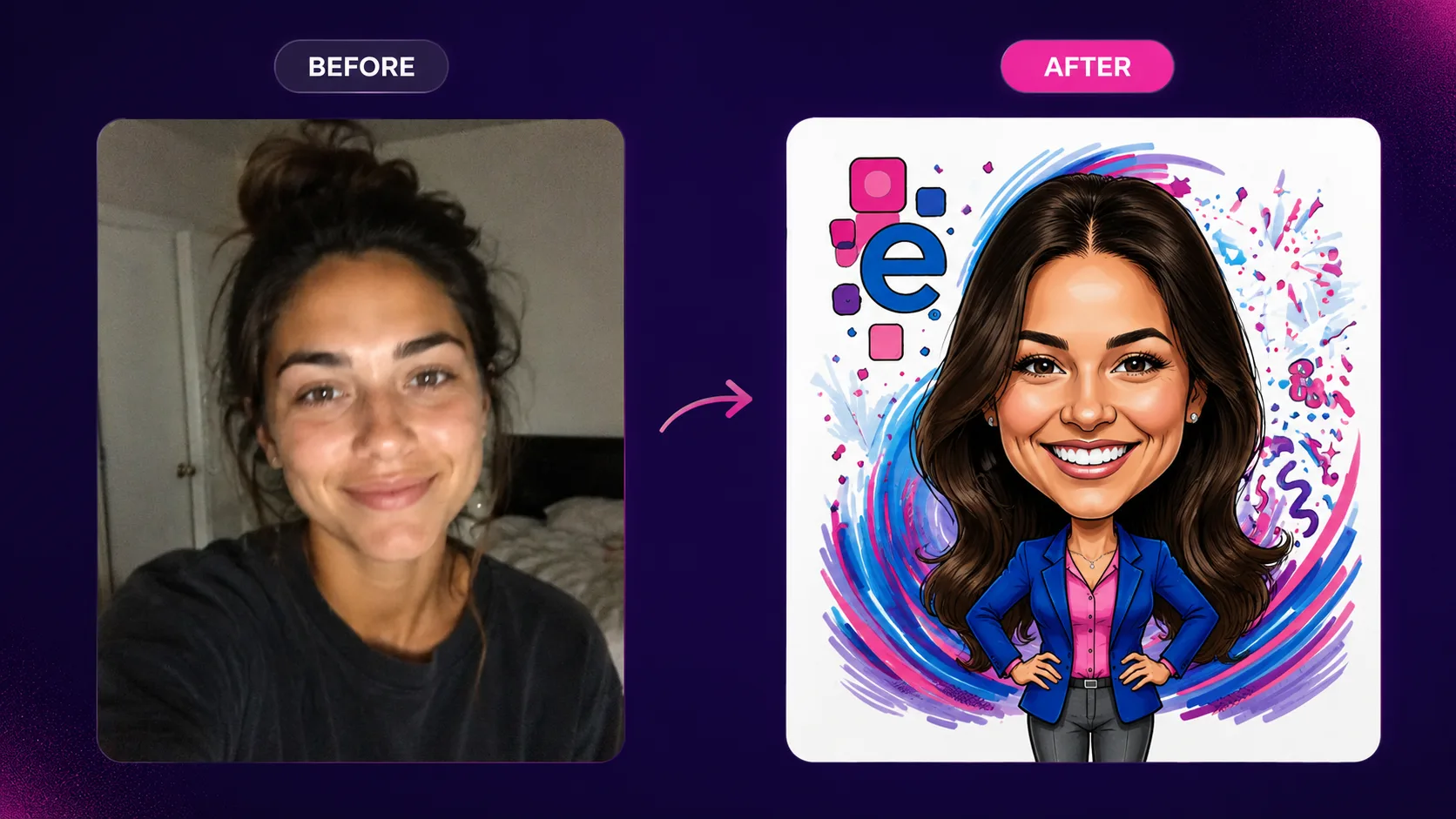
Standard caricature (135 portraits): A branded marker-style caricature with business casual attire, each employee’s name overlaid in the client’s preferred font, and a rotating branded background.
Hollywood Glam award edition (30 portraits): An elevated treatment reserved for award winners — a formal gala aesthetic with a more dramatic background and an award designation included in the overlay.
Both experiences shared the same brand color palette and logo treatment. The only differences were the artistic direction and the overlay design.
Solving the Brand Consistency Problem
Getting a corporate logo and background to render consistently across 165 different AI portraits was the central technical challenge. AI is probabilistic — give it the same prompt twice and you’ll get two slightly different results. Giving it a specific logo and asking it to reproduce it exactly is notoriously unreliable.
Adam’s solution: use Pictor’s multiple reference images feature.
He designed two distinct branded backgrounds and saved them as reference images. He then instructed the AI prompt to randomly select one of these two backgrounds for each portrait. The result was brand-consistent output every time — the backgrounds rotated randomly but always matched the client’s visual identity — without the AI ever attempting to reproduce the logo freehand.
“You never knew which picture was going to get what background,” Adam said, “but at least it was always brand consistent. And it didn’t just leave it up to the roll of the dice.”
He also applied a practical trick for the name overlay: he duplicated the text token layer and offset it slightly to create a drop shadow effect. This gave the name better contrast against the AI-generated background — important when you can’t predict exactly what the portrait will look like behind the text.
The Hollywood Glam Prompt Problem
The award edition portraits required their own prompt iteration. Using “Hollywood Glam” as an AI attire descriptor consistently produced output that wasn’t appropriate for a corporate context. The AI’s interpretation of that phrase leaned toward revealing formal wear.
Adam broke down the instruction into specific language: formal gala-style gowns with full coverage, specific color direction, structured silhouettes. No shorthand. Once he had language that reliably produced the right look, the award edition portraits came out consistently across all 30.
This is a common pattern in AI prompt development. The phrase that seems right often trips a different association in the model. The fix is almost always describing the thing you want in precise, literal terms rather than relying on a style shorthand.
The Prompt Development Process
Adam started with a foundation he’d already built for wedding caricatures — specifically a superhero-themed caricature prompt he’d developed for a local event. He had the proportions and the marker-drawing aesthetic in place. What he needed was to adapt the style for a corporate context: business casual attire, brand-consistent backgrounds, and a consistent look across a wide range of faces.
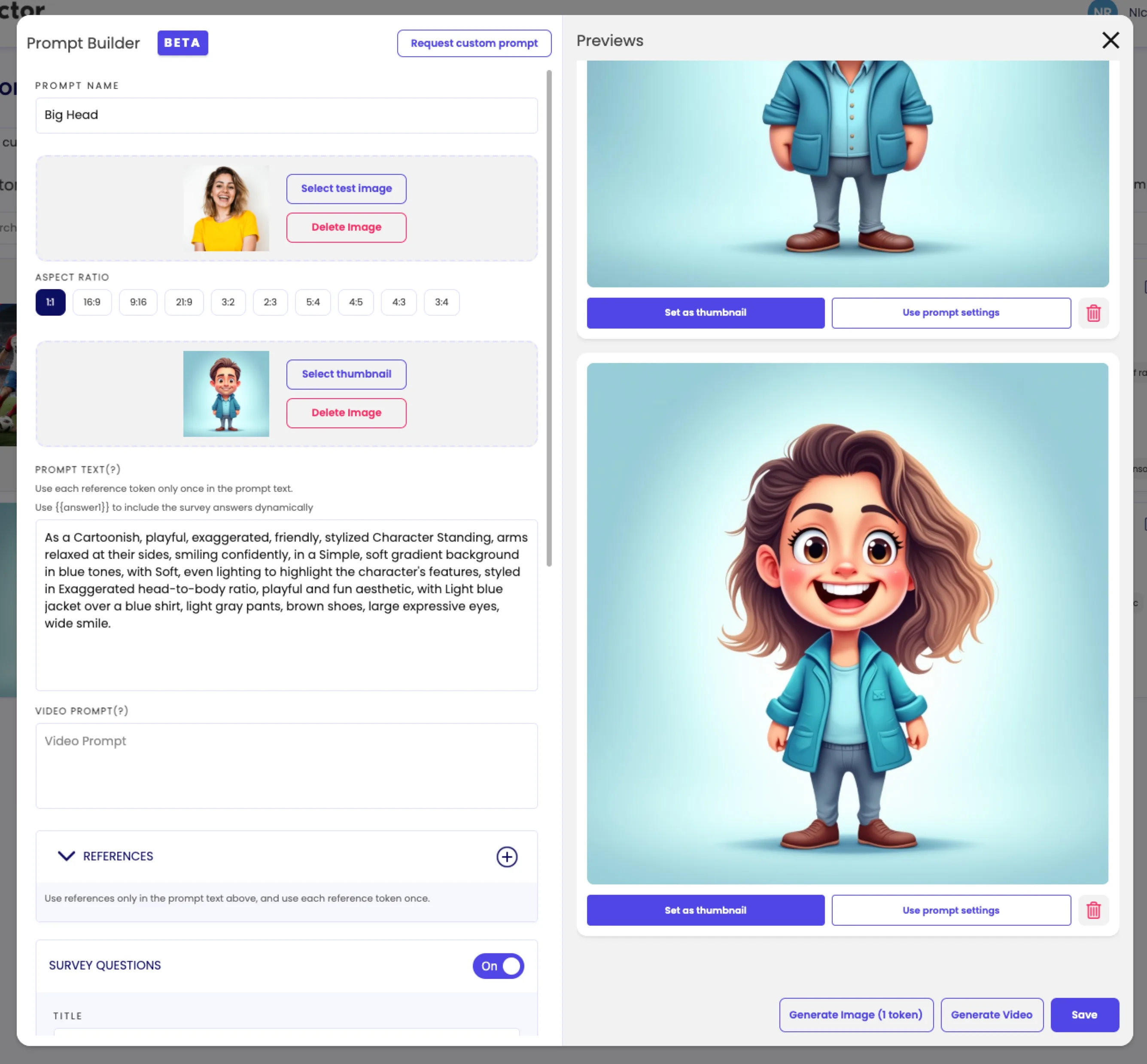
He worked in phases:
- Proportions and style — Adapted from his existing caricature prompt, pulling from the PBM (Photo Booth Marketing) prompt library as a reference point for the marker-drawing look.
- Business casual attire — Iterated in Pictor, using Claude as an LLM sounding board when he hit inconsistency problems. (“I would put it back into Claude and say, hey, I’m not getting a consistent result on this. This is what I want it to look like.”)
- Background consistency — Built two branded backgrounds as reference images, instructed the prompt to rotate between them randomly. This resolved the logo consistency issue without requiring the AI to reproduce the brand mark freehand.
- Hollywood Glam variant — Separate prompt development pass. Replaced the “Hollywood Glam” shorthand with specific attire language to avoid inappropriate outputs.
- Final review — Let the prompt run on a variety of test headshots, including photos with different lighting, zoom levels, and skin tones, until the output was reliable enough to run against the full client list.
Total prompt development time: 5–6 hours across multiple sessions.
“You’ve got to take the time into consideration when somebody wants something custom,” Adam said. “It can take a lot of time to get a look that the client’s looking for. It’s not what you’re looking for, it’s what the client’s looking for.”
The Pricing Model
Adam charged $15 per portrait. The client’s original scope was approximately 100 portraits. She expanded it as the project progressed — adding employees and then adding the Hollywood Glam award tier.
Pricing per portrait (rather than a flat project fee) gave the client a clear framework for adding headcount at any point without renegotiating. It also kept the math simple for Adam: every additional employee was a known quantity.
Revenue breakdown:
- 165 portraits × $15 = $2,475
- Total with scope adds: $2,500+
Cost breakdown:
- Pictor license: $149/month
- AI tokens (165 portraits + test runs at ~$0.07–$0.20/image): ~$12–$66
- Total platform cost: approximately $161–$215
Net before time: ~$2,285–$2,340
Adam values his internal time at $50/hour and bills AI prompt development to clients at approximately $150/hour. At 5–6 hours of prompt development, that’s $750–$900 in billable creative work, for which he charged a flat per-portrait rate that covered it.
“When I price things like that, you have to get comfortable. It’s not about how much it was, it’s what the perceived value is for the client. They’re having this party. They’re going to spend $15 for an employee. Have you ever worked for a company — would you expect them to at least spend $15 per employee on you at a party?”
The client didn’t push back on the price.
What Made Pictor the Right Tool
Adam identified four specific capabilities that made Pictor the right platform for this project:
1. Multiple reference images. No other photo booth platform he evaluated supports more than one reference image per prompt. (Snapic supports one.) Being able to rotate between two branded backgrounds — while keeping both brand-consistent — solved the single hardest technical problem in the project.
2. Survey-to-overlay personalization. Pictor’s survey fields let Adam input each employee’s name during processing, which then appeared on the final portrait via the text overlay layer. 165 individually named portraits, no manual Photoshop work.
3. Virtual booth as a production tool. The virtual booth is designed for guest-facing use — but there’s nothing stopping an operator from using it as a personal batch processing tool. Adam uploaded each headshot himself, controlled the queue, and reviewed each output before moving on.
4. End-to-end output. Portrait in, print-ready JPEG out. No post-processing step, no additional software. The workflow ran start to finish in one platform.
“Being all remote, I wanted something that I could run it all the way through from start to finish, and the output, I was done,” Adam said. “It kind of ticked everything.”
The Client’s Reaction
The client approved every portrait before the event. Of the 165 outputs, two initially came out looking too realistic — more like a stylized photo than a caricature. The client flagged them. Adam asked for new headshots of those two employees, re-ran the portraits, and the replacements came out correctly. (The original photos had a glare artifact that confused the AI’s stylization.)
Everything else was approved on the first pass.
The portraits were included in the award packets. Employees saw them for the first time at the awards dinner. Adam hadn’t heard back with direct employee feedback at the time of our Show & Tell — he’d reached out to the client hoping to see photos of the reaction — but the client’s email was straightforwardly positive.
What Came Next
Since completing this project, Adam has already converted the proof of concept into two new opportunities:
Local distillery (recurring): A virtual booth activation with a rotating theme every two months — tied to the distillery’s seasonal promotions. The virtual booth will run at their pop-up events throughout the year.
Wine and music festival (on-site): A custom AI portrait activation where guests receive a personalized Caribbean-themed wine label, printed on site and affixed to their bottle purchase. Different format, same underlying Pictor infrastructure.
Neither of these would have been as easy to close without a concrete example: here’s a $2,500 project we completed in 10 days without a physical booth, and here’s exactly what it looked like.
“It gave me a lot more confidence to offer that to clients and say, hey, look what we could do,” Adam said. “We don’t even need to be there.”
Key Takeaways for Operators
You don’t need a physical booth to run a photo booth project. Virtual booth delivery — whether guest-facing via QR or operator-run as a production tool — is a real revenue model. The overhead is minimal. The output is the same.
Pricing per output scales cleanly for growing lists. Corporate clients often add headcount. A per-portrait rate gives them flexibility and gives you a clear path to more revenue without revisiting the contract.
Prompt development is real creative work. 5–6 hours is normal for a high-quality custom output. Factor it into your pricing — either as a setup fee or baked into the per-portrait rate.
Multiple reference images solve brand consistency. If your client’s brand needs to show up in the AI-generated portion of the image (not just in an overlay), use Pictor’s multiple reference image support to design and rotate consistent branded backgrounds rather than asking the AI to improvise.
One project can become a sales asset. Adam closed two follow-on deals in part because he now had a fully realized example to show potential clients. The project paid for itself twice.
About Pictor
Pictor is AI virtual photo booth software built for photo booth operators. It’s the only platform that supports AI photo and video outputs, multiple reference images per prompt, branded virtual booths, and real-time slideshow display — all in one place.
For a narrative walkthrough of this project and Adam’s process, see the full Show & Tell recap: How to Deliver AI Portraits Remotely in Pictor — $2,500, 165 Outputs, 0 Miles Traveled.
Nicholas Rhodes
Founder of Pictor & OutSnapped
Nicholas is the founder of Pictor and OutSnapped—a premium photo experience agency producing AI activations, red-carpet productions, and branded content for global events. He hosts Pictor Show & Tell almost every Wednesday.
Nicholas has produced thousands of branded photo experiences for global clients through OutSnapped and builds the tools operators use daily at Pictor.