How to Choose Photo Booth Software: A Black Friday 2026 Buying Checklist
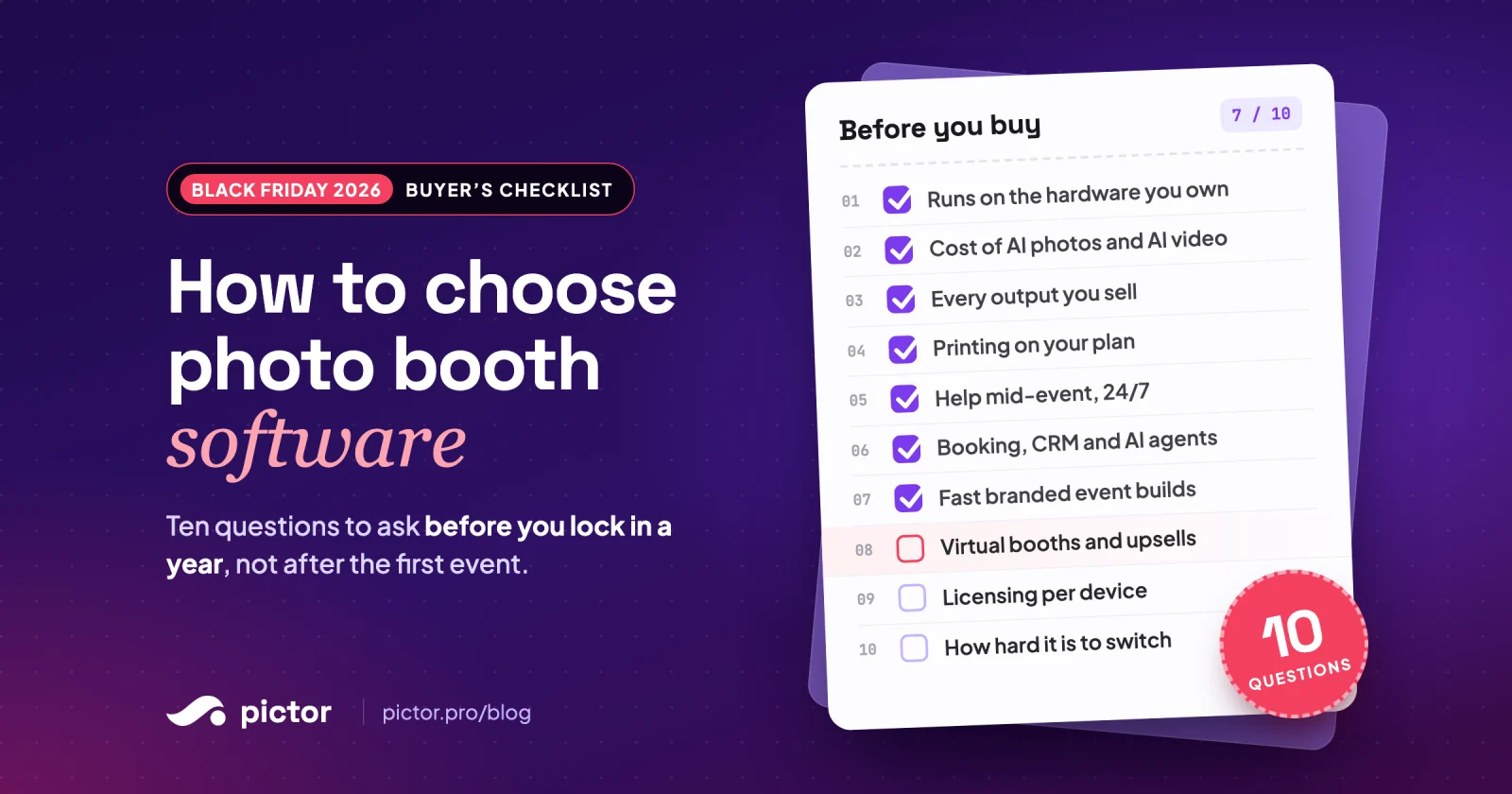
Ten questions to ask any photo booth software before you lock in a year this Black Friday: devices, AI photo and AI video costs, CRM and AI-agent integrations, virtual booths and switching.

Nicholas Rhodes
Drafted with AI assistance; reviewed and approved by Nicholas Rhodes before publishing.
What should you check before buying photo booth software on Black Friday?
Check ten things before you commit: which devices it runs on, what every AI photo and AI video really costs, which outputs it supports, whether printing and sharing work on your plan, how support works during a live event, whether it connects to your booking tool, CRM and AI agents, how fast you can build a branded event, what you can sell to clients (including virtual booths), how licensing works per device, and how hard it is to move your events over. A discount only helps if the software fits how you run your booth business.
Black Friday is when a lot of photo booth operators lock in a year of software. That makes it the worst time to choose on price alone. A cheap year on the wrong platform costs more in reshoots, workarounds and lost upsells than any discount saves. Use this checklist on every app you are considering, including Pictor.
1. Does it run on the hardware you already own?
Start with your booths, not the feature list. List every device you run today and every device you plan to buy in the next year.
- iPad booths are the most popular setup for mobile operators. Make sure the app is native on iOS.
- Android tablets are cheaper to scale. Check for a native Android app, not a web wrapper.
- Mac or PC setups: ask whether the software runs as a native desktop app or in a browser, and which plan that needs.
- DSLR or mirrorless tethering: check which plan includes it. It is often not on the entry plan.
On Pictor, native apps run on iOS and Android, DSLR is on Pro and Premium, and Mac and PC operators use the browser-based Virtual Booth on Premium. The 2.0.1 update rebuilt the DSLR settings screen and added Wi-Fi camera support.
2. What do AI photos and AI video actually cost?
AI photos and AI videos are the easiest upsell in the business right now. Operators report charging 30–60% more for AI experiences than for traditional-only packages. But the per-render cost decides your margin.
AI video is where vendors differ most. Some don’t offer it yet. Others turn a still into a short clip. Ask for a live demo on your own event, not a sizzle reel, and check how long a guest waits for the result.
Ask each vendor:
- Is AI priced per render, per event, or bundled into the plan?
- What does one AI video cost versus one AI photo?
- Do credits or tokens expire?
- Can you see the cost before you run an effect?
For reference, Pictor’s AI images cost 1–2 tokens, background removal costs 1 token, and AI video costs 5–15 tokens per 5-second render. Tokens never expire, and you see the cost before you run an effect. Pictor brought AI photos to photo booths in 2023 and AI video in 2025. AI video is on Premium, and one guest capture can produce several AI video scenes, all placed on the template editor’s timeline. See the full math on our AI pricing page.
3. Which outputs does it support?
Clients book experiences, not software. Check that the app covers every output you sell today and the ones you want to sell next year: still photos, animated GIFs, boomerangs, videos, AI photos and AI videos. If a client asks for a format you can’t deliver, you lose the booking or rent a second tool.
4. Does printing work on your plan?
Printing is still a must for weddings and many corporate events. Confirm which plans include it and which printers are supported. Pictor includes printing on every plan, including Basic, with the free Print Partner App for DNP printers.
5. What happens when something breaks mid-event?
This is the question most buyers skip. Ask each vendor:
- What are support hours, and in which time zone?
- Is there emergency support during live events, and on which plans?
- What happens if the venue Wi-Fi drops?
Pictor’s chat and email support runs 10 AM to 6 PM Eastern, Monday to Friday. Emergency support is available 24/7 through the in-app chat on every plan. Captures queue on the device when the connection drops and upload when it returns.
6. Does it connect to your booking tool, CRM and AI agents?
Every manual step between a booking and a live event is time you aren’t selling. Check the integrations before you check the price. Ask each vendor:
- Booking: does the event build itself from your booking software, or do you retype every detail?
- CRM: can leads from brand activations go straight into your CRM while the event runs, or only as a spreadsheet afterwards?
- AI agents: can you run the software from an AI assistant like ChatGPT or Claude?
On Pictor:
- The BoothBook integration has been live since September 2026. Your client picks the theme and templates and fills in the text in BoothBook, and the event name, date, theme and text sync into Pictor. It works with every BoothBook plan, at no extra cost.
- Lead capture exports as CSV or pushes in real time by webhook to any CRM or tool that accepts webhooks, including Zapier. Dropbox is supported too.
- Pictor MCP is open to every Pictor plan, including Basic, and is now in open beta. It connects Pictor to Claude, ChatGPT or any MCP client, so you can look up events and galleries or create an event from a template by asking your AI assistant. For the past 60 days our team has used the MCP server to build all of our live events.
7. How fast can you build a branded event?
Time spent designing is time you aren’t selling. Look for:
- Templates you can start from instead of building every event from scratch.
- A way to set an event’s look and wording once and reuse it.
- A live preview so you can test the guest flow before the event.
In Pictor, Global Styles and Global Text set an event’s look and wording in one place, the flow editor has a live preview, and the Photo Booth Marketplace had nearly 50 themes at launch (September 2026), each with about 40 ready-to-use assets.
8. What can you sell with it, including virtual booths?
The best software pays for itself through upsells. Check for AI video, paywalls, virtual booths for remote guests, branded galleries for clients, and lead capture for brand activations. Then check which plan each one is on.
Virtual booths deserve their own line. A virtual booth lets guests use your experience from their own phone or computer, so you can sell to hybrid events, remote teams and clients who want a booth with no hardware at all. Ask whether the vendor charges a fee per virtual event and how many guest sessions are included.
On Pictor, the Virtual Booth runs in a modern browser and comes with Premium, with no per-event fee. Each event includes 500 virtual sessions, and each license runs one live Virtual Booth at a time.
9. How does licensing work?
Most photo booth software is licensed per device or per booth. Ask whether you can mix plans on one account, what happens when you add a booth mid-year, and what the renewal price will be after any Black Friday discount ends. Pictor licenses per active device and plan, and you can mix Basic, Pro and Premium licenses on one account.
10. How hard is it to switch?
If you’re moving from another app, ask how long it takes to rebuild your most common event, whether templates can come with you, and whether the vendor helps with the move. Rebuild one real event during a trial before you pay for a year.
How to use this checklist this Black Friday
- Shortlist two or three apps that pass questions 1, 3 and 5. Those are deal-breakers.
- Run the same real event on each during a free trial.
- Do the AI math from question 2 on your last ten events.
- Only then compare the Black Friday prices.
If you’re comparing Pictor with the app you use now, our side-by-side comparisons cover Snappic, Booth.events, LumaBooth, Simple Booth, dslrBooth and TouchPix. For the wider market, see our roundup of the best photo booth software in 2026.
When is Pictor’s Black Friday 2026 offer?
We reveal Pictor’s Black Friday 2026 offers live on Show & Tell, Wednesday, November 18 at 1:00 PM EST. It’s free to join. See the countdown and save your seat.
Nicholas Rhodes
Founder of Pictor & OutSnapped
Nicholas is the founder of Pictor and OutSnapped—a premium photo experience agency producing AI activations, red-carpet productions, and branded content for global events. He hosts Pictor Show & Tell almost every Wednesday.
Nicholas has produced thousands of branded photo experiences for global clients through OutSnapped and builds the tools operators use daily at Pictor.