How to Run a Photo Booth at a Corporate Event
Brand approvals, consent and lead capture, brand-safe AI, pricing the full scope, and the post-event recap corporate clients expect.

Nicholas Rhodes
Drafted with AI assistance; reviewed and approved by Nicholas Rhodes before publishing.
How do you run a photo booth at a corporate event?
Running a photo booth at a corporate event means selling reliability, brand control, and a clean report, not just a fun few hours. Start with the business objective, get brand approvals early, design consent and lead capture into the guest flow, price the whole scope, and hand the client a recap that connects activity back to what they were trying to achieve.
Beginner series · Stage 3 of 5 · Part 13 of 22
Running a photo booth at a corporate event is different from a wedding or private party. The booth still needs to be fun and guests should still walk away with something worth sharing, but corporate clients are also buying brand control, data handling, and a clean post-event report. A booth that looks great but creates confusion for the marketing team isn’t a successful activation. Your job is to make the experience feel effortless for guests while making the event feel low-risk for the client.
What should you ask before you quote the job?
Before you talk backdrops, props, or AI styles, ask what the activation needs to achieve. Common corporate objectives include branded social content, higher booth or conference engagement, lead generation, supporting a product launch, employee engagement, recruiting content, sponsor visibility, or usable marketing assets.
The objective changes almost every operational decision that follows. A booth for an employee holiday party may only need branded overlays and instant sharing. A trade show activation may need custom fields, consent language, CRM delivery, lead-volume reporting, and a more controlled guest flow. Ask early: who is the audience, what should guests do after receiving their photo or video, is the priority engagement, content, or leads, how will the client judge success, and who approves the creative and data process. Understanding the objective lets you recommend the right experience instead of just selling the equipment you already own.
How do you get brand approvals before you build the event?
Corporate brand teams often need to approve every guest-facing element: the start screen, buttons, overlays and frames, backgrounds and AI styles, booth signage, backdrops and props, hashtags, SMS and email delivery copy, gallery pages, and logo and color usage.
Don’t wait until the week of the event to ask for brand assets. Request these in the first planning conversation: official logo files, brand guidelines, approved fonts and colors, campaign artwork, required legal copy, hashtags, examples of approved creative, and the name of the final approver.
Send a simple approval deck or link that shows the complete guest journey, with mockups of the start screen, capture experience, final output, and delivery message. A client approves faster when they can see exactly what guests will experience.
Pictor supports branded overlays across paid plans, and overlays can change between events, so it’s practical to build one experience for a trade show, another for a customer event, and a third for an internal celebration. For clients that need the app itself to carry no Pictor branding, full white-label or grey-label delivery is available through an Enterprise arrangement. Pictor’s Q4 corporate booking guide covers the seasonal side of this same conversation.

How do you handle consent and lead capture?
Corporate activations frequently collect more than a photo: a name, email address, phone number, company, role, badge ID, or marketing preference. That means consent can’t be an afterthought.
Work with the client to decide what information is required, why it’s being collected, whether marketing consent is optional, whether photos may be used publicly, how long data is retained, who receives it after the event, and how guests can ask questions about their information. Keep the guest-facing language short and understandable; a long legal block may be technically correct and still create a poor experience.
Separate necessary delivery information from optional marketing consent whenever possible. A guest may need to give an email to receive their photo, but that doesn’t automatically mean they want future marketing messages. Confirm where the data will go before the event. Pictor can collect emails, phone numbers, and custom fields, then deliver results through CSV export or real-time webhooks to a CRM, marketing platform, or internal tool that accepts them. Make sure the client knows which fields you’ll capture and when they’ll receive the final file.
How should you use AI without creating brand risk?
AI can make an activation memorable, but novelty alone isn’t a strategy. Choose styles that fit the campaign, audience, and brand. A professional conference may suit cinematic portraits or campaign-matched environments. A recruiting event can support more playful styles, provided the output stays recognizable and appropriate.
Show the client examples before the event and get approval on the style or prompt, the strength of the transformation, backgrounds and props, clothing or facial changes, whether the original image is also delivered, content moderation rules, and expected processing time.
Pictor includes AI presets from the Basic plan. Pro adds the Custom Prompt Editor, digital props, and background removal. Premium adds AI video and custom AI video. That range gives you room to match the experience to the client instead of forcing every brand into the same effect. For group activations, test several group shots before going live: Pictor’s GroupSense™ is designed to preserve individual likeness and detail in group transformations, which matters when several employees, customers, or executives appear in the same frame.
How do you price the business problem, not just booth hours?
Corporate clients are rarely buying three hours of equipment access. They’re buying a branded marketing activation, a lead-generation system, a staffed guest experience, content for social and internal channels, a reliable vendor who works within venue rules, and a measurable outcome. Your quote should reflect that scope.
Build pricing around planning and creative development, brand revisions, hardware and capture mode, AI processing, staffing, setup and teardown, travel, data configuration, custom integrations, printing or digital delivery, reporting, rush timelines, and multiple event dates.
A useful structure is a base activation plus clearly defined additions:
| Base activation | Optional additions |
|---|---|
| One capture station | Custom AI experience |
| Standard staffing | Lead capture and webhook delivery |
| Branded overlay | DSLR capture |
| Digital delivery | Prints, additional stations, extended hours |
| Standard event report | Multi-day support, custom reporting |
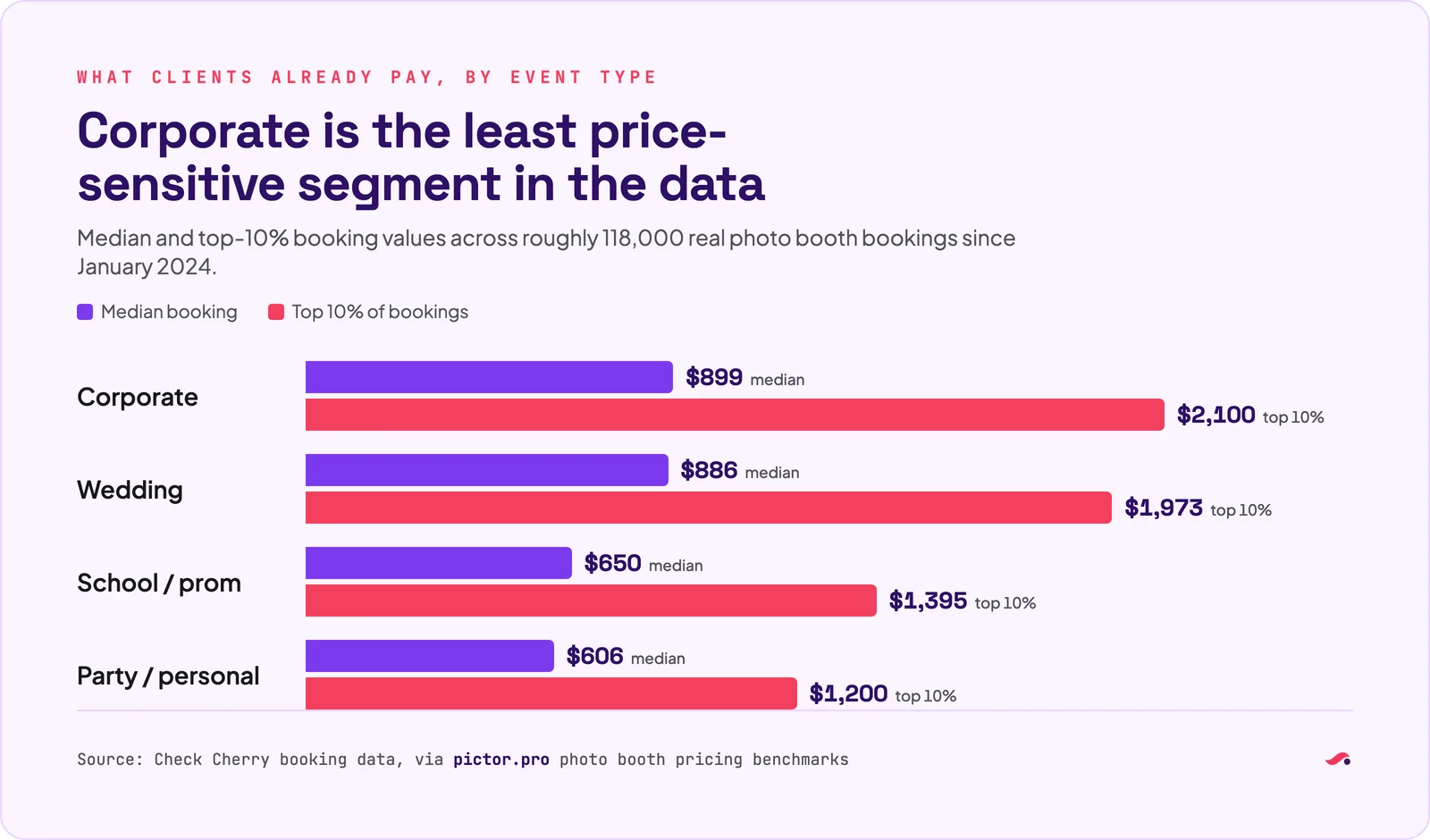
Avoid lowering price without reducing scope. If a client has a fixed budget, adjust deliverables rather than giving away planning, staffing, or reporting for free. Corporate bookings often run well above the $500–$1,500 range typical of private events. Pictor’s pricing conversation with Chris Meyer of BoothCamp Create has more on pricing the whole job.
What should the statement of work cover?
Corporate procurement teams want clarity. Give them a concise statement of work covering event dates and location, setup and teardown windows, number of stations, capture modes, staffing hours, deliverables, data fields, data delivery method, creative approval responsibilities, travel charges, cancellation terms, payment schedule, technical requirements, and an on-site point of contact.
Ask whether the client or venue requires a vendor agreement, purchase order, tax form, security questionnaire, or data-processing documentation. Many corporate venues also require a Certificate of Insurance (COI), sometimes listing the venue or client as an additional insured. Request the exact wording and submission deadline instead of assuming a standard certificate will be accepted. Your contract should also address equipment damage, guest conduct, delays from venue access or internet limitations, force majeure, cancellation, and what happens if a hardware or software failure affects delivery.
How do you manage multiple activations as one program?
If you’re running several booths, rooms, offices, or event dates, don’t manage each one as a separate project. Build a repeatable activation playbook: approved creative, event-specific variations, floor plans, power and network requirements, load-in instructions, staffing assignments, guest-flow instructions, consent language, troubleshooting steps, escalation contacts, and a reporting format.
When you run several booths at once, the Pictor Devices page shows each booth’s status, battery and storage, and lets you launch events or control the screen from the web. It is in open beta on every plan, by request through the support chat. Save your approved activation as an event preset so every location starts from the same setup.
Standardize what can be standardized. Keep the brand consistent while allowing location-specific details like event names, dates, QR codes, or calls to action. Pictor licenses active devices individually, and feature tiers can be mixed within an account, which is useful when one location needs DSLR support or AI video while another only needs a simpler tablet setup. Confirm device, plan, and event requirements before quoting a multi-location program.
What belongs in the post-event recap?
A corporate client shouldn’t have to ask what happened after the booth is packed away. Your recap can include total sessions, unique participants where available, photos, GIFs, or videos delivered, shares or delivery attempts, leads captured, consent results, most-used creative, top-performing AI style, technical issues, guest feedback, and recommended next steps.
Include a small selection of approved visual examples. If the client plans to publish photos, confirm the necessary permissions are in place before sharing externally. Pictor’s Operator-Smart Analytics, branded delivery, CSV export, and webhook options can help you build a report more useful than a folder of images, one that connects activity back to the original business objective: engagement, lead generation, content creation, or brand exposure.
Which Pictor plan fits a corporate activation?
Pro ($99/mo) is the common starting point once you need the Custom Prompt Editor and DSLR tethering for a brand-controlled experience. Move to Premium ($149/mo) when the activation calls for AI video, or ask about an Enterprise arrangement for white-label delivery on large programs. See the full breakdown on the pricing page.
Want to see how a branded corporate event template looks in Pictor? Start free on Pictor →
The corporate operator’s standard
A successful corporate photo booth activation should feel on-brand to the client, simple for guests, controlled for the marketing team, reliable for the event producer, and measurable after the event. That requires more than a camera and a backdrop. It requires a clear approval process, responsible data handling, accurate pricing, proper insurance documentation, and a delivery plan that survives the pressure of a live event.
Not legal or financial advice. This guide is for general educational purposes. Requirements vary by client, venue, location, and event type. Consult your insurance provider about coverage and COI requirements, and a qualified lawyer about contracts, consent, privacy, data processing, and intellectual property.
FAQ
What makes corporate photo booth activations different from weddings?
Corporate clients are buying brand control, data handling, and a measurable outcome in addition to a fun guest experience. That means more approval steps, consent language, lead-capture design, and a formal post-event recap.
How far ahead should I request brand assets?
In the first planning conversation. Ask for logo files, brand guidelines, approved fonts and colors, campaign artwork, required legal copy, and the name of the final approver so revisions don’t stall the week of the event.
Do I need a Certificate of Insurance for corporate events?
Many corporate venues and clients require one, sometimes listing the venue or client as an additional insured. Request the exact wording and submission deadline early rather than assuming a standard certificate will be accepted.
How should I price a corporate activation?
Around the full scope: planning, brand revisions, hardware, AI processing, staffing, setup and teardown, travel, data configuration, and reporting. Present a base activation with clearly defined optional additions rather than one flat number.
Can Pictor send lead data to a client’s CRM?
Pictor can export leads as CSV or deliver them in real time by webhook to any CRM, marketing platform, or tool that accepts webhooks. There are no built-in connectors to specific named CRM vendors.
What should be in the post-event report?
Total sessions, output delivered, shares, leads captured, consent results, top-performing creative, technical issues, and recommended next steps, tied back to the objective the client set at the start.
Next in the series: Photo Booth Troubleshooting: What to Do When Something Goes Wrong.
Beginner series · Stage 3 of 5 · Part 13 of 22
Start here: How to Start a Photo Booth Business
Previous: How to Run a Photo Booth at a Wedding
Next: Photo Booth Troubleshooting