Photo Booth Startup Costs in 2027: What You Actually Need to Spend
Line-item ranges for every startup category, three realistic launch paths, and a free budget worksheet, so you know what your first setup actually costs.
Nicholas Rhodes
Drafted with AI assistance; reviewed and approved by Nicholas Rhodes before publishing.
How much does it cost to start a photo booth business in 2027?
Most beginners spend $950–$2,600 on a working first photo booth setup: a capture device, a stand, lighting, a backdrop, software, and insurance. Printing and a custom shell push you toward the top of that range. A premium, multi-format operation can run $2,600–$10,000 or more, but that’s a later decision, not a starting one.
Beginner series · Stage 0 of 5 · Part 2 of 22
Start here: How to Start a Photo Booth Business
Previous: Is a Photo Booth Business Profitable?
If you’re planning to start a photo booth business, the first real question isn’t “which booth should I buy?” It’s “how much cash do I actually need before I can take a real booking?” Part 1 of this series covered whether the business can be profitable. This part breaks the startup number into line items so you can build your own budget instead of guessing.
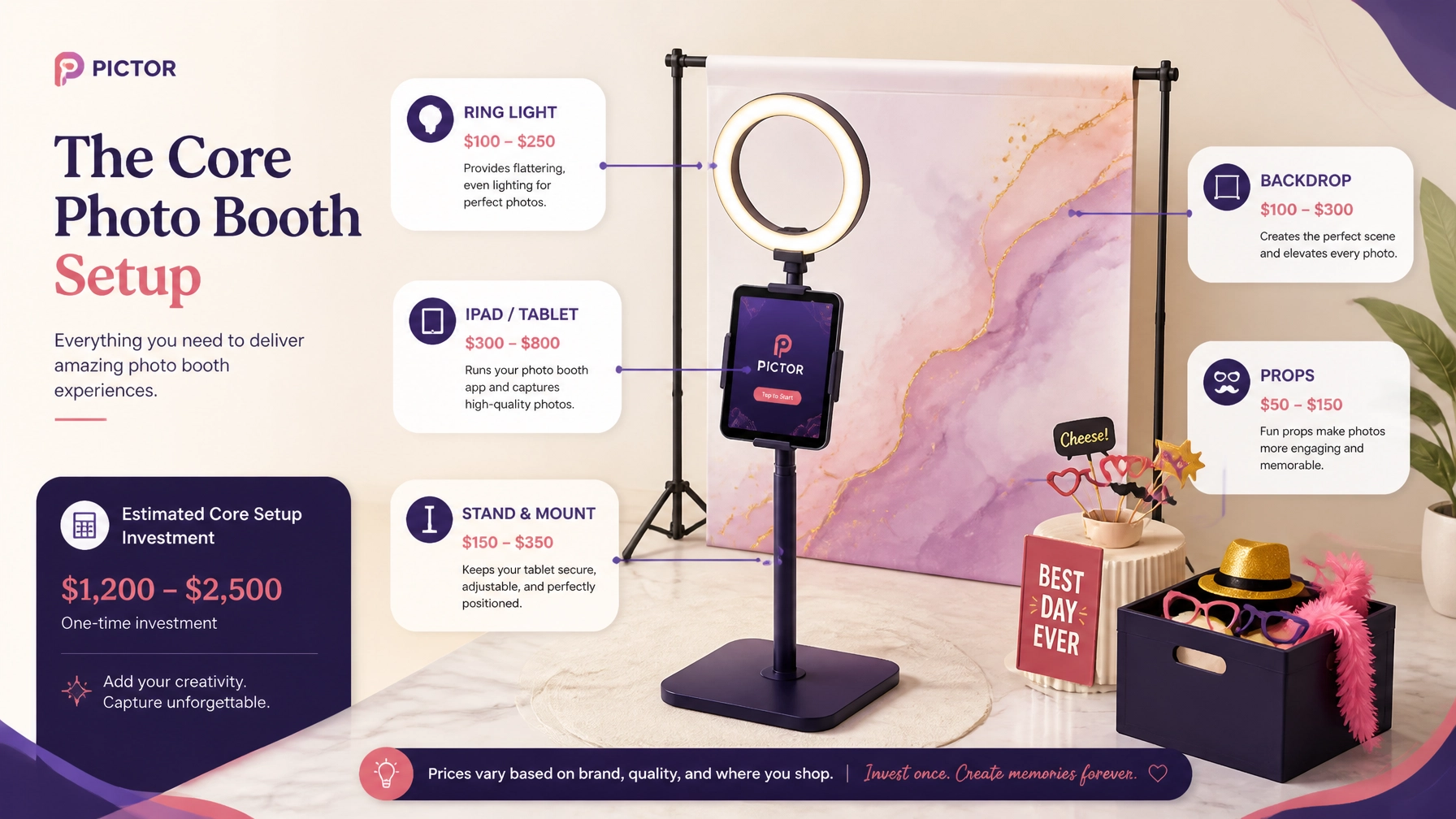
What actually goes into a startup budget?
Most startup budgets cover the same ten categories. The mistake beginners make is treating all ten as equally urgent on day one. They aren’t.
- Capture device
- Stand or booth shell
- Lighting
- Printer (optional at first)
- Backdrop and props
- Software
- Insurance and legal setup
- Website and branding
- Transport and storage
- Emergency reserve
Your first setup needs to be reliable, presentable, and easy to transport. It doesn’t need to look like the final version of your business.
What does each category actually cost?
Capture device
A recent iPad or comparable tablet supports a capable digital photo booth for roughly $300–$600, depending on condition and storage. That’s the sensible starting point if you want to test demand, offer photos and GIFs, and keep transport simple. A DSLR or mirrorless setup costs more, roughly $700–$1,500+ once you include the body, lens, and tethering accessories, and adds real complexity: more cables, more failure points, more setup time. Pictor supports capture workflows across iPad, Android, DSLR/mirrorless (Pro and Premium) and the browser-based Virtual Booth, so your software choice doesn’t lock you into one hardware path.
Required for event one: one dependable capture device. Can wait: a second camera or backup tablet.
Stand or booth shell
A basic tablet stand or open-air frame runs $100–$300. A more substantial enclosure or branded kiosk can run $500–$2,000+. For a first setup, prioritize stability, fast assembly, and cable management over a custom shell. A clean open-air setup looks professional when the lighting and backdrop are handled well.
Required for event one: a stable stand. Can wait: a custom-built enclosure or illuminated signage.
Lighting
A basic ring light or LED panel costs $80–$200. A stronger two-light setup runs $200–$400, and a full professional kit can reach $400–$800. Good lighting improves your photos more than an expensive camera paired with poor lighting does. Test whatever you buy in a bright ballroom, a dark room, and outdoor shade before your first paid event.
Required for event one: at least one dependable light. Can wait: a multi-light kit and modifiers.
Printer
A printer is optional if you start with digital-only delivery: photos, GIFs, and videos sent by SMS, email, or gallery link. If your market expects prints, a dye-sublimation printer typically costs $500–$1,200, before paper and ribbon. Don’t buy one just because every competitor lists one; check what comparable rentals in your market actually charge before deciding whether prints move the needle on price.
Required for event one: nothing, if you sell a digital-only package. Can wait: a printer and its consumables budget.
Backdrop and props
A starter backdrop and stand runs $80–$250. A small, versatile prop kit adds $50–$150. You don’t need a warehouse of props for your first ten events; a neutral backdrop, a shimmer or sequin option, and a handful of signs and glasses cover most bookings.
Software
Pictor’s free trial lets you test event creation, branding, capture, and delivery before you spend anything. When you’re ready to run paid events, Basic starts at $49/mo and covers AI Presets, GIFs, boomerangs, and printing on every plan. Move to Pro ($99/mo) when you want the Custom Prompt Editor or DSLR tethering. See the full feature breakdown on Pictor for operators.
Insurance and legal setup
A reasonable planning range for a year of basic liability coverage is $300–$600, though your actual premium depends on location, coverage limits, and claims history. Business registration, permits, and contract templates can add $100–$400 more. Many venues and corporate clients require proof of insurance before you can even book the date, so get quotes before you publish your packages, not after.
Website and branding
A lean DIY site with a template, a logo, and a sample gallery can cost as little as $0–$150 if you build it yourself with a free or low-cost builder. A more polished identity runs $150–$500. Your first site needs to answer four questions: what events do you serve, where do you operate, what does the experience look like, and how does someone book you. It doesn’t need ten pages or custom animation.
Transport and storage
If you already own a suitable vehicle, plan for $50–$200 in cases, bins, and protective packaging. A more complete set of hard cases and rolling storage can reach $300–$600. You don’t need a dedicated van at launch; use what you have until booking volume proves you need more.
Emergency reserve
Keep $100–$400 in reserve for replacement cables, extra batteries, printer media, or a last-minute repair. This isn’t equipment. It’s the buffer that keeps one broken cable from putting a client event at risk.
| Category | Lean example | Standard example |
|---|---|---|
| Capture device | $450 | $650 |
| Stand / shell | $150 | $250 |
| Lighting | $120 | $200 |
| Printer | $0 (digital-only) | $550 |
| Backdrop + props | $130 | $150 |
| Software (first month) | $0 (free trial) | $49 |
| Insurance + legal | $250 | $400 |
| Website + branding | $0 (DIY) | $150 |
| Transport + storage | $60 | $120 |
| Emergency reserve | $40 | $130 |
| Example total | ~$1,200 | ~$2,600 |
These are rounded planning examples, not quotes. Skip a row, upgrade another, and your real number moves. What matters is that both examples land inside the $950–$2,600 range this series uses, and neither requires a printer, a custom shell, or a second capture device to run a real event.
Three realistic launch paths
| Path | Approx. range | Best for |
|---|---|---|
| Lean | ~$950–$1,500 | Testing demand, parties, digital-only events |
| Standard | ~$1,500–$2,600 | Weddings and regular local bookings, with printing |
| Premium | $2,600–$10,000+ | Corporate activations, multiple formats, later-stage growth |
A premium setup, custom shell, second camera, or multi-format kit can make sense once bookings justify it. It’s usually more than a first-time operator needs, and it can create pressure to accept unprofitable work just to justify the purchase. Part 1 of this series covers why validating demand before a major hardware purchase is the safer order of operations.
What should you buy first?
Start with the smallest setup that delivers a reliable, branded guest experience. A practical order:
- Capture device
- Stand
- Lighting
- Software
- Backdrop and props
- Insurance and contracts
- Transport and storage
- Website and branding
- Printer, if your market demands physical prints
- Additional props and premium upgrades
The goal isn’t to own the most impressive booth in your market on day one. It’s to create an experience guests enjoy, deliver it consistently, and recover your investment through profitable bookings. Part 3 of this series walks through exactly what to pack and confirm before your first live event.
Which Pictor plan do you need to start?
Most new operators start on Basic ($49/mo) for core photo, GIF, and print workflows, or a free trial while validating demand. Move to Pro ($99/mo) when you add the Custom Prompt Editor and want DSLR tethering. Printing is included on every plan, including Basic. AI images cost 1–2 tokens (as low as $0.07 each at volume), and tokens never expire.
Want to sanity-check your own numbers before you spend? Start free on Pictor →
Get the startup budget worksheet
Reading category ranges is one thing. Building your own number is another. The worksheet below is a fill-in-the-blank version of the table above: pick your line items, write in your real quotes, and see your total before you spend a dollar.
Get the Startup Budget Worksheet
A one-page, fill-in-the-blank worksheet covering all ten startup categories, three example launch paths, and a spot to total your real numbers before you spend. Enter your email and we will send it to you.
We email the link so we know it reaches a real inbox. One email, no list, no drip.
FAQ
How much does it cost to start a photo booth business?
Most beginners land in the $950–$2,600 range for a working first setup: a tablet or camera, a stand, lighting, a backdrop, software, and insurance. Premium or multi-format operations can run well past $10,000 as they grow.
Do I need a printer to start?
No. A digital-only package that delivers photos, GIFs, and videos by SMS, email, or gallery link reduces your equipment and consumable costs. Confirm demand for prints in your market before adding a dye-sub printer to your first budget.
Should I buy a tablet or a DSLR first?
A tablet is usually the lower-cost, simpler-to-transport starting point, typically $300–$600. A DSLR or mirrorless setup, usually $700–$1,500+, can offer more control over image quality but adds cables, batteries, and setup complexity.
How much should I budget for insurance?
A reasonable planning range for a year of basic liability coverage is $300–$600, though your actual premium depends on location, coverage limits, and claims history. Get quotes before you publish your packages, since many venues require proof of insurance before booking.
What should I buy first if money is tight?
Start with a capture device, a stable stand, and one dependable light. Those three let you run a professional-looking event. Add software next, then backdrop and props, then insurance and contracts before you accept your first paid booking.
Is Pictor’s software included in the startup budget?
Pictor’s free trial lets you test event creation, branding, and delivery at no cost while you validate demand. Paid plans start at Basic ($49/mo) once you’re ready to run real events, and printing is included on every plan.
Next in the series: What You Actually Need for Your First Photo Booth Event.
Beginner series · Stage 0 of 5 · Part 2 of 22
Start here: How to Start a Photo Booth Business
Previous: Is a Photo Booth Business Profitable? The Real Numbers Behind Your First Year
Next: What You Actually Need for Your First Photo Booth Event